MCP server · Coding
Blind Auditor MCP server
by Sim-xia
Makes your AI double-check the code it writes against your own rules before showing it to you.
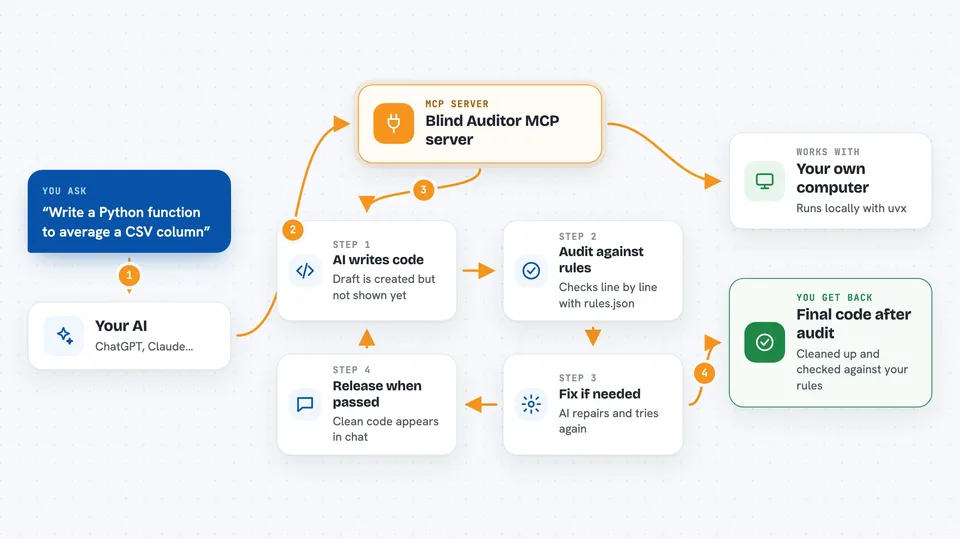
Blind Auditor is a small helper that sits between your AI and the code it writes. Instead of your AI handing you code right away, this helper makes it stop, review its own work against a rulebook you set up, and only then show you the result. It is handy if you work with an AI coding assistant and keep finding the same mistakes in what it produces.
What is an MCP server? The 30-second version
On its own, your AI can only chat and write things out. An MCP server is a small helper program that gives your AI a new skill or a connection to something. This one connects your AI to an auditing step: when the AI wants to give you code, it has to send that code to Blind Auditor first, and Blind Auditor makes it review the code before you ever see it.
What this MCP server does
You ask your AI to write some code. Before showing it to you, the AI sends its draft to Blind Auditor. Blind Auditor then tells the AI to switch into an auditor role and check the code line by line against the rules you wrote in a file called rules.json. If the code scores below the threshold, or breaks a critical rule, the AI has to fix it and try again. Only when the audit passes does the code get released to you.
 Click to zoom
What you can do with it
- Make your AI review its own code before you see it
- Enforce your own coding rules, like no hardcoded passwords
- Catch critical mistakes before they reach you
- Set a minimum quality score the code has to reach
- Limit how many times the AI can retry before giving up
- Reset the audit session when you want a fresh start
Try asking your AI
- “Write me a Python function that reads a CSV file and returns the average of a column”
- “Add a login form to my web page and show me the code”
- “Fix the bug in this function and give me the corrected version”
- “Write a small script that renames all the files in a folder”
What it gives back to you
You get the final code only after it has passed the audit, so what shows up in your chat is the cleaned-up version. Along the way, the AI may mention the issues it found and fixed. If the audit keeps failing after the maximum number of tries, the code is released anyway with a warning so you know it did not fully pass.
Before you start
What you need
- Python 3.10 or newer
- The uv tool installed on your computer
- An AI coding tool that supports MCP servers, like Cursor, Windsurf, or the Claude desktop app
- A rules.json file describing the rules your code should follow
Good to know
The audit depends on your AI honestly scoring its own work, and if it keeps failing after the maximum retries the code is released anyway with a warning, so a weak rulebook or a lazy AI can let problems through.
Install it with your AI
Add Blind Auditor MCP server to your AI, no technical skills needed
You don't install anything by hand. You copy one prompt, paste it into an AI that can work on your computer, and it checks, installs and connects the server for you, asking you when it needs something.
Sign in to get the install prompt
Members get a ready-made prompt that lets the Claude desktop app check Blind Auditor MCP server, install it and connect it for them, step by step. You don't need any technical skills: you copy, paste and answer a few questions. Your connected AI can also find and install any of the 4,361 MCP servers here for you.
Who it's for
People who use an AI coding assistant and want it to follow their team's coding standards and catch its own mistakes before handing over code.