
MCP server · Finance and crypto · official
Arcadia Finance MCP server
by arcadia-finance · official
Lets your AI read your Arcadia accounts and prepare liquidity, lending, and borrowing transactions for you.
This is a helper made by Arcadia Finance, a platform for providing liquidity on Uniswap and Aerodrome. It connects your AI assistant to Arcadia so the AI can look up your accounts, pools, and strategies, and prepare the transactions you need. It is handy if you already use Arcadia or want to explore it without clicking through every page yourself.
What is an MCP server? The 30-second version
On its own, your AI can only chat with you. An MCP server is a small helper program that gives your AI a new skill or a connection to an app or service. This one connects your AI to Arcadia Finance, so it can look up your accounts, pools, and strategies, and prepare transactions there when you ask. Think of it as a bridge between the chat window and your Arcadia account.
What this MCP server does
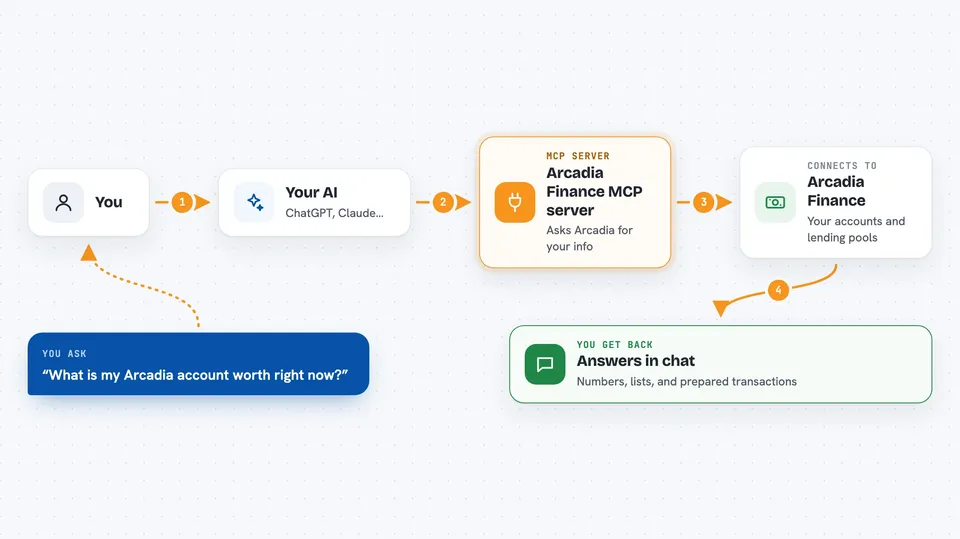
You ask your AI something in plain words, like what your account is worth or which pool pays the most. The AI uses this helper to ask Arcadia for that information. Arcadia sends back the numbers, and the AI explains them to you in the chat. If you want to do something, like deposit or borrow, the helper prepares the transaction for you. It does not send it for you; you or your wallet still have to sign and send it.
 Click to zoom
What you can do with it
- Check your account health, collateral, debt, and liquidation price
- See your profit, yield, and account value over time
- Compare lending pools by interest rate and size
- Browse liquidity strategies and see which ones are featured
- Get a rebalancing suggestion for one of your accounts
- Prepare deposits, withdrawals, borrows, and repayments as transactions
- Set up or change automations for an account
Try asking your AI
- “What is my Arcadia account worth right now and how healthy is it?”
- “Which lending pool on Base has the best rate today?”
- “Show me the featured liquidity strategies and their APY.”
- “Prepare a deposit of 1 ETH into my Arcadia account.”
What it gives back to you
You get answers in the chat: numbers, lists, and short summaries. For example, a list of pools with their rates, or a plain explanation of your account health. When you ask for an action, it gives you an unsigned transaction, which is the prepared instruction that still needs your wallet to sign and send. It does not move any money on its own.
Before you start
What you need
- An Arcadia Finance account if you want to manage positions
- A wallet that can sign transactions on Base, Unichain, or Optimism
- Node.js 22 or newer if you install it locally
- A wallet MCP server or your own signing setup to actually send transactions
Good to know
It can prepare transactions that move or borrow real money, so always read what it prepared carefully and check the details in your wallet before you sign.
Install it with your AI
Add Arcadia Finance MCP server to your AI, no technical skills needed
You don't install anything by hand. You copy one prompt, paste it into an AI that can work on your computer, and it checks, installs and connects the server for you, asking you when it needs something.
Sign in to get the install prompt
Members get a ready-made prompt that lets the Claude desktop app check Arcadia Finance MCP server, install it and connect it for them, step by step. You don't need any technical skills: you copy, paste and answer a few questions. Your connected AI can also find and install any of the 4,361 MCP servers here for you.
Who it's for
People who already use Arcadia Finance or want to explore liquidity and lending on Base, Unichain, or Optimism with help from an AI assistant.




