MCP server · Finance and crypto · official
AlphAI financial news MCP server
by makeev · official
Lets your AI search financial news, check insider trades and read per-ticker analysis for you.
AlphAI is a hosted helper that connects your AI assistant to a financial news service. Once it is connected, you can ask your AI things like what is happening with a certain stock, and it will look it up for you. It is handy if you follow markets, write about companies, or just want a quick read on the news.
What is an MCP server? The 30-second version
On its own, your AI can only chat with you using what it already knows. An MCP server is a small helper that gives your AI a new skill or a connection to an outside service. This one connects your AI to AlphAI, a financial news platform. So when you ask about a stock or a market story, your AI can go and look it up there and bring the answer back to you.
What this MCP server does
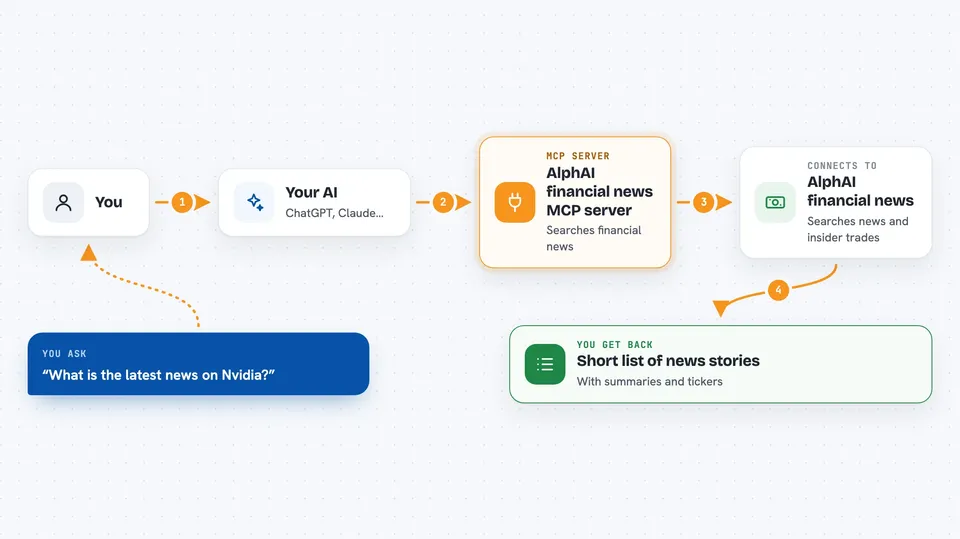
You ask your AI a question about financial news or a stock. Your AI sends that request to the AlphAI helper over the internet. The helper searches AlphAI's news feed, which is already sorted by ticker, category and a relevance score from 1 to 10. It also has SEC Form 4 insider trading news and earnings reads. Your AI then gives you back a short list or summary in the chat.
 Click to zoom
What you can do with it
- Search financial news by keyword, ticker, category or date
- Get the latest news for one stock ticker
- See the biggest stories of the last 48 hours
- Look up SEC Form 4 insider trading news
- Compare news that mentions two companies at once
- Read a filing-verified earnings summary for a ticker
- Check scheduled macro events like CPI or FOMC dates
- Save and manage ticker alerts on paid plans
Try asking your AI
- “What is the latest news on Nvidia?”
- “Show me insider trading news from the past week.”
- “What are the biggest market stories right now?”
- “Compare the news around Apple and Microsoft.”
What it gives back to you
You get back short lists of stories with titles, AI-written summaries, the tickers involved, a category and a relevance score. For some tools you also get earnings reads, insider trade details or upcoming macro dates. It all shows up as normal text in your chat, so you can read it or ask follow-up questions. Full article text is not included, only summaries and analysis.
Before you start
What you need
- An AI app that can connect to MCP servers, like Claude Desktop, Claude Code, Cursor, VS Code or ChatGPT
- A free AlphAI account (you sign in through your browser, no key to copy)
Good to know
It is news, not advice, so it will not tell you to buy or sell, and the free plan is limited to 100 requests a day.
Install it with your AI
Add AlphAI financial news MCP server to your AI, no technical skills needed
You don't install anything by hand. You copy one prompt, paste it into an AI that can work on your computer, and it checks, installs and connects the server for you, asking you when it needs something.
Sign in to get the install prompt
Members get a ready-made prompt that lets the Claude desktop app check AlphAI financial news MCP server, install it and connect it for them, step by step. You don't need any technical skills: you copy, paste and answer a few questions. Your connected AI can also find and install any of the 4,361 MCP servers here for you.
Who it's for
People who follow markets, write about companies, or need a quick, sorted read on financial news without digging through many sites.