MCP server · Chat
AstroWay MCP server
by astroway
Lets your AI build astrology charts, tarot spreads, numerology and Human Design readings for you.
AstroWay is a helper that connects your AI assistant to a big online astrology and esoterica calculator. Once it is set up, you can just ask your AI for a birth chart, a tarot spread or a Vedic dasha and it will do the math for you. It is handy for anyone curious about astrology who does not want to learn chart software.
What is an MCP server? The 30-second version
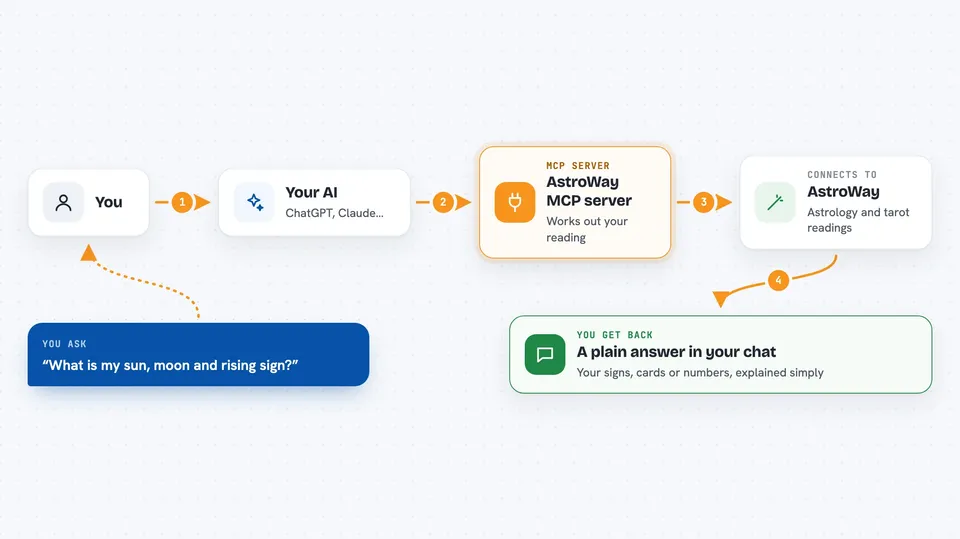
On its own, your AI can only chat with you. An MCP server is a small helper program that gives your AI a new skill or a connection to an outside service. This one connects your AI to the AstroWay calculation service, so when you ask for a natal chart or a tarot reading, the AI can actually go and calculate it instead of guessing. You install it once, and after that it just sits quietly in the background waiting for you to ask.
What this MCP server does
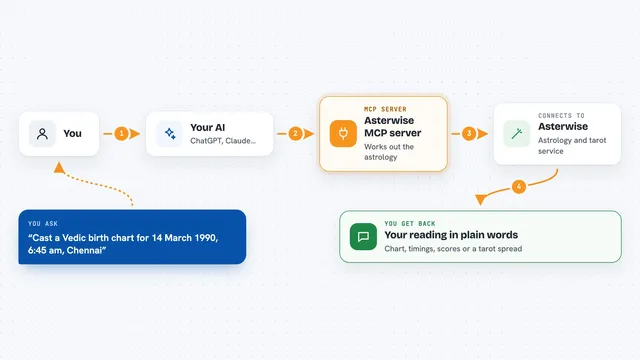
You type a normal question, like asking for a birth chart for a certain date, time and place. Your AI reads the question, picks the right AstroWay tool, and sends the details to the AstroWay service. AstroWay does the real calculation and sends the result back. Your AI then explains it to you in the chat, in plain words. You never have to touch the numbers or the formulas yourself.
 Click to zoom
What you can do with it
- Calculate a full natal chart from a birth date, time and place
- Compare two people's charts to see how they fit together
- Check which planets are affecting you right now and in the future
- Pull tarot cards from different decks and read the spread
- Work out numerology numbers in several traditions
- Get a Human Design type, strategy and authority
- Ask follow-up questions about your chart and get grounded answers
Try asking your AI
- “Calculate a natal chart for me, born 15 March 1990 at 14:30 in Kyiv, Ukraine. Tell me my sun, moon and rising sign.”
- “Compare two charts: person A born 10 June 1988 at 09:15 in London, person B born 22 November 1991 at 22:40 in Berlin. What are the strongest connections?”
- “Pull a three card past-present-future tarot spread from the Rider-Waite deck for the question should I take the new job.”
- “What is my Human Design type and authority? Born 15 March 1990 at 14:30 in Kyiv, Ukraine.”
What it gives back to you
You get back a written answer in the chat, usually with the key numbers and placements listed out, like your sun sign, moon sign and rising sign, or the tarot cards you drew with a short meaning for each. For comparisons you get a list of the strongest links between two charts. For forecasts you get the dates and planets involved. Everything arrives as normal text you can read and ask follow-up questions about.
Before you start
What you need
- An AstroWay API key (a kind of password for apps; you get one free by signing up at api.astroway.info, no card needed)
- An MCP-compatible AI app such as Claude Desktop, Cursor or VS Code
- Node.js installed on your computer (the free tool that runs the helper program)
Good to know
Each request uses credits from your AstroWay account, and the AI-written reading tools cost more than the plain calculation ones, so keep an eye on your balance.
Install it with your AI
Add AstroWay MCP server to your AI, no technical skills needed
You don't install anything by hand. You copy one prompt, paste it into an AI that can work on your computer, and it checks, installs and connects the server for you, asking you when it needs something.
Sign in to get the install prompt
Members get a ready-made prompt that lets the Claude desktop app check AstroWay MCP server, install it and connect it for them, step by step. You don't need any technical skills: you copy, paste and answer a few questions. Your connected AI can also find and install any of the 4,361 MCP servers here for you.
Who it's for
Anyone curious about astrology, tarot, numerology or Human Design who wants their AI to do the calculations instead of learning chart software.