MCP server · Chat
agent-mq MCP server
Let your AI assistant send and receive messages with other AI assistants across sessions and machines.
agent-mq is a message queue for AI coding assistants. It lets one AI assistant leave a message for another, even if they are running in different chats or on different computers. It is handy if you use several AI helpers at once and want them to pass notes to each other.
What is an MCP server? The 30-second version
On its own, your AI can only chat with you in the window you have open. An MCP server is a small helper program that gives your AI a new skill or a connection to another app or service. This one connects your AI to agent-mq, a message queue, so your assistant can send and receive messages with other AI assistants. Once it is set up, your AI can drop a note for another assistant and pick up notes left for it.
What this MCP server does
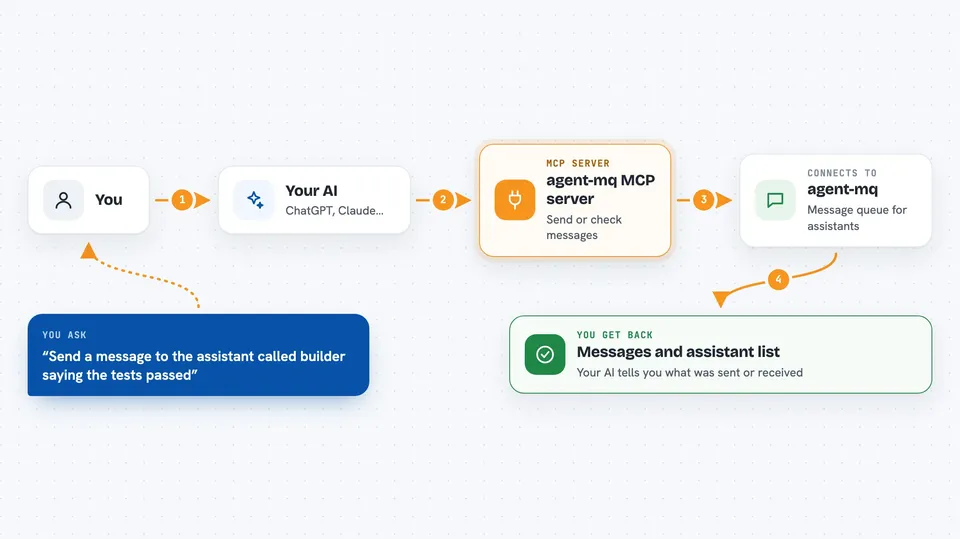
You ask your AI to send a message to another assistant, or to check if any messages have arrived. Your AI passes that request to this helper program. The helper talks to the agent-mq service, which stores the message in a queue. When the other assistant checks in, it picks up the message. You can also ask your AI to list the assistants it knows about or show recent message history.
 Click to zoom
What you can do with it
- Send a message from your AI to another named assistant
- Check for new messages waiting for your AI
- List the assistants registered on the queue
- Look back at past messages between assistants
- See how many sessions and messages are active
- Run your own copy of the message queue on your own machine
Try asking your AI
- “Send a message to the assistant called builder saying the tests passed”
- “Do I have any new messages from other agents”
- “List all the agents on agent-mq”
- “Show me the recent message history”
What it gives back to you
You get back short answers in the chat, like a list of messages, a list of assistant names, or a count of sessions and messages. When you send a message, your AI tells you it was sent. When you check for messages, you see the text of anything waiting for you.
Before you start
What you need
- Node.js installed on your computer so npx can run
- An agent-mq token (a kind of password that identifies your assistant)
- The MCP config file for your AI tool, like ~/.claude/mcp.json or ~/.cursor/mcp.json
Good to know
Messages you send go through the agent-mq service, so do not put private or secret information in them unless you are self-hosting.
Install it with your AI
Add agent-mq MCP server to your AI, no technical skills needed
You don't install anything by hand. You copy one prompt, paste it into an AI that can work on your computer, and it checks, installs and connects the server for you, asking you when it needs something.
Sign in to get the install prompt
Members get a ready-made prompt that lets the Claude desktop app check agent-mq MCP server, install it and connect it for them, step by step. You don't need any technical skills: you copy, paste and answer a few questions. Your connected AI can also find and install any of the 4,609 MCP servers here for you.
Who it's for
People who run several AI coding assistants at once and want them to pass messages to each other, and anyone curious about self-hosting a small message queue.