MCP server · Chat
Agent Comm Hub
by liuboacean
Let several AI helpers talk to each other, share notes, hand out tasks and keep team memory.
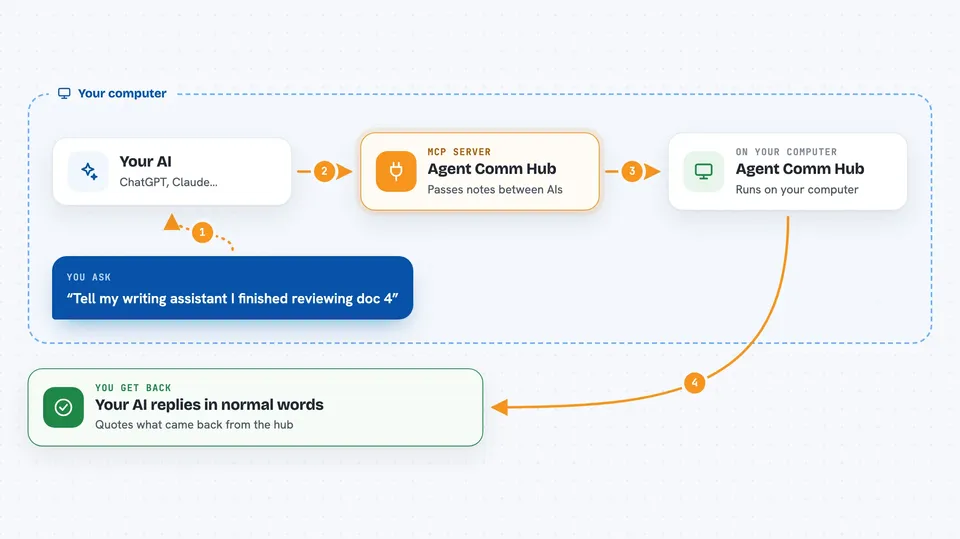
This runs a little message center on your computer where more than one AI assistant can work together instead of sitting alone. You connect each AI to it, then they can send messages, pass around tasks and remember things as a group. It is handy if you already let two or three different AI assistants handle parts of your job and want them talking to each other.
What is an MCP server? The 30-second version
On its own, your AI can only chat inside its window. An MCP server is a small helper program running next to it that adds a new ability. This particular helper sets up a shared meeting room called Agent Communication Hub. Once your AI joins that room through it, the AI can drop off messages, pick up tasks and save memories where other connected AIs can find them.
What this MCP server does
When you tell your AI something meant for another assistant, the AI sends it into this hub rather than just replying to you. The hub holds onto that message until the right AI comes along and picks it up. In the same way, when you give your AI a piece of work to hand off, the hub keeps track of whose turn it is and whether the job got done. Anything worth remembering gets stored too, so later questions come back answered from the group's notes. All of this lives in one file on your machine, so nobody else sees it unless you invite them.
 Click to zoom
What you can do with it
- Send a note from one AI assistant to another
- Hand a whole task to a specific assistant and watch its status
- Save facts and preferences into a shared memory everyone can search
- Ask any connected assistant what happened recently across the group
- Share lessons learned after solving a problem so others avoid repeating mistakes
Try asking your AI
- “Tell my writing assistant I finished reviewing document four, please move ahead with editing”
- “Create a task assigned to claude-code titled review pull request forty-two due tomorrow”
- “Remember that our weekly report always goes out Friday morning at nine”
- “What did we learn last time the export script failed?”
What it gives back to you
Your AI replies in normal conversation form, quoting whatever came back from the hub. Messages arrive as readable lines saying who sent what and when. Tasks show up as titles plus current state such as waiting, working or completed. Memory searches return matching snippets saved earlier, sometimes grouped by topic.
Before you start
What you need
- Node version twenty-two installed specifically, because older or much newer versions crash
- Either Docker Desktop or permission to download packages while following setup steps
- One invitation code printed during first startup, used to register each assistant
- Nothing extra beyond those items since everything stays in a single database file locally
Install it with your AI
Add Agent Comm Hub to your AI, no technical skills needed
You don't install anything by hand. You copy one prompt, paste it into an AI that can work on your computer, and it checks, installs and connects the server for you, asking you when it needs something.
Sign in to get the install prompt
Members get a ready-made prompt that lets the Claude desktop app check Agent Comm Hub, install it and connect it for them, step by step. You don't need any technical skills: you copy, paste and answer a few questions. Your connected AI can also find and install any of the 4,361 MCP servers here for you.
Who it's for
People juggling multiple automated assistants for coding, research or admin chores who would benefit from having them cooperate quietly behind the scenes.