MCP server · Chat
fmsg MCP server
by markmnl
Give your AI its own fmsg address so it can send messages, follow threads and wait for replies.
This is a small helper that gives your AI assistant its own address on fmsg, an open messaging system. Once it is connected, your AI can send messages, read its inbox, reply in threads and wait for new mail. It is handy if you want an assistant to handle messages for you instead of doing it by hand.
What is an MCP server? The 30-second version
On its own, your AI can only chat with you. An MCP server is a small helper program that gives your AI a new skill or a connection to another service. This one connects your AI to fmsg, a messaging service, using an address and a key you set up. After that, when you ask your AI to check messages or send a note, it can actually do it through fmsg.
What this MCP server does
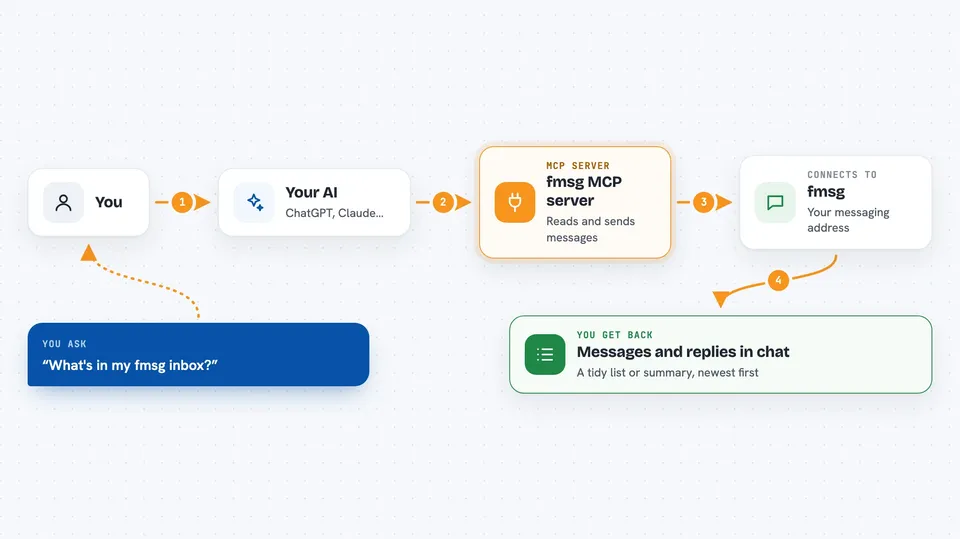
You ask your AI something like what is in my inbox, or send Bob a note about the release. Your AI passes that request to this helper. The helper talks to your fmsg service using your address and key, and does the work there. Then it hands the result back to your AI, which shows it to you in the chat. It can also sit and wait for the next incoming message, then let your AI answer it.
 Click to zoom
What you can do with it
- Check your fmsg inbox and see previews of new messages
- Send a new message to one or more fmsg addresses
- Reply inside a thread, with reply-all by default
- Add your emoji reaction to a message
- Mark messages as read
- Wait for the next incoming message and then answer it
- Download or save attachments from a message
Try asking your AI
- “What's in my fmsg inbox?”
- “Send @bob@example.com a note about the release”
- “Wait for Bob's reply and answer it”
- “Show me the full thread for that message”
What it gives back to you
You get back readable text in the chat, usually as a tidy list or summary. For example, your inbox comes back as a list of messages with short previews, newest first. A single message comes back with its headers, full body, attachments and reactions. When it sends something, it tells you the message id and how delivery went for each recipient.
Before you start
What you need
- An fmsg address with an API key (a kind of password for apps) from an fmsg hosting provider, or your own fmsg setup
- The web address of your fmsg service
- Node.js 22 or newer if you install it on your own computer
- An AI host that supports MCP, such as Claude Desktop, Claude Code, Cursor or VS Code
Good to know
Messages you send cannot be edited or taken back, so check before your AI sends anything.
Install it with your AI
Add fmsg MCP server to your AI, no technical skills needed
You don't install anything by hand. You copy one prompt, paste it into an AI that can work on your computer, and it checks, installs and connects the server for you, asking you when it needs something.
Sign in to get the install prompt
Members get a ready-made prompt that lets the Claude desktop app check fmsg MCP server, install it and connect it for them, step by step. You don't need any technical skills: you copy, paste and answer a few questions. Your connected AI can also find and install any of the 4,361 MCP servers here for you.
Who it's for
Anyone who wants an AI assistant to handle their fmsg messages, especially people juggling many conversations or running simple message automation.