MCP server · Research · official
Percolate MCP server
by bguillow-rgb · official
Let your AI search a specialty coffee database for tasting notes, brew recipes, and buying links.
This is a helper that connects your AI to Percolate, a specialty coffee journal for iPhone. It has over 1,100 coffees with tasting notes, brew recipes, and where to buy them. It is handy if you love coffee and want your AI to help you pick or brew a bag.
What is an MCP server? The 30-second version
On its own, your AI can only chat with you. An MCP server is a small helper program that gives your AI a new skill or a connection to an app or service. This one connects your AI to the Percolate coffee database, so it can look up coffees, recipes, and suggestions for you when you ask. You just talk to your AI like normal, and it quietly uses this helper behind the scenes.
What this MCP server does
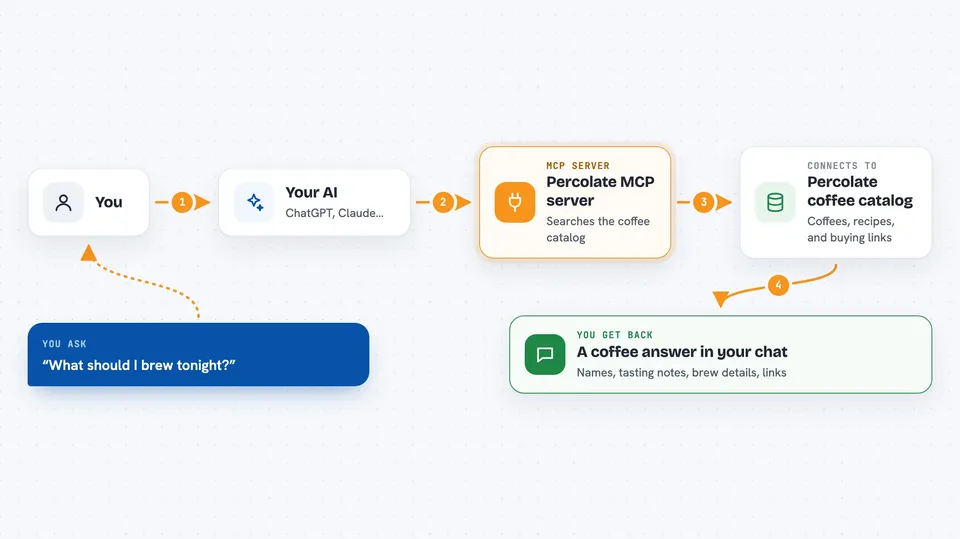
You ask your AI something about coffee, like what to brew tonight or how to make a certain bag taste better. Your AI sends that question to this helper. The helper looks through the Percolate coffee catalog and finds matching coffees, recipes, or suggestions. Then your AI turns that into a normal answer in your chat, with links and a source line. Everything is read-only, so nothing in the database gets changed.
 Click to zoom
What you can do with it
- Search coffees by roast level, brew method, price, or category
- Get the full profile of one coffee, including flavors and pairings
- Find coffees similar to one you already like
- Get brew recipes with ratio, temperature, and grind
- Compare two coffees side by side
- See what coffees are trending right now
- Get a coffee suggestion for the time of day
Try asking your AI
- “Recommend a medium roast with chocolate and nutty notes.”
- “How should I brew this Onyx Monarch on a V60?”
- “What coffee works for espresso under $20?”
- “What should I brew tonight?”
What it gives back to you
You get back a normal chat answer with coffee names, tasting notes, and brew details. It can include lists, side-by-side comparisons, or a single suggestion with a recipe. Each answer comes with a short source line you can quote, plus links to the coffee or the Percolate site. It also shows when the data was last updated.
Before you start
What you need
- The Claude desktop app (or another AI app that supports MCP servers)
- Node.js 18 or newer on your computer
Good to know
It only reads coffee data and never changes anything, but some retailer links may be affiliate links, so buying through them can earn the app a small commission.
Install it with your AI
Add Percolate MCP server to your AI, no technical skills needed
You don't install anything by hand. You copy one prompt, paste it into an AI that can work on your computer, and it checks, installs and connects the server for you, asking you when it needs something.
Sign in to get the install prompt
Members get a ready-made prompt that lets the Claude desktop app check Percolate MCP server, install it and connect it for them, step by step. You don't need any technical skills: you copy, paste and answer a few questions. Your connected AI can also find and install any of the 4,361 MCP servers here for you.
Who it's for
Coffee lovers, home brewers, and anyone curious about specialty coffee who wants quick, useful answers from their AI.