MCP server · Research
Apify MCP server
by apify
Let your AI pull data from websites, social media, maps, and search results using ready-made Apify tools.
This is a helper that connects your AI assistant to Apify, a service full of ready-made tools for grabbing information from the web. Once it is connected, you can just ask your AI to collect posts, search results, contact details, or page content, and it will use the right Apify tool for you. It is handy for anyone who needs web data without writing any code.
What is an MCP server? The 30-second version
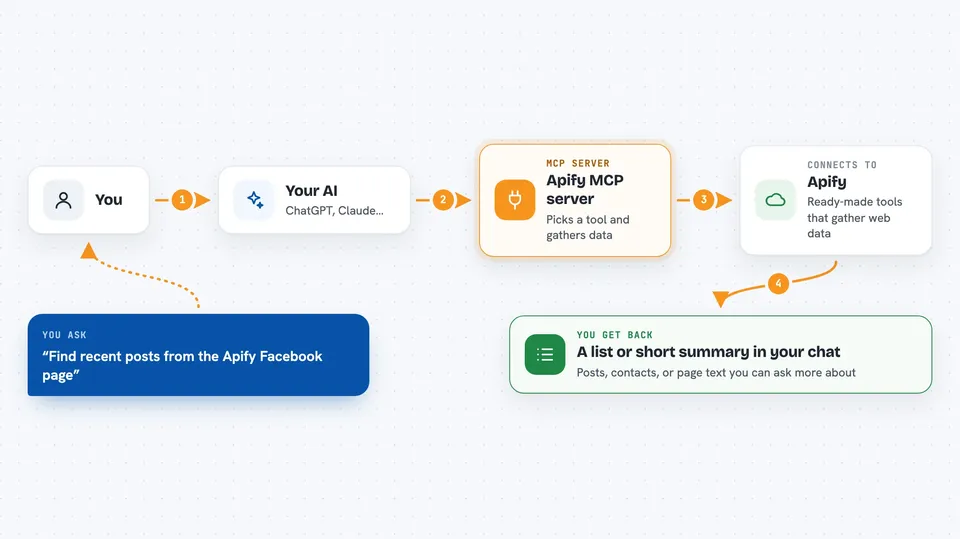
On its own, your AI can only chat with you using what it already knows. An MCP server is a small helper program that gives your AI a new skill or a connection to another service. This one connects your AI to Apify, so it can reach thousands of pre-built web tools on your behalf. When you ask for something, your AI picks the right Apify tool, runs it, and brings the results back into your chat.
What this MCP server does
You ask your AI a question, like finding recent posts from a Facebook page or contact details from Google Maps. Your AI uses this helper to pick a matching Apify tool from the Apify Store. That tool runs in Apify's cloud, visits the sites, and collects the data. The results come back and your AI shows them to you in the chat, usually as a list or a short summary. You never have to pick the tool or fill in the settings yourself.
 Click to zoom
What you can do with it
- Collect posts and comments from social media pages
- Pull contact details from Google Maps listings
- Grab search engine results for a keyword
- Fetch any web page and turn it into readable text
- Search the web and read the top results for you
- Look through your past Apify runs and their logs
- Find and use new Apify tools as you need them
Try asking your AI
- “Find the latest posts from the Apify Facebook page and summarize them”
- “Get the contact details for coffee shops in Berlin from Google Maps”
- “Search the web for recent news about electric cars and give me a summary”
- “Fetch this page and give me its main content as plain text: example.com/article”
What it gives back to you
You get answers right in the chat, usually as a list of items, a short summary, or a block of text pulled from the pages. For example, you might see a table of posts with dates and links, or a list of businesses with phone numbers and addresses. If a run takes a while, your AI can check its status and show you the log. Everything stays in the conversation so you can ask follow-up questions.
Before you start
What you need
- An Apify account (a free plan exists)
- An Apify API token (a kind of password for apps; Apify gives you one in your account settings)
- An MCP client like Claude Desktop, Claude.ai, VS Code, or Cursor
Good to know
Some Apify tools cost money to run, so keep an eye on your Apify balance, and be careful when asking your AI to change or delete your saved tasks or schedules.
Install it with your AI
Add Apify MCP server to your AI, no technical skills needed
You don't install anything by hand. You copy one prompt, paste it into an AI that can work on your computer, and it checks, installs and connects the server for you, asking you when it needs something.
Sign in to get the install prompt
Members get a ready-made prompt that lets the Claude desktop app check Apify MCP server, install it and connect it for them, step by step. You don't need any technical skills: you copy, paste and answer a few questions. Your connected AI can also find and install any of the 4,361 MCP servers here for you.
Who it's for
Office workers, marketers, researchers, and analysts who need web data but do not want to write code.