MCP server · Developer tools
MCP CLI
by chrishayuk
Test and chat with MCP servers from your terminal, with tools, plans, and a live dashboard.

MCP CLI is a program you run in your computer's terminal. It lets you talk to MCP servers, which are small helpers that give an AI new skills, and see exactly what those helpers can do. It is handy if you want to try out an MCP server before trusting it with your everyday work.
What is an MCP server? The 30-second version
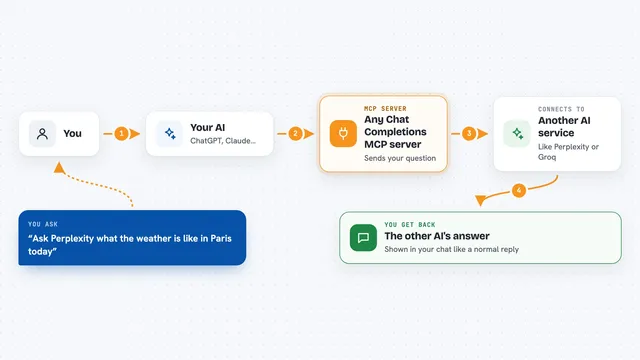
On its own, your AI can only chat. An MCP server is a small helper program that gives your AI a new skill or a connection to an app or service. This tool, MCP CLI, is a way to connect to those helper servers from your terminal and try them out. You type a request, the AI picks a tool from the server, and you watch the result come back.
What this MCP server does
You start MCP CLI in your terminal and it connects to one or more MCP servers you list. You then type a message or a command, and the AI decides which tool from the server to use. MCP CLI runs that tool and shows you the answer, the timing, and the token usage. You can also run plans, attach files, and open a browser dashboard to watch everything live.
 Click to zoom
What you can do with it
- Chat with an AI that can use tools from your MCP servers
- Run single commands without entering a chat
- Attach images, text files, or audio to a message
- Create and run multi-step plans of tool calls
- Export a conversation as Markdown or JSON
- Watch tool calls and reasoning in a live browser dashboard
- Check server health and token usage
Try asking your AI
- “List the tools this MCP server offers”
- “Use the server to look up the weather in Paris”
- “Create a plan to fetch a user and then send them a message”
- “Attach this screenshot and ask the AI what it shows”
What it gives back to you
You get answers in your terminal, with the AI's reply, the tools it used, and how long each step took. Plans show as a small diagram with steps and their status. You can also export the whole conversation as a Markdown or JSON file.
Before you start
What you need
- A terminal on your computer
- Python 3.10 or newer
- At least one MCP server you want to test
- Optional: an API key if you use a cloud AI provider instead of the default local one
Good to know
It runs commands and tools on your computer, so only connect servers you trust, and review plans before running them.
Install it with your AI
Add MCP CLI to your AI, no technical skills needed
You don't install anything by hand. You copy one prompt, paste it into an AI that can work on your computer, and it checks, installs and connects the server for you, asking you when it needs something.
Sign in to get the install prompt
Members get a ready-made prompt that lets the Claude desktop app check MCP CLI, install it and connect it for them, step by step. You don't need any technical skills: you copy, paste and answer a few questions. Your connected AI can also find and install any of the 4,609 MCP servers here for you.
Who it's for
Developers, testers, and anyone curious about trying MCP servers before using them in daily work.