
MCP server · Developer tools · official
Currents MCP server
by currents-dev · official
Lets your AI read your Currents test results and help you fix failing Playwright tests.
This is a helper made by Currents, the service that collects your automated test results from your build pipeline. Once you connect it, your AI assistant can look at your test runs and failures and help you figure out what went wrong. It is handy for anyone who runs automated browser tests and keeps seeing red results.
What is an MCP server? The 30-second version
On its own, your AI can only chat with you. An MCP server is a small helper program that gives your AI a new skill or a connection to an app or service. This one connects your AI to Currents, the place where your test results live. So when you ask about a failing test, your AI can go look it up in Currents and answer with real data instead of guessing.
What this MCP server does
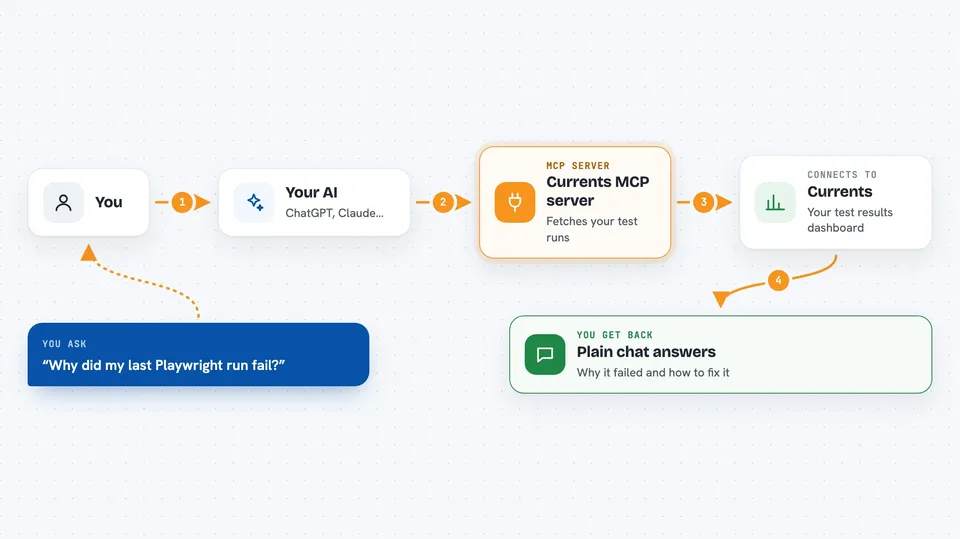
You ask your AI something about your tests, like why a run failed. Your AI uses this helper to talk to Currents. Currents sends back the runs, the failing tests, the error messages, and the steps that led to the failure. Your AI reads that and explains it to you or suggests a fix. You can also ask it to change things in Currents, like turning a quarantine rule on or off.
 Click to zoom
What you can do with it
- List your recent test runs and see which ones failed
- Find the error messages and steps for failing tests
- See which tests are flaky over time
- Look at performance numbers for your test files
- Turn quarantine, skip, or tag rules on and off
- Cancel or reset a run that is still going
- Create or link a Jira issue from a failing test
Try asking your AI
- “Why did my last Playwright run fail?”
- “Show me the flakiest tests in this project over the past week.”
- “Get the error details for the failing checkout test so I can fix it.”
- “Cancel the run that is still in progress for the main branch.”
What it gives back to you
You get answers in plain chat: lists of runs, names of failing tests, error messages, and the steps that led up to each failure. It can also show trends, like which tests fail most often or how long your test files take. When it changes something in Currents, it tells you what it changed. Everything appears as text right in your conversation.
Before you start
What you need
- A Currents account with at least one project
- A Currents API key (a kind of password for apps; you get it from your Currents settings)
- An AI tool that supports MCP servers, like Cursor or the Claude desktop app
Good to know
It can change or delete things in your Currents account, like cancelling runs or turning rules off, so be clear about what you want before you ask.
Install it with your AI
Add Currents MCP server to your AI, no technical skills needed
You don't install anything by hand. You copy one prompt, paste it into an AI that can work on your computer, and it checks, installs and connects the server for you, asking you when it needs something.
Sign in to get the install prompt
Members get a ready-made prompt that lets the Claude desktop app check Currents MCP server, install it and connect it for them, step by step. You don't need any technical skills: you copy, paste and answer a few questions. Your connected AI can also find and install any of the 4,361 MCP servers here for you.
Who it's for
Developers and QA engineers who run automated tests and want help understanding and fixing failures faster.





