
MCP server · Developer tools · official
crapkit MCP server
by JeanFrancoisGagne · official
Your AI can find the worst function in your code to fix next, using complexity and test coverage.
crapkit is a helper for programmers that looks at every function in a code project and gives it a score. The score combines how complicated the function is with how much of it your tests actually run. It then shows you the worst ones first, so you know what to fix next. It is handy if you write code and want an honest list of trouble spots instead of guessing.
What is an MCP server? The 30-second version
On its own, your AI can only chat with you. An MCP server is a small helper program that gives your AI a new skill or a connection to another tool. This one connects your AI to crapkit, a program that scores functions in your code. Once connected, you can ask your AI about your code and it will run crapkit behind the scenes to answer.
What this MCP server does
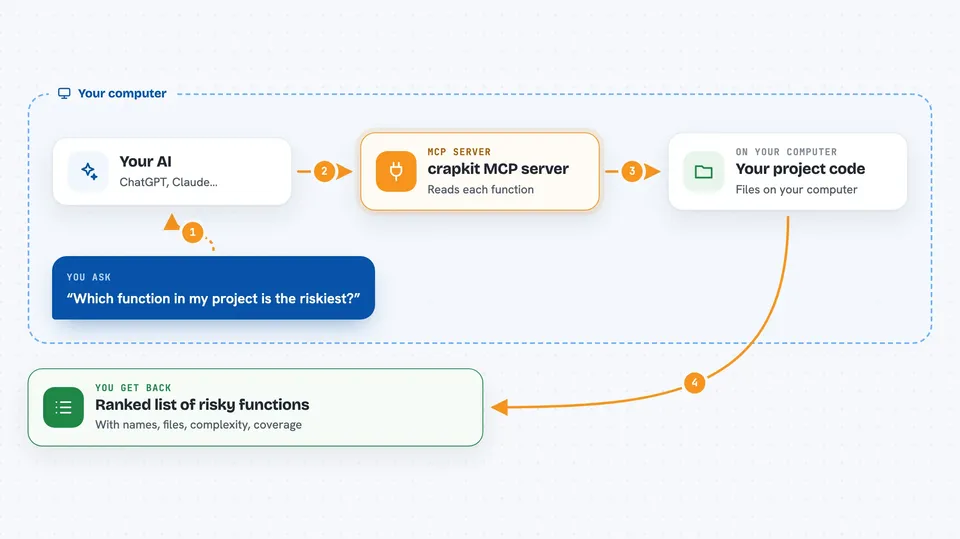
You ask your AI something like which function in my project is the riskiest. Your AI uses this helper, which runs crapkit on your project. crapkit reads each function, measures how complex it is, and joins that with the test coverage your own test command already produced. It ranks the functions by risk, then hands the list back to your AI, which explains it to you in plain words.
 Click to zoom
What you can do with it
- List the riskiest functions in your project, worst first
- Show which lines inside a function are not covered by tests
- Point out near-duplicate functions that could be merged
- Check whether a change you made adds new risky functions
- Explain why a particular function scores badly
- Compare the current score of a function with its saved baseline
Try asking your AI
- “Which function in this repo is the worst to fix next, and why?”
- “Show me the uncovered lines in the top three risky functions”
- “Did my last change add any new functions over the complexity ceiling?”
- “Are there near-duplicate functions in this file I should merge?”
What it gives back to you
You get back a short ranked list, usually with the function name, its file and line, its complexity number, its coverage percentage, and its score. Your AI often adds a sentence or two explaining what makes each one risky. If you asked about uncovered lines, you get those line numbers too. Nothing in your code is changed by this server; it only reads and reports.
Before you start
What you need
- Python 3.11 or newer installed on your computer
- Git installed and your project tracked in a Git repository
- crapkit installed (for example with pip install crapkit)
- A coverage file your own test command already writes
Good to know
crapkit only reads your code and reports scores, but it only sees files you have committed to Git, so uncommitted work is invisible to it.
Install it with your AI
Add crapkit MCP server to your AI, no technical skills needed
You don't install anything by hand. You copy one prompt, paste it into an AI that can work on your computer, and it checks, installs and connects the server for you, asking you when it needs something.
Sign in to get the install prompt
Members get a ready-made prompt that lets the Claude desktop app check crapkit MCP server, install it and connect it for them, step by step. You don't need any technical skills: you copy, paste and answer a few questions. Your connected AI can also find and install any of the 4,361 MCP servers here for you.
Who it's for
Developers and tech leads who want a clear, ranked list of which functions in their codebase deserve attention first.





