
MCP server · Developer tools · official
DVERA MCP server for Controller Tester
by SuresoftTechnologies · official
Lets your AI set up, run, and review Controller Tester checks for C and C++ code.
DVERA is a helper from Suresoft Technologies that connects your coding assistant to Controller Tester, usually just called CT. CT is a tool that tests C and C++ software, especially software where mistakes are costly. This is handy if you write or review C and C++ code and already have CT installed at your company.
What is an MCP server? The 30-second version
On its own, your AI can only chat with you. An MCP server is a small helper program that gives your AI a new skill or a connection to another tool. This one connects your AI to your local CT installation, so the AI can ask CT to set up a project, run tests, or read coverage numbers for you. You still talk to your AI in normal words, and the helper passes the work to CT behind the scenes.
What this MCP server does
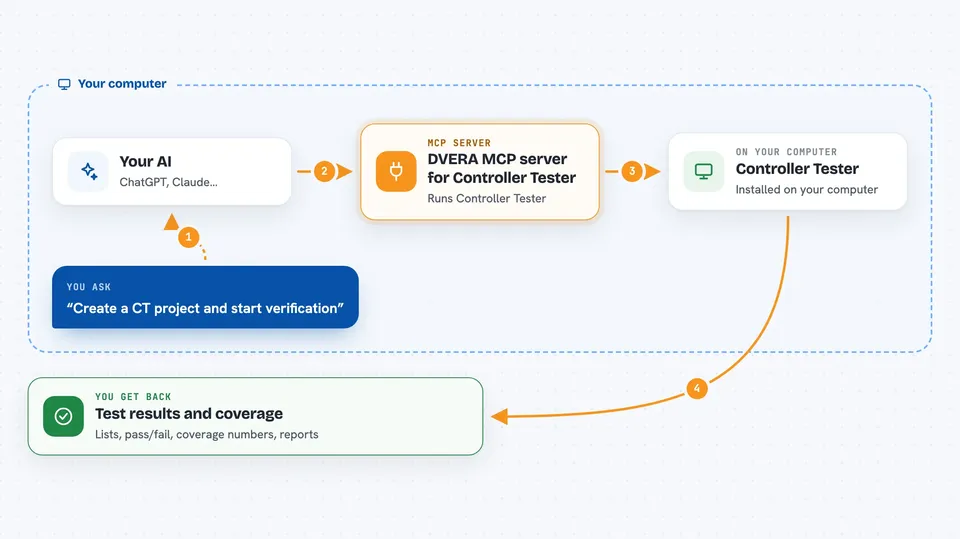
You ask your AI something like create a CT project, or generate tests for a function. The AI uses this helper, which forwards the request to the CT program already installed on your computer. CT does the real work: it analyzes the code, builds it, runs tests, and measures coverage. The helper brings CT's answer back into your chat, so you can read results and ask follow-up questions without switching apps.
 Click to zoom
What you can do with it
- Set up a new CT verification project for your C or C++ code
- Generate unit tests for a specific function
- Find functions that have no tests yet and create tests for them
- Run existing tests and see which ones pass or fail
- Re-run tests after a code change and review what shifted
- Read statement, branch, MC, and DC coverage numbers
- Export a report with execution and coverage evidence
Try asking your AI
- “Create a CT project and start verification.”
- “Generate tests for the calculate_checksum function.”
- “Find functions without tests and generate tests for them.”
- “Run regression tests and show me the coverage changes.”
What it gives back to you
You get answers in your chat: lists of functions, test results, pass or fail summaries, and coverage numbers. It can also produce reports that CT exports for review. When the helper makes a change, like creating a project or adding tests, it tells you what it did. If something is missing, it explains what is wrong instead of guessing.
Before you start
What you need
- A deployed CT 2026.06 or later installation with a valid license
- The DVERA integration that comes with your CT environment
- A supported C or C++ build and target environment
- Python 3.8 or later (CT ships its own, so you may not need to install one)
Good to know
The helper can create projects, generate tests, and run builds on your machine, so review generated tests and results before trusting them, and make sure you have a valid CT license.
Install it with your AI
Add DVERA MCP server for Controller Tester to your AI, no technical skills needed
You don't install anything by hand. You copy one prompt, paste it into an AI that can work on your computer, and it checks, installs and connects the server for you, asking you when it needs something.
Sign in to get the install prompt
Members get a ready-made prompt that lets the Claude desktop app check DVERA MCP server for Controller Tester, install it and connect it for them, step by step. You don't need any technical skills: you copy, paste and answer a few questions. Your connected AI can also find and install any of the 4,361 MCP servers here for you.
Who it's for
C and C++ developers, test engineers, and verification teams who already use Controller Tester at work.




