
MCP server · Developer tools · official
argot MCP server
by get-tmonier · official
Lets your AI check new code against your repository's own history and habits.
argot is a helper that looks at code changes and compares them to how your repository has always been written. It notices things like a brand new library nobody on the team uses, a function that already exists somewhere else, or a test that quietly got weaker. It is handy for developers and reviewers who want a second pair of eyes on code that an AI wrote.
What is an MCP server? The 30-second version
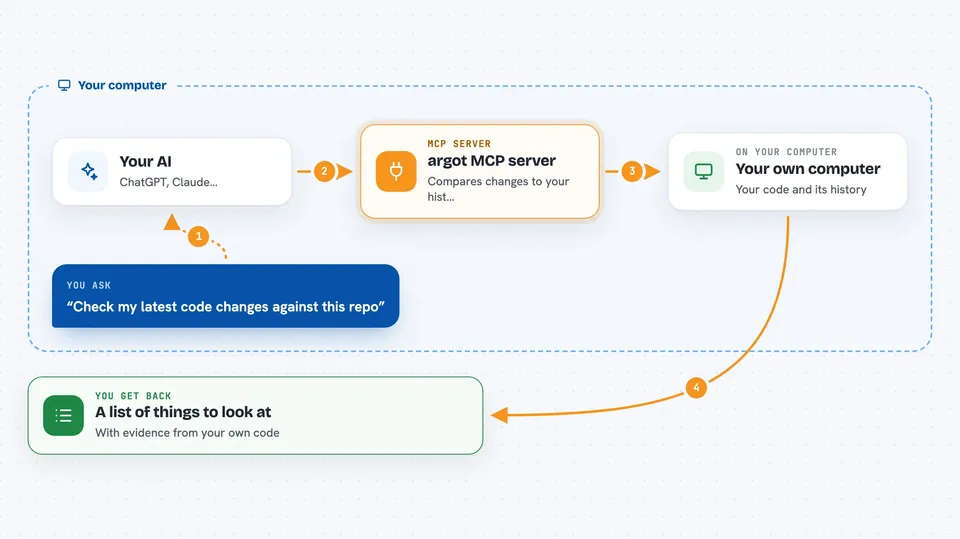
On its own, your AI can only chat with you. An MCP server is a small helper program that gives your AI a new skill or a connection to a tool, and here it connects your AI to argot. Once connected, your AI can ask argot to look at your code changes and your repository's history. argot does the checking locally on your machine, and your AI brings the results back to you in the chat.
What this MCP server does
You ask your AI to review some code changes. Your AI passes that request to argot through this connection. argot compares the changes to patterns it learned from your repository's own git history. It then hands back a list of things worth a closer look, like a foreign dependency or a duplicated function. Your AI shows you those findings so you can decide what to do.
 Click to zoom
What you can do with it
- Spot imports of libraries your repository has never used
- Flag new functions that duplicate something you already have
- Point out code that looks like it belongs in a different module
- Warn when a test was deleted, skipped, or made weaker
- Notice when a change reverses the usual direction between layers
- Review a whole set of changes or just one part of it
Try asking your AI
- “Check my latest changes against this repo's history and tell me what looks out of place”
- “Does this pull request add any dependencies we have never used before?”
- “Is there already a function in this repo that does what I just wrote?”
- “Did any tests get weakened or removed in these changes?”
What it gives back to you
You get a list of findings, each with a short label and some evidence from your repository. It might say something like a foreign import was found, or a test was disabled, and point to the file and line. Your AI can then explain them to you in plain words or help you fix them. Nothing in your code is changed unless you decide to act on it.
Before you start
What you need
- The argot tool installed on your computer
- A repository with usable git history
- A fitted snapshot of that repository (created with argot init)
- An AI client that supports MCP, like Claude Code
Good to know
argot only points out things worth reviewing, so treat its findings as hints and not as proof that the code is wrong.
Install it with your AI
Add argot MCP server to your AI, no technical skills needed
You don't install anything by hand. You copy one prompt, paste it into an AI that can work on your computer, and it checks, installs and connects the server for you, asking you when it needs something.
Sign in to get the install prompt
Members get a ready-made prompt that lets the Claude desktop app check argot MCP server, install it and connect it for them, step by step. You don't need any technical skills: you copy, paste and answer a few questions. Your connected AI can also find and install any of the 4,609 MCP servers here for you.
Who it's for
Developers and code reviewers who use AI to write code and want a quick, history-based sanity check before merging.




