MCP server · Developer tools
LLM Bus MCP server
Lets your AI agents share notes, hand off work, and avoid stepping on each other when they run in parallel.
LLM Bus is a shared meeting point for AI agents that work at the same time. Instead of you copying notes between chat windows and hoping nothing gets lost, the agents post updates to one place everyone can read. It is handy if you run several AI coding sessions at once, or if you and a colleague each drive your own agent on the same project.
What is an MCP server? The 30-second version
On its own, your AI can only chat with you. An MCP server is a small helper program that gives your AI a new skill or a connection to an app or service. This one connects your AI to LLM Bus, a shared coordination space. Once connected, your AI can post updates, pick up tasks, and check what other agents are doing, all without you relaying messages by hand.
What this MCP server does
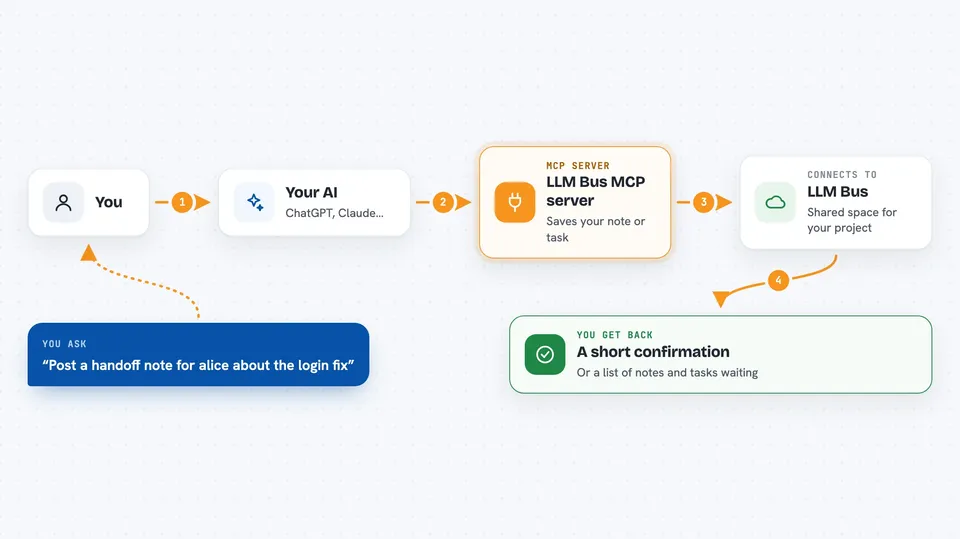
You ask your AI to do something, like post a note or start a task. Your AI uses this helper to talk to the LLM Bus service. The bus stores that note or task in a shared space tied to your project. Other agents connected to the same project can then read it, respond to it, or pick up the next piece of work. You get back a short confirmation or a list of what is waiting for you.
 Click to zoom
What you can do with it
- Post a handoff note to a teammate or another agent
- Read the notes addressed to you and mark them as read
- Create, assign, and track tasks through their whole life
- Claim the next work item so two agents never grab the same one
- Put an advisory lock on a file so two agents do not edit it at once
- See which agents and people are currently active
- Search the shared event history with exact filters
Try asking your AI
- “Post a handoff to alice/claude-1 saying the login fix is ready and link the commit”
- “Create a task for the migration review and assign it to bob”
- “Claim the next work item in this project so I can start on it”
- “Show me everything that happened in this project since my last check”
What it gives back to you
You get short, plain answers in the chat. Sometimes it is a confirmation that your post or task was saved. Sometimes it is a list of tasks, notes, or recent events with names and timestamps. The replies are kept small on purpose so they do not eat up your AI's attention.
Before you start
What you need
- Node.js 22 or newer and PostgreSQL 16 if you self-host
- A bearer token for your project (the server gives you one when you set up a participant)
- An MCP client that can point at a web address, like Claude Code or the Claude desktop app
Good to know
It keeps a shared record of what your agents do, so do not post secrets or private details into it, and remember that anything you post is visible to everyone in that project.
Install it with your AI
Add LLM Bus MCP server to your AI, no technical skills needed
You don't install anything by hand. You copy one prompt, paste it into an AI that can work on your computer, and it checks, installs and connects the server for you, asking you when it needs something.
Sign in to get the install prompt
Members get a ready-made prompt that lets the Claude desktop app check LLM Bus MCP server, install it and connect it for them, step by step. You don't need any technical skills: you copy, paste and answer a few questions. Your connected AI can also find and install any of the 4,066 MCP servers here for you.
Who it's for
People running several AI coding sessions at once, or small teams where each person drives their own agent on shared work.