
MCP server · Developer tools
Any CLI MCP server
by eirikb
Lets your AI run command line tools like Git or GitHub CLI by reading their help text.
This is a small helper that turns a command line tool into something your AI can use. It reads the tool's help text and builds a set of actions from it. It is handy for people who already use tools like Git or the GitHub command line but want their AI to run them without typing commands.
What is an MCP server? The 30-second version
On its own, your AI can only chat with you. An MCP server is a small helper program that gives your AI a new skill or a connection to something else. This helper connects your AI to command line tools, so when you ask for something, the AI can run the right command for you. Here it works with any tool that shows a help screen when you type its name plus --help.
What this MCP server does
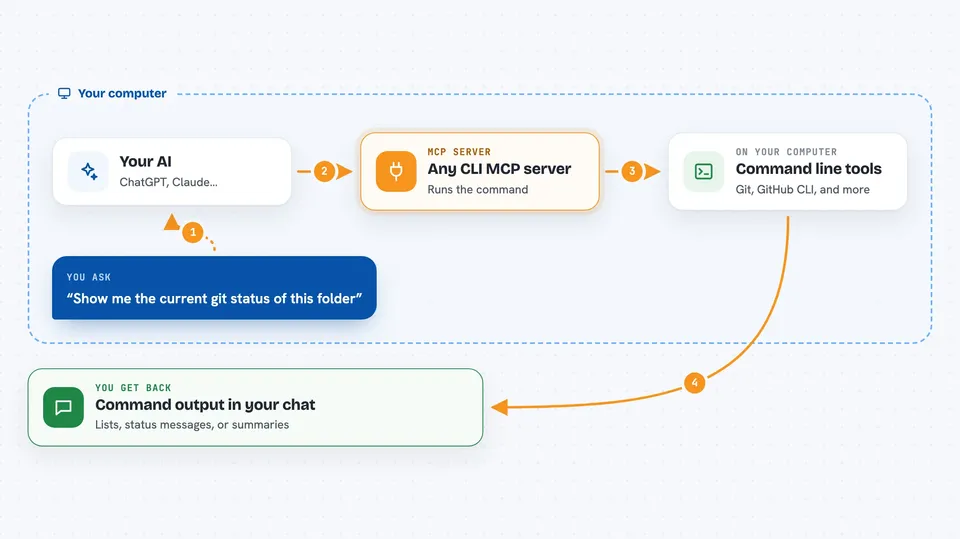
You ask your AI to do something, like check your Git status or list your GitHub repositories. The AI looks at the actions this helper built from the tool's help text. It picks the right command and runs it through the helper. The helper runs the command on your computer and sends the result back. You see the answer in your chat, without typing any commands yourself.
 Click to zoom
What you can do with it
- Run Git commands like checking status or viewing history
- Use the GitHub command line to list or manage repositories
- Use the Azure command line for cloud tasks
- Turn almost any command line tool with a help screen into AI actions
- Build a cache so the helper starts faster next time
Try asking your AI
- “Show me the current git status of this folder”
- “List my GitHub pull requests”
- “What branches exist in this repository”
- “Show the last five commits”
What it gives back to you
You get the normal output of the command, shown as text in your chat. That can be a list, a status message, or a short summary. If the command changes something, like creating a branch, the helper reports what happened. You read it like any other answer from your AI.
Before you start
What you need
- Node.js installed on your computer
- The command line tool you want to use, like Git or the GitHub CLI, already installed and set up
- The Claude desktop app or another AI app that supports MCP servers
Good to know
It runs real commands on your computer, so a wrong request could change or delete files, and it can do anything the underlying tool is allowed to do.
Install it with your AI
Add Any CLI MCP server to your AI, no technical skills needed
You don't install anything by hand. You copy one prompt, paste it into an AI that can work on your computer, and it checks, installs and connects the server for you, asking you when it needs something.
Sign in to get the install prompt
Members get a ready-made prompt that lets the Claude desktop app check Any CLI MCP server, install it and connect it for them, step by step. You don't need any technical skills: you copy, paste and answer a few questions. Your connected AI can also find and install any of the 4,361 MCP servers here for you.
Who it's for
Developers and anyone who already uses command line tools and wants their AI to run them.



