MCP server · Finance and crypto
Verify Proof MCP server
Check that a file existed at a certain time using its blockchain timestamp proof, right in your chat.

This is a small helper that lets your AI check blockchain timestamp proofs for you. You point it at a file and a proof file, and it tells you whether the file matches the record that was anchored on Bitcoin or Polygon. It is handy for anyone who needs to show a document has not changed since a certain date, like legal, insurance, or forensic work.
What is an MCP server? The 30-second version
On its own, your AI can only chat. An MCP server is a small helper program that gives your AI a new skill or a connection to an app or service. This one connects your AI to the verify-proof tool, which checks blockchain timestamp proofs. So when you ask your AI to verify a file, it can actually run the check and tell you the result.
What this MCP server does
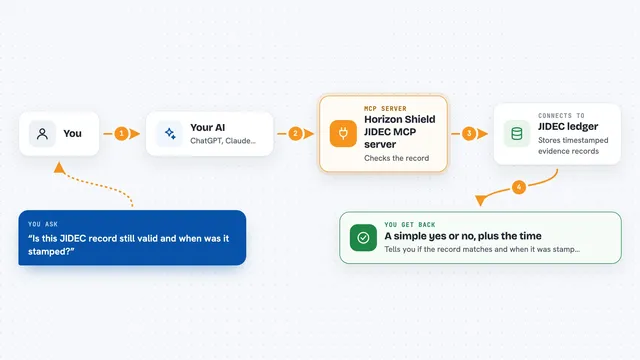
You ask your AI to verify a file against a proof. The AI uses this helper to compute the file's SHA-256 hash on your computer. The helper then reads the proof file, which contains the hash that was anchored on a blockchain like Bitcoin or Polygon. It compares the two hashes and checks the Merkle path if there is one. Finally, it tells you whether the file matches the proof and when it was anchored.
 Click to zoom
What you can do with it
- Verify a local file against a blockchain proof file
- Compute the SHA-256 hash of any file
- Explain in plain words what a proof file proves
- Check a known hash against proof data
- Create a new proof by anchoring a file's hash on ProofLedger (needs a free API key)
Try asking your AI
- “Verify ~/contract.pdf against ~/contract-proof.json”
- “What does this proof file actually prove?”
- “Compute the SHA-256 of this file so I can anchor it”
- “Check if this hash matches the proof I have”
What it gives back to you
You get a clear answer in the chat: whether the file is verified, which blockchain it was anchored on, the transaction ID, and the date it was timestamped. For a hash request, it gives you the SHA-256 hash. For an explanation, it describes what the proof asserts and how to check it on a block explorer.
Before you start
What you need
- Python installed on your computer
- The verify-proof package with the MCP extra (pip install "verify-proof[mcp]")
- A proof JSON file from a service like ProofLedger
- For creating proofs: a free ProofLedger API key
Good to know
The create_proof tool sends your file's hash to ProofLedger and uses your API key, so only use it when you are ready to create a new proof.
Install it with your AI
Add Verify Proof MCP server to your AI, no technical skills needed
You don't install anything by hand. You copy one prompt, paste it into an AI that can work on your computer, and it checks, installs and connects the server for you, asking you when it needs something.
Sign in to get the install prompt
Members get a ready-made prompt that lets the Claude desktop app check Verify Proof MCP server, install it and connect it for them, step by step. You don't need any technical skills: you copy, paste and answer a few questions. Your connected AI can also find and install any of the 4,361 MCP servers here for you.
Who it's for
This is most useful for legal professionals, insurance adjusters, forensic investigators, and anyone who needs to prove a file existed at a certain time without trusting a third party.