MCP server · Finance and crypto
WaxSeal MCP server
Lets your AI check WaxSeal identities and signatures, and sign or approve things with your key.
WaxSeal is a service that gives a person or an AI a kind of digital seal, tied to a key and recorded online. This MCP server connects your AI assistant to WaxSeal so it can look up a seal, check that a signature is real, and, if you give it your key, sign things or create approval tokens. It is handy if you work with documents, approvals, or want to confirm who really wrote or approved something.
What is an MCP server? The 30-second version
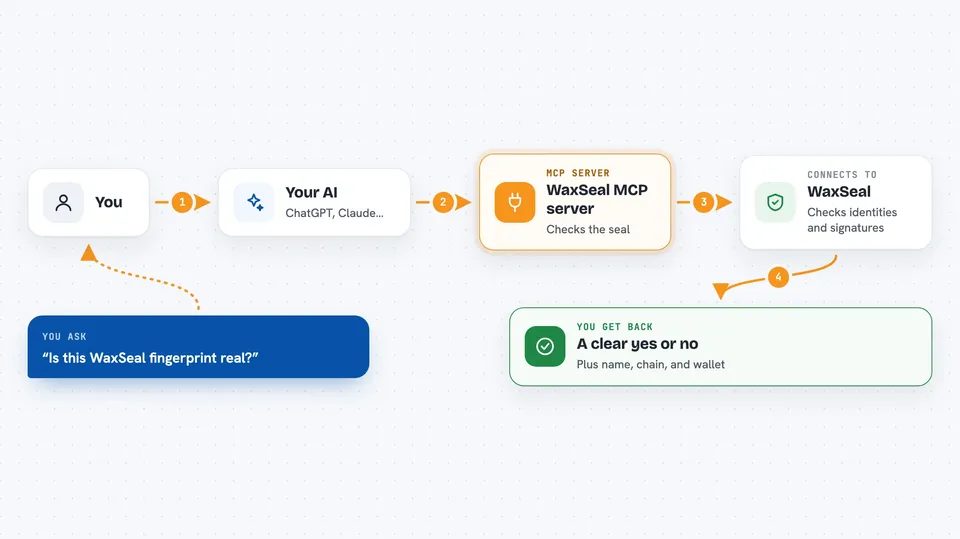
On its own, your AI can only chat with you. An MCP server is a small helper program that gives your AI a new skill, here the ability to talk to WaxSeal. Once connected, when you ask your AI to check a seal or a signature, it quietly asks this helper, and the helper asks WaxSeal. You just see the answer in the chat.
What this MCP server does
You ask your AI something like "is this WaxSeal real?" or "does this signature match?" Your AI passes the request to this MCP server. The server looks up the fingerprint or checks the signature against the on-chain key through WaxSeal's service. It comes back with a clear yes or no, plus details like the name and chain. If you have given it your private key, it can also sign content or create a time-limited approval token for you.
 Click to zoom
What you can do with it
- Look up a WaxSeal fingerprint and see the name, chain, wallet, and status
- Check whether an Ed25519 signature matches a seal's on-chain key
- Validate a human approval token before your AI does something irreversible
- Sign content with your WaxSeal private key
- Create a signed, time-limited approval token for a specific action
- Get a quick overview of the WaxSeal platform and what each tool does
Try asking your AI
- “Check this WaxSeal fingerprint and tell me who it belongs to”
- “Does this signature match the message I approve this transfer”
- “Sign this document text with my WaxSeal key”
- “Create an approval token for deleting these files, valid for 10 minutes”
What it gives back to you
You get short answers in the chat: a name, a chain, a wallet address, and a yes or no on whether the seal or signature is valid. When you sign or create an approval, you get back the signed text or token itself, ready to copy. Everything is shown as plain text or a small list, not as files.
Before you start
What you need
- Node.js 18 or newer if you run it yourself with npx
- A WaxSeal private key in PEM format if you want to sign or create approvals
- An MCP-capable app like Claude, Cursor, Windsurf, or VS Code
Good to know
The signing tools use your private key, so only connect this when you are comfortable letting your AI sign or approve things on your behalf.
Install it with your AI
Add WaxSeal MCP server to your AI, no technical skills needed
You don't install anything by hand. You copy one prompt, paste it into an AI that can work on your computer, and it checks, installs and connects the server for you, asking you when it needs something.
Sign in to get the install prompt
Members get a ready-made prompt that lets the Claude desktop app check WaxSeal MCP server, install it and connect it for them, step by step. You don't need any technical skills: you copy, paste and answer a few questions. Your connected AI can also find and install any of the 4,361 MCP servers here for you.
Who it's for
People who handle documents, approvals, or identity checks and want their AI to confirm seals and signatures without leaving the chat.