MCP server · Finance and crypto
Horizon Shield JIDEC MCP server
Lets your AI check that an AI agent's evidence record is genuine and timestamped on the JIDEC ledger.
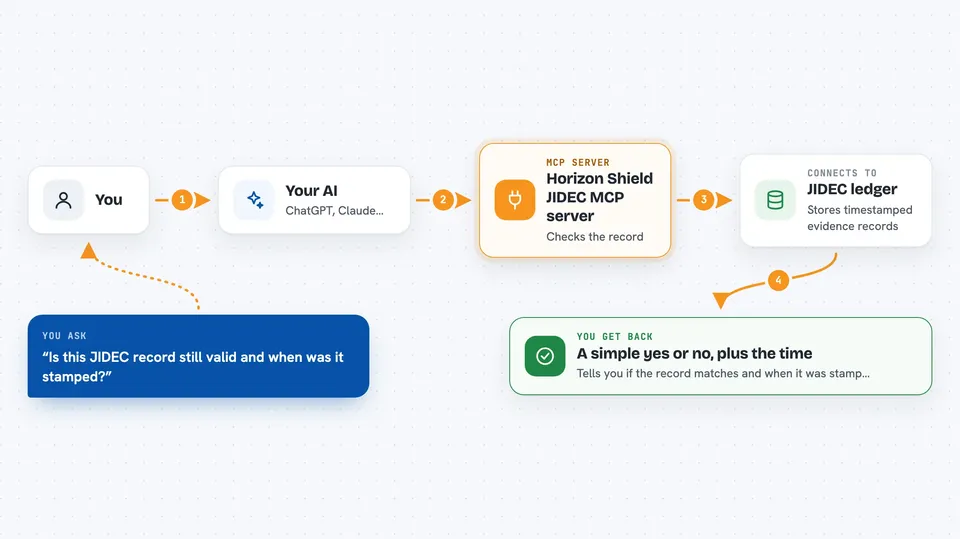
This is a small helper that connects your AI assistant to the JIDEC ledger, a record-keeping system that stamps entries using Bitcoin's timeline. It is handy if you work with AI agent logs or evidence records and you want to confirm they have not been changed. You do not need to be a programmer to use it, but you do need to have the record you want to check.
What is an MCP server? The 30-second version
On its own, your AI can only chat with you. An MCP server is a small helper program that gives your AI a new skill or a connection to an outside service. This one connects your AI to the JIDEC ledger, which stores evidence records with timestamps anchored to Bitcoin. Once it is connected, you can ask your AI to look up a record and check it for you.
What this MCP server does
You give your AI a record identifier or a piece of evidence from an AI agent. Your AI passes that to this helper, which fetches the record bytes from the JIDEC ledger. The helper then recomputes the SHA-256 fingerprint of those bytes and checks the OpenTimestamps timestamp attached to the record. You get back a simple answer in the chat telling you whether the record matches and when it was stamped.
 Click to zoom
What you can do with it
- Fetch an evidence record from the JIDEC ledger by its identifier
- Recompute the SHA-256 fingerprint of a record to see if it matches
- Check the OpenTimestamps timestamp to confirm when the record existed
- Verify that an AI agent's evidence has not been altered since it was stamped
- Look up the Bitcoin-anchored proof behind a record
Try asking your AI
- “Check whether this JIDEC record is still valid and tell me when it was timestamped”
- “Fetch record hs-2024-001 from the JIDEC ledger and verify its SHA-256”
- “Does the OpenTimestamps proof for this evidence record check out”
- “Compare the fingerprint of this file with the one stored on JIDEC”
What it gives back to you
You get a short answer in the chat: whether the record was found, whether the SHA-256 matched, and whether the OpenTimestamps check passed. If something does not match, the AI will tell you that too. For records that check out, you also see the timestamp information so you know when the record was anchored.
Before you start
What you need
- An AI assistant that supports MCP servers, such as the Claude desktop app
- Access to the JIDEC ledger (the record identifier or evidence you want to check)
- Any credentials your JIDEC setup requires, if the ledger is not public
Good to know
This server only reads and checks records, but the records themselves may contain sensitive evidence, so be careful about what you paste into the chat.
Install it with your AI
Add Horizon Shield JIDEC MCP server to your AI, no technical skills needed
You don't install anything by hand. You copy one prompt, paste it into an AI that can work on your computer, and it checks, installs and connects the server for you, asking you when it needs something.
Sign in to get the install prompt
Members get a ready-made prompt that lets the Claude desktop app check Horizon Shield JIDEC MCP server, install it and connect it for them, step by step. You don't need any technical skills: you copy, paste and answer a few questions. Your connected AI can also find and install any of the 4,609 MCP servers here for you.
Who it's for
People who handle AI agent logs, audit trails, or evidence records and want a quick way to confirm they are genuine and timestamped.