MCP server · Chat
pingwa WhatsApp MCP server
by grzgrzgrz3
Let your AI send you WhatsApp messages and ask you questions you can answer with a tap.
This is a small helper that connects your AI assistant to WhatsApp so it can message you and wait for your reply. You text a quick "join" to get a key, and from then on your AI can ping your phone when a job finishes or ask you a yes/no question. It is handy if you run long tasks and want to know when they are done, or want to approve something from your phone.
What is an MCP server? The 30-second version
On its own, your AI can only chat inside its window. An MCP server is a small helper program that gives your AI a new skill or a connection to an app or service. This one connects your AI to WhatsApp, so it can send you a message or ask you a question and read your answer back. You do not need a Meta account or any setup beyond texting "join" once.
What this MCP server does
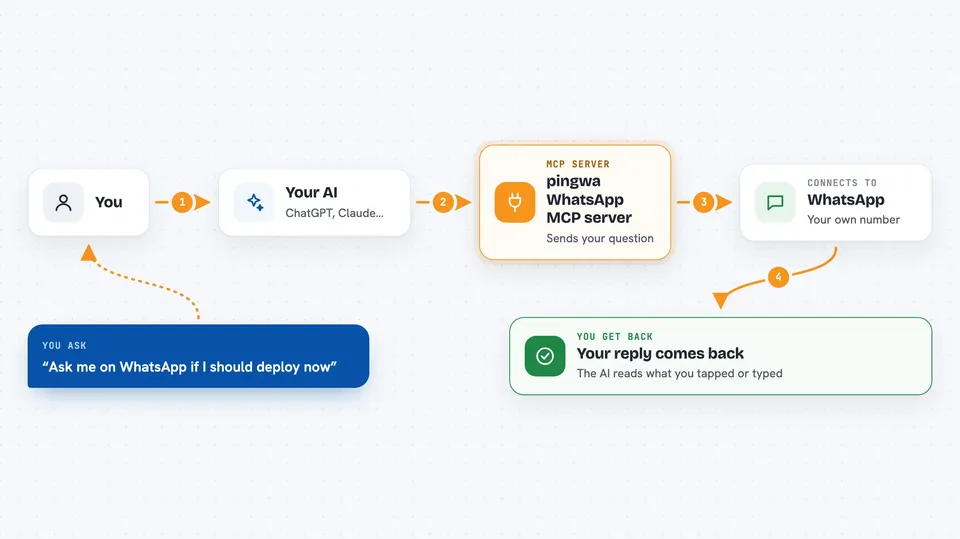
You ask your AI to notify you or to ask you something. The AI uses this helper, which sends the message to the pingwa service. That service delivers it to your own WhatsApp number. When you reply on WhatsApp, the helper picks up your reply and hands it back to the AI. So your AI can wait for your answer and continue based on what you tapped or typed.
 Click to zoom
What you can do with it
- Send a WhatsApp message to your own phone
- Ask a question with tap-to-answer buttons and wait for your reply
- Check for new replies you sent from WhatsApp
- Check your plan, quota, and reply window
- List or revoke your API keys
- Get a link to upgrade to a paid plan
Try asking your AI
- “Notify me on WhatsApp when the build finishes”
- “Ask me on WhatsApp if I want to deploy to production, with yes and no buttons”
- “Check my WhatsApp replies and tell me what I said”
- “Check my pingwa status and quota”
What it gives back to you
You get short answers in the chat: a confirmation that your message was sent, the text of your reply when you answer a question, a list of recent messages you sent from WhatsApp, or your plan and quota details. If you ask it to wait for a reply, it pauses until you tap a button or type something back. Everything shows up as plain text in the conversation.
Before you start
What you need
- A pingwa API key (send "join" on WhatsApp to the service number to get one)
- The uv tool installed if you run it locally, or nothing if you use the remote URL
- Your own WhatsApp number to receive the messages
Good to know
The helper can send WhatsApp messages to your phone and read your replies, so keep your API key private and revoke any key you no longer use.
Install it with your AI
Add pingwa WhatsApp MCP server to your AI, no technical skills needed
You don't install anything by hand. You copy one prompt, paste it into an AI that can work on your computer, and it checks, installs and connects the server for you, asking you when it needs something.
Sign in to get the install prompt
Members get a ready-made prompt that lets the Claude desktop app check pingwa WhatsApp MCP server, install it and connect it for them, step by step. You don't need any technical skills: you copy, paste and answer a few questions. Your connected AI can also find and install any of the 4,609 MCP servers here for you.
Who it's for
Anyone who runs long tasks or scripts and wants a simple way to get a WhatsApp ping or approve something from their phone.