
MCP server · Research
GetABrain MCP server
Ask real paid people questions from your AI and get back clean, structured answers.
This is a small helper that lets your AI ask real human workers questions through a service called GetABrain. You type a request in plain words, and the AI sends it out to actual people who answer it in a neat format. It is handy when you need a human opinion, a quick rating, or a simple yes or no that your AI cannot decide on its own.
What is an MCP server? The 30-second version
On its own, your AI can only chat with you using what it already knows. An MCP server is a small helper program that gives your AI a new skill or a connection to another service. This particular helper connects your AI to GetABrain, a place where paid human workers answer questions. Once it is connected, your AI can send a question there, wait for the answers, and bring them back to you in the chat.
What this MCP server does
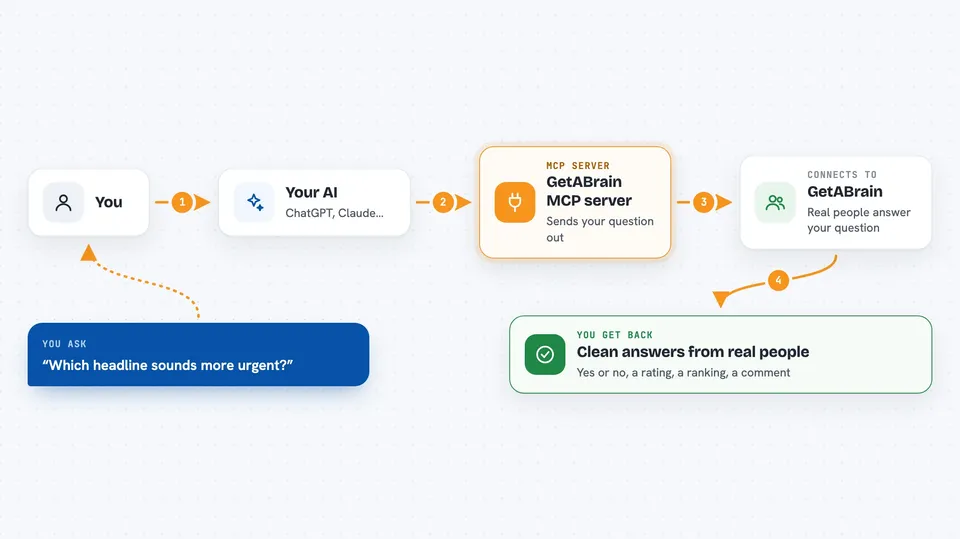
You ask your AI something that needs a human view, like which of two headlines sounds better. Your AI passes that question to this helper, which sends it to GetABrain. GetABrain puts the question in front of real paid workers. When they answer, the helper collects the replies and hands them back to your AI. Your AI then shows you the answers in a tidy, structured form you can read or use.
 Click to zoom
What you can do with it
- Ask a yes or no question and get a clear answer from real people
- Run a quick A/B test between two options
- Get star ratings or rankings on something you made
- Check how people feel about a piece of text or an image
- Ask workers to review a video, audio clip, or photo
- Request a voice, video, or photo capture from a worker
- Rate the answers you get to help improve future matches
Try asking your AI
- “Which of these two subject lines sounds more urgent? Option A: Your invoice is due tomorrow. Option B: Quick reminder about your invoice.”
- “Please ask real people to rate this logo idea from 1 to 5 and tell me the average.”
- “Run a sentiment check on this customer review and tell me if it reads positive, neutral, or negative.”
- “Ask a few workers to rank these three product names from best to worst.”
What it gives back to you
You get back the answers from the human workers, already sorted into a clean format. Depending on the question, that could be a yes or no, a number rating, a ranking, a short comment, or a file like a photo or voice clip. Your AI shows these in the chat as a short list or summary. If you are in test mode, the answers are marked as simulated so you know they are not from real people.
Before you start
What you need
- A GetABrain account (sign up at getabrain.ai)
- An API key and secret from GetABrain (a kind of username and password for apps; the site gives you both)
- The Claude desktop app or another app that can use MCP servers
- Node.js installed on your computer if you run it locally
Good to know
On a live key, submitting questions spends real money from your prepaid balance, so check your balance and use test mode first if you are just trying things out.
Install it with your AI
Add GetABrain MCP server to your AI, no technical skills needed
You don't install anything by hand. You copy one prompt, paste it into an AI that can work on your computer, and it checks, installs and connects the server for you, asking you when it needs something.
Sign in to get the install prompt
Members get a ready-made prompt that lets the Claude desktop app check GetABrain MCP server, install it and connect it for them, step by step. You don't need any technical skills: you copy, paste and answer a few questions. Your connected AI can also find and install any of the 4,361 MCP servers here for you.
Who it's for
People who need quick human judgment in their AI workflow, like researchers, marketers, product testers, and anyone running small surveys or reviews.





