
MCP server · Research
Airbnb MCP server
by HasData
Let your AI search Airbnb stays by place and dates, and read full listing details like price, amenities and host info.
This is a helper that connects your AI assistant to Airbnb. Once it is set up, you can ask your AI in plain words to find stays in a city for certain dates, or to pull up the full details of a listing you are looking at. It is handy for anyone planning a trip, comparing options, or doing travel research without clicking through page after page.
What is an MCP server? The 30-second version
On its own, your AI can only chat with you using what it already knows. An MCP server is a small helper program that gives your AI a new skill or a connection to an outside service. This one connects your AI to Airbnb, so when you ask about stays, your AI can actually look them up instead of guessing. You just talk normally, and the helper does the looking behind the scenes.
What this MCP server does
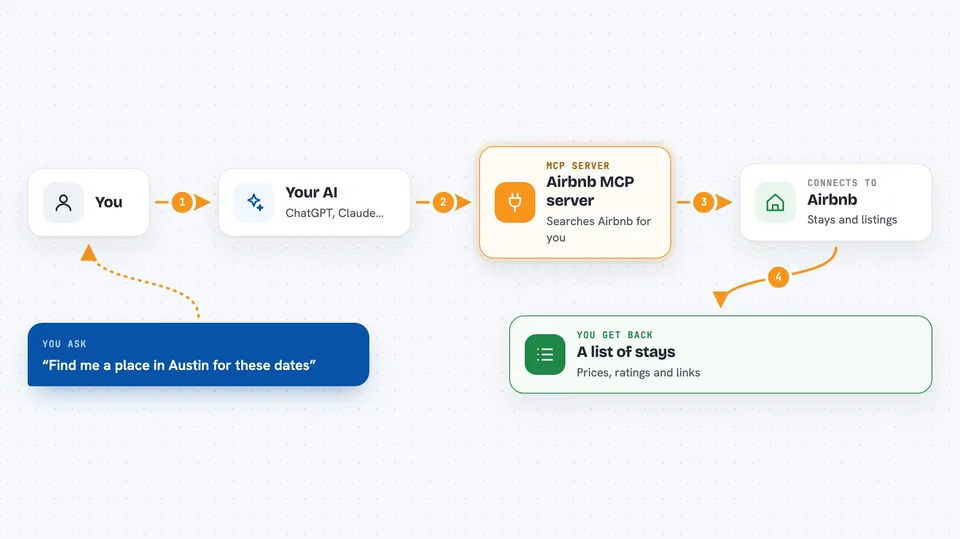
You ask your AI something like find me a place in Austin for these dates. Your AI passes that request to this helper, which searches Airbnb's public listing pages for you. The helper sends back a clean list of matching stays with prices, ratings and links. If you want more on one place, you ask your AI to open that listing, and the helper fetches the full details like bedrooms, amenities and host info. Everything comes back as tidy text your AI can read and summarize for you.
 Click to zoom
What you can do with it
- Search Airbnb stays by city or area and travel dates
- Filter results by number of guests, including children, infants and pets
- Compare nightly prices across different cities
- Read a listing's full details from its Airbnb link
- Check how many bedrooms, beds and baths a place has
- See whether a host is a Superhost and how long they have been hosting
- Look at the amenities a listing offers and whether each one is available
Try asking your AI
- “Find me Airbnb stays in Austin for two adults from September 15 to 18, under $200 a night, sorted by rating”
- “Compare the nightly price for a three night stay for two people in Austin versus Nashville”
- “For this Airbnb link, tell me how many beds and baths it has and whether the host is a Superhost”
- “Search this map area for places with a pool for four guests next weekend”
What it gives back to you
You get back a list of stays with the title, a short description, rating, review count, a link, and a price that shows the stay total and the nightly figure. When you ask about a single listing, you get the full picture: guest and bedroom counts, a longer description, the address, photos, host details, and a list of amenities with a note on whether each is available. Your AI usually turns all of this into a short summary or a comparison table right in the chat. It never changes anything on Airbnb, it only reads.
Before you start
What you need
- An MCP client like Claude, Cursor, Windsurf or VS Code
- A HasData API key, free to create at the HasData dashboard with no card needed
- The server URL and your key, added in your client's settings
Good to know
Each search or listing lookup uses 5 credits from your HasData account, and the free tier gives you 1,000 credits a month, so keep an eye on how many calls you make.
Install it with your AI
Add Airbnb MCP server to your AI, no technical skills needed
You don't install anything by hand. You copy one prompt, paste it into an AI that can work on your computer, and it checks, installs and connects the server for you, asking you when it needs something.
Sign in to get the install prompt
Members get a ready-made prompt that lets the Claude desktop app check Airbnb MCP server, install it and connect it for them, step by step. You don't need any technical skills: you copy, paste and answer a few questions. Your connected AI can also find and install any of the 4,609 MCP servers here for you.
Who it's for
Trip planners, travel agents, and anyone comparing Airbnb stays for a holiday or work trip who would rather ask their AI than click through listings by hand.




