MCP server · Research
Google Hotels MCP server
by HasData
Lets your AI search hotels and vacation rentals on Google Hotels and compare rates across booking sites.
This is a helper for your AI that connects it to Google Hotels. Once it is set up, you can ask your AI in plain words to find hotels for a trip, and it will pull back real listings with prices, ratings and amenities. It is handy for anyone planning travel, booking a stay, or comparing hotel prices for work.
What is an MCP server? The 30-second version
On its own, your AI can only chat with you using what it already knows. An MCP server is a small helper program that gives your AI a new skill or a connection to an app or service. This one connects your AI to Google Hotels, so when you ask about a stay, the AI can actually look up hotels and rentals there instead of guessing. You do not need a Google account, and the helper runs online, so there is nothing to install on your computer.
What this MCP server does
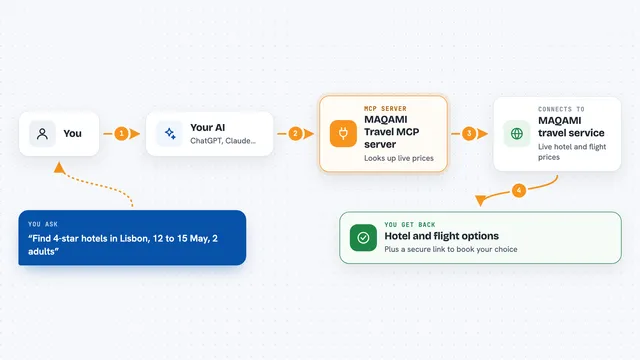
You ask your AI something like find hotels in Barcelona for these dates. The AI sends that request to this helper, which queries Google Hotels for that destination and those nights. Google Hotels sends back a list of properties with nightly rates, total rates, star class, guest ratings, review counts, amenities, photos and coordinates. Your AI then shows you a tidy list or summary in the chat. If you pick one property, the AI can ask again for that single hotel and get the rate at every booking site Google compares, plus the address and phone.
What you can do with it
- Search hotels in a city for specific check-in and check-out dates
- Filter results by star class, guest rating, price range or free cancellation
- Search vacation rentals instead of hotels, with a minimum number of bedrooms or bathrooms
- Sort results by lowest price, highest rating or most reviewed
- Open one property to see what each booking site charges for it
- See whether Google marks the price as a good deal and what the typical price range is
- Get amenities, photos, coordinates and nearby transit for a property
Try asking your AI
- “Find hotels in Barcelona for the nights of 12 to 15 November, two adults, and list the five cheapest with nightly rate, rating and class.”
- “Same stay, four stars and up, free cancellation only, sorted by rating.”
- “Take the top result and show what each booking site charges for it, and whether that is a good price.”
- “Vacation rentals in Lisbon that week with at least two bedrooms and a pool.”
What it gives back to you
You get a list of properties in the chat, each with its name, nightly rate, total rate, star class, guest rating and review count. You also see amenities, photos and coordinates, and for a single property the rate at every booking site Google compares, the address and phone, and Google's verdict on whether the price is a good deal. Rates are shown two ways, one with taxes and fees and one without, so you can compare like with like. Everything comes back as structured data your AI turns into a readable answer.
Before you start
What you need
- An MCP client such as Claude, Cursor, Windsurf or VS Code
- A HasData API key from the HasData dashboard (a kind of password for apps; the site gives you one for free, no card needed)
- For Claude Desktop's config file route, Node.js or Python on your computer
Good to know
Every successful call costs 10 credits from your HasData account, and the free tier covers about 100 calls a month, so keep an eye on how often you ask.
Install it with your AI
Add Google Hotels MCP server to your AI, no technical skills needed
You don't install anything by hand. You copy one prompt, paste it into an AI that can work on your computer, and it checks, installs and connects the server for you, asking you when it needs something.
Sign in to get the install prompt
Members get a ready-made prompt that lets the Claude desktop app check Google Hotels MCP server, install it and connect it for them, step by step. You don't need any technical skills: you copy, paste and answer a few questions. Your connected AI can also find and install any of the 4,361 MCP servers here for you.
Who it's for
Anyone who plans trips or books stays, from everyday travelers to assistants and travel coordinators comparing hotel prices.