MCP server · Design tools
CATIA Magic SysML v1 MCP bridge
Lets your AI read and (with a paid licence) edit SysML v1 models inside CATIA Magic.
This is a small helper that connects your AI assistant to a live SysML v1 model in CATIA Magic Systems of Systems Architect. Once it is set up, you can ask your AI questions about the model, or ask it to make changes, instead of clicking through the tool yourself. It is meant for systems engineers and architects who already work in CATIA Magic every day.
What is an MCP server? The 30-second version
On its own, your AI can only chat. An MCP server is a small helper program that gives your AI a new skill or a connection to another app. This one connects your AI to CATIA Magic, so it can look at your SysML v1 model and act on it when you ask. You still drive the conversation; the helper does the talking to CATIA Magic behind the scenes.
What this MCP server does
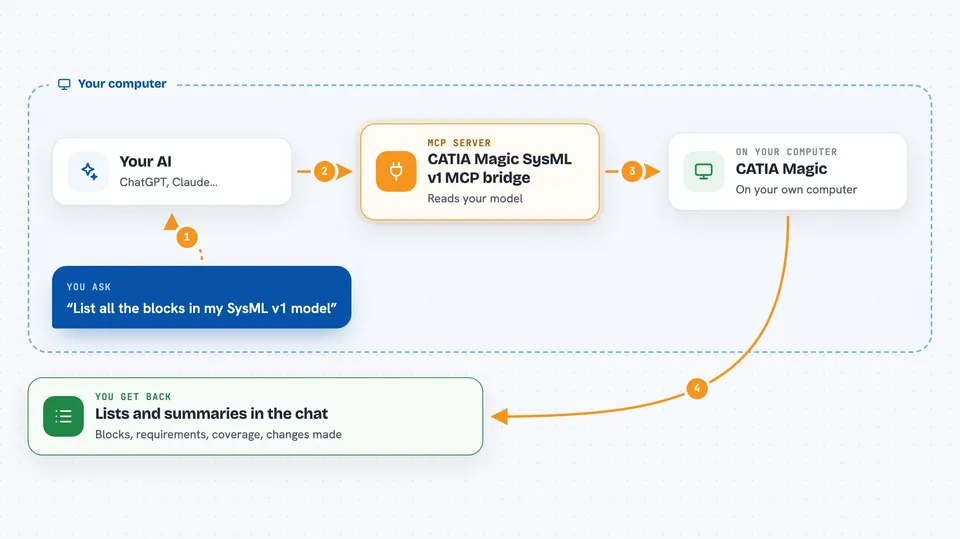
You ask your AI something about your SysML v1 model, for example to list the blocks or check which requirements are covered. Your AI passes that request to this helper, which talks to CATIA Magic on your machine. The helper reads the model and sends the answer back. With a paid licence, it can also make edits, like changing a block or adding an allocation, and then report what it changed.
 Click to zoom
What you can do with it
- List and explore the blocks, requirements, and other elements in your model
- Audit which requirements are covered and which are not
- Trace links between elements, such as allocations and dependencies
- Produce or describe diagrams from the model
- Edit model elements under a PRO licence
- Run administrative tasks under an ENTERPRISE licence
- Check that the bridge is alive with a simple ping
Try asking your AI
- “List all the blocks in my SysML v1 model and their names.”
- “Which requirements have no verification or allocation yet?”
- “Show me the allocations between the system blocks and the requirements.”
- “Under my PRO licence, rename the block Engine Control to Engine Controller.”
What it gives back to you
You get answers in the chat: lists of elements, short summaries, coverage reports, or descriptions of diagrams. When it makes a change, it tells you what it changed. Everything stays on your machine, so nothing is sent to an outside service.
Before you start
What you need
- CATIA Magic Systems of Systems Architect 2026x installed
- Python 3.11 or later
- An MCP client such as Claude Code or Cursor
- A licence file for PRO or ENTERPRISE features (FREE tier is read-only)
Good to know
With a PRO or ENTERPRISE licence it can change your model, so ask for a summary of changes and keep a backup before letting it edit.
Install it with your AI
Add CATIA Magic SysML v1 MCP bridge to your AI, no technical skills needed
You don't install anything by hand. You copy one prompt, paste it into an AI that can work on your computer, and it checks, installs and connects the server for you, asking you when it needs something.
Sign in to get the install prompt
Members get a ready-made prompt that lets the Claude desktop app check CATIA Magic SysML v1 MCP bridge, install it and connect it for them, step by step. You don't need any technical skills: you copy, paste and answer a few questions. Your connected AI can also find and install any of the 4,361 MCP servers here for you.
Who it's for
Systems engineers and architects who build or review SysML v1 models in CATIA Magic and want their AI to help with reading, auditing, and editing.