MCP server · Design tools
AETumi MCP server
by AETumiApp
Lets your AI find ready-made Three.js and WebGL 3D website pieces while you build.
AETumi MCP is a helper that connects your AI coding assistant to the AETumi library of 3D website building blocks. It is made for people who build 3D or animated websites and want to stop copying links between their browser and their editor. If you have never touched 3D code before, this one is more advanced than most, but the idea is simple.
What is an MCP server? The 30-second version
On its own, your AI can only chat with you. An MCP server is a small helper program that gives your AI a new skill or a connection to another service. This one connects your AI to AETumi, a place that collects ready-made 3D web components, scenes and templates. Once it is connected, you can ask your AI for a 3D hero section or a WebGL background, and it will reach into AETumi to find one for you.
What this MCP server does
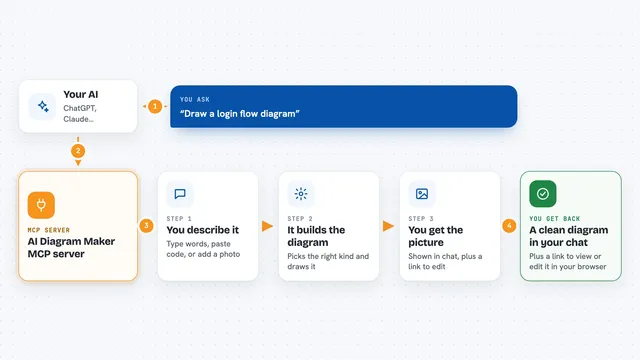
You ask your AI a question about a 3D website piece you need, like a dark hero section for a car brand. Your AI sends that request to the AETumi helper. The helper searches the AETumi catalog and its library of example experiences, then sends back matching assets, categories and build suggestions. Your AI shows you the results in the chat and can keep working on your project with that context. It is read-only, so it looks things up and recommends, but it does not change your files by itself.
What you can do with it
- Search the AETumi catalog for Three.js and WebGL components, scenes and templates
- Get the full public details of one asset by its id
- List asset categories and industries with counts
- Get a recommended build approach for a type of project
- Find example experiences by industry, visual style or customer goal
- Match a plain-language description like dark cinematic automotive launch to an example
- Look up AETumi pricing plans and general info
Try asking your AI
- “Find me a Three.js hero section for a luxury product website.”
- “Show me WebGL shader backgrounds for a fashion landing page.”
- “Find a 3D product viewer built with React Three Fiber.”
- “Recommend a build for a 3D headphone website.”
What it gives back to you
You get back lists of matching assets with names and details, category lists with counts, and build recommendations written in plain words. When you ask for example experiences, you get links to live interactive references you can look at. It also answers simple questions about AETumi, like pricing plans and what the platform is. Everything shows up as normal chat text you can read and copy.
Before you start
What you need
- An AI coding assistant that supports MCP, such as Claude Code, Cursor or Codex
- Nothing else for the hosted server: it runs in the cloud and needs no install
- Node.js if you want to run the small optional local version from the repository
Good to know
The hosted tools only read and recommend, but the AETumi library is a commercial one, so some assets lead to paid plans.
Install it with your AI
Add AETumi MCP server to your AI, no technical skills needed
You don't install anything by hand. You copy one prompt, paste it into an AI that can work on your computer, and it checks, installs and connects the server for you, asking you when it needs something.
Sign in to get the install prompt
Members get a ready-made prompt that lets the Claude desktop app check AETumi MCP server, install it and connect it for them, step by step. You don't need any technical skills: you copy, paste and answer a few questions. Your connected AI can also find and install any of the 4,361 MCP servers here for you.
Who it's for
Front-end developers, creative developers, agencies and studios building Three.js or WebGL websites with an AI coding assistant.