MCP server · Design tools · official
Luw.ai MCP server
by Luvi-io · official
Redesign rooms, exteriors and gardens from photos, render sketches, edit images, and make videos or 3D models.
This is the official Luw.ai helper for your AI assistant. Once it is connected, you can ask your AI in plain words to redesign a room, restyle a building outside, plan a garden, turn a sketch into a realistic picture, or make a short video or 3D model. It is handy for interior designers, architects, real estate agents, and anyone who works with photos of spaces.
What is an MCP server? The 30-second version
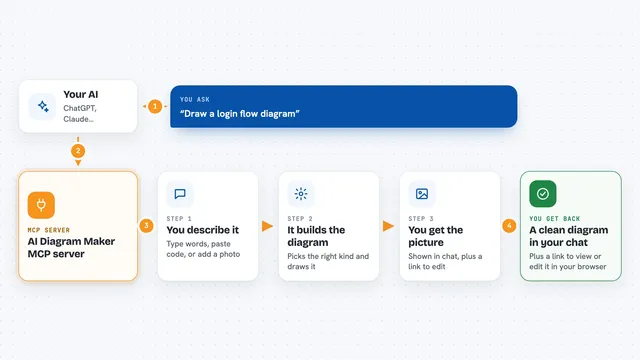
On its own, your AI can only chat. It cannot actually make a picture or change a photo. An MCP server is a small helper program that gives your AI a new skill or a connection to another service. This one connects your AI to Luw.ai, a design and rendering service, so when you ask for a new living room or a fly-through video, your AI sends that request to Luw.ai and brings the finished result back into your chat.
What this MCP server does
You type a request in your normal chat, like redesigning a photo of a bedroom in a certain style. Your AI reads that request and calls this helper. The helper sends your photo and your instructions to Luw.ai, which does the design or rendering work. When it is done, the finished image, video or 3D model comes back and your AI shows it to you right in the conversation. You can then ask for changes, like a different sofa colour or a wider view, and it keeps going from there.
What you can do with it
- Redesign a room photo in a style you choose, with several options
- Stage an empty room as a furnished living room or bedroom
- Turn a sketch or CAD view into a photoreal render
- Edit any image with a simple sentence, like changing a floor or wall
- Remove furniture or objects from a photo
- Turn a render into a short fly-through video
- Build a textured 3D model from a few photos
Try asking your AI
- “Redesign ~/Desktop/living-room.jpg in Japandi style, give me 2 options”
- “This listing photo is an empty room. Stage it as a cozy Scandinavian living room”
- “Render my sketch plan-sketch.png as a photoreal modern villa at golden hour”
- “Turn this render into a drone fly-through video”
What it gives back to you
You get finished images, videos or 3D model files back, shown right inside your chat. For longer jobs like videos, your AI can check back and collect the result when it is ready. You also get short answers when you ask ArchiGPT a design question, and lists of styles or options when you ask what is available. If you set an output folder, every result is also saved to your computer.
Before you start
What you need
- A Luw.ai account (new accounts get free credits)
- An API key from your Luw.ai dashboard (a kind of password for apps; the site gives you one)
- For working with files on your computer: Node.js 18 or newer
Good to know
Every generation uses your Luw.ai credits, so check your balance and remember that each variation is billed separately.
Install it with your AI
Add Luw.ai MCP server to your AI, no technical skills needed
You don't install anything by hand. You copy one prompt, paste it into an AI that can work on your computer, and it checks, installs and connects the server for you, asking you when it needs something.
Sign in to get the install prompt
Members get a ready-made prompt that lets the Claude desktop app check Luw.ai MCP server, install it and connect it for them, step by step. You don't need any technical skills: you copy, paste and answer a few questions. Your connected AI can also find and install any of the 4,609 MCP servers here for you.
Who it's for
Interior designers, architects, landscape designers, real estate agents, and anyone who works with photos of rooms, buildings or outdoor spaces.