
MCP server · Research
VeryChic MCP server
by jordantete
Let your AI browse VeryChic flash-sale hotel deals, filter them, and check prices by date.
This is a small helper that connects your AI assistant to VeryChic, the flash-sale travel site for hotel deals. Once it is set up, you can just ask your AI in plain words for deals in a country, under a price, or with a spa, and it will look them up for you. It is handy for anyone planning a trip who wants to compare offers without clicking around the site.
What is an MCP server? The 30-second version
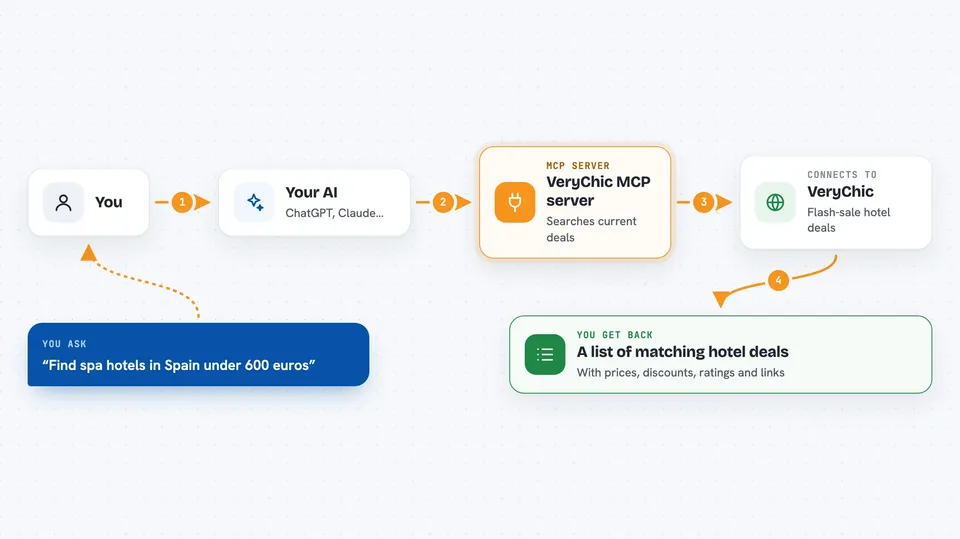
On its own, your AI can only chat with you; it cannot see inside other apps or websites. An MCP server is a small helper program that gives your AI a new skill or a connection to a service, here to VeryChic. When you ask a question, your AI passes it to this helper, the helper talks to VeryChic, and the answer comes back into your chat. This one is read-only, so it only looks things up and never books or changes anything.
What this MCP server does
You ask your AI something like "find spa hotels in Spain under 600 euros". Your AI sends that request to this helper, which searches the current VeryChic flash-sale offers and filters them by your criteria. If you want more on one offer, the helper also fetches that offer's details, its guest review scores, and its day-by-day prices for the months you care about. The results come back into your chat as a tidy list or summary you can read and compare.
 Click to zoom
What you can do with it
- Browse the current VeryChic flash-sale offers
- Filter deals by destination, country, price, discount, stars, flights, or theme
- Sort results by discount, price, rating, stars, or distance
- Find offers near a place you name, within a distance you choose
- Pull up one offer's full details, gallery, and guest review scores
- Check day-by-day prices and availability for specific months
- Spot which month is cheapest for a given hotel
Try asking your AI
- “Browse the current VeryChic deals.”
- “Search VeryChic offers in Spain under 600 euros.”
- “Find 5-star spa hotels with at least 40% off, cheapest first.”
- “Show VeryChic offers within 300 km of Paris, nearest first.”
- “What does that hotel cost in February and March 2027?”
What it gives back to you
You get back a list of matching offers with the hotel name, destination, price, discount, star rating, and a link. For a single offer, you get its full description, included perks, guest review grades, and a day-by-day price table for the months you asked about. It also gives a per-month summary so you can quickly see which month is cheapest. Everything shows up right in your chat as text you can read and compare.
Before you start
What you need
- An MCP client that supports local servers, such as the Claude desktop app, Claude Code, Cursor, VS Code, or Windsurf
- The uv tool installed (it runs the server for you without any setup)
- No account and no password, since it only reads public offers
Good to know
It only reads public VeryChic offers and never books or changes anything, but it is an unofficial community tool, so use it for personal, low-volume browsing and respect VeryChic's terms.
Install it with your AI
Add VeryChic MCP server to your AI, no technical skills needed
You don't install anything by hand. You copy one prompt, paste it into an AI that can work on your computer, and it checks, installs and connects the server for you, asking you when it needs something.
Sign in to get the install prompt
Members get a ready-made prompt that lets the Claude desktop app check VeryChic MCP server, install it and connect it for them, step by step. You don't need any technical skills: you copy, paste and answer a few questions. Your connected AI can also find and install any of the 4,609 MCP servers here for you.
Who it's for
Anyone planning a trip who wants to compare VeryChic hotel deals quickly, especially travellers hunting for flash-sale bargains.




