MCP server · Research
Plantrip MCP server
by klabianco
Let your AI plan trips: itineraries, packing lists, weather, costs, and travel answers.
Plantrip is a travel planning service. This MCP server connects your AI assistant to Plantrip so it can build trip plans for you. It is handy if you plan trips often and want help with itineraries, packing, weather, and budgets.
What is an MCP server? The 30-second version
On its own, your AI can only chat with you. An MCP server is a small helper program that gives your AI a new skill. This one connects your AI to Plantrip, a travel planning service. Once it is set up, your AI can ask Plantrip for trip plans and answers, and then tell you what it found.
What this MCP server does
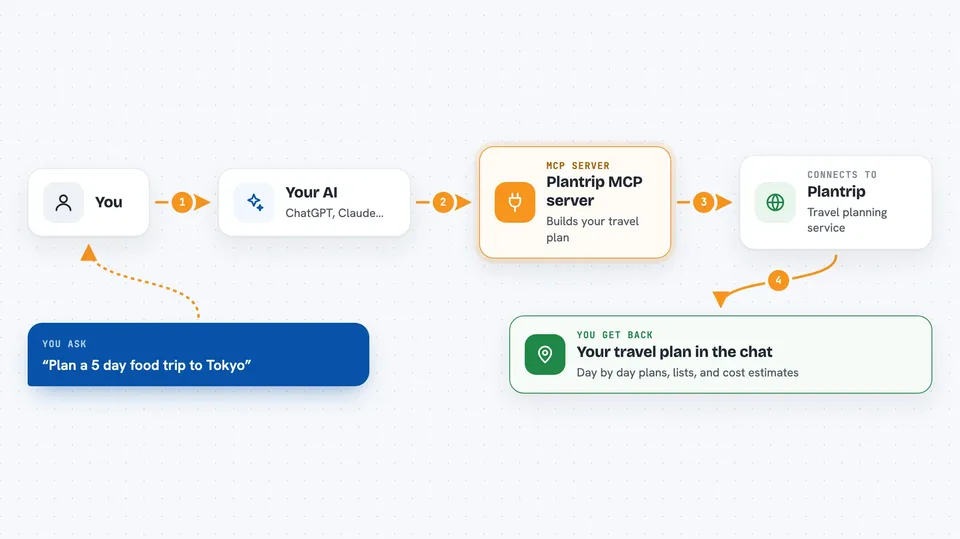
You ask your AI for travel help, like a five day plan for Tokyo. Your AI sends that request to this helper program on your computer. The helper talks to Plantrip over the internet using your API key. Plantrip builds the itinerary, packing list, weather notes, or cost estimate. Your AI then shows you the result in the chat, and you can ask for changes.
 Click to zoom
What you can do with it
- Create a day by day travel itinerary for a destination
- Generate a packing list based on weather and activities
- Get weather and climate insights for a place and month
- Estimate trip costs for hotels, food, transport, and activities
- Ask general travel questions and get expert answers
- Search Plantrip's library of destination guides
- Check tour dates and send a booking inquiry
Try asking your AI
- “Create a 5-day itinerary for Tokyo focused on food and culture”
- “What should I pack for a hiking trip to Patagonia in March?”
- “What's the weather like in Bali in August?”
- “How much would a week in Iceland cost for 2 people?”
What it gives back to you
You get answers right in the chat. Itineraries come back as day by day plans with activities, locations, and costs. Packing lists and cost estimates come back as lists and numbers. Weather notes and travel answers come back as short written summaries.
Before you start
What you need
- A free Plantrip account (sign in at plantrip.io/developers)
- An API key from Plantrip (a kind of password for apps; the site gives you one for free)
- The Claude desktop app or Claude Code
Good to know
It can save and delete trips in your Plantrip account, so check before you let it remove anything.
Install it with your AI
Add Plantrip MCP server to your AI, no technical skills needed
You don't install anything by hand. You copy one prompt, paste it into an AI that can work on your computer, and it checks, installs and connects the server for you, asking you when it needs something.
Sign in to get the install prompt
Members get a ready-made prompt that lets the Claude desktop app check Plantrip MCP server, install it and connect it for them, step by step. You don't need any technical skills: you copy, paste and answer a few questions. Your connected AI can also find and install any of the 4,361 MCP servers here for you.
Who it's for
Anyone who plans trips and wants quick help with itineraries, packing, weather, and budgets, from casual travelers to travel agents.