MCP server · Developer tools
Deadzone MCP server
by laradji
Lets your AI search library documentation offline, using a local file instead of the internet.
Deadzone is a small helper program that gives your AI a searchable copy of many software library docs, stored right on your computer. You ask a question in plain English, and it finds the matching bits from the docs. It is handy if you work with tools like Terraform, Go libraries, or other coding docs and want quick answers without opening a browser.
What is an MCP server? The 30-second version
On its own, your AI can only chat with you using what it already learned. An MCP server is a small helper program that gives your AI a new skill or a connection to something useful. Deadzone is that helper for library documentation: it holds a local search index of many docs. When you ask your AI a question, the AI quietly asks Deadzone, and Deadzone looks it up on your machine.
What this MCP server does
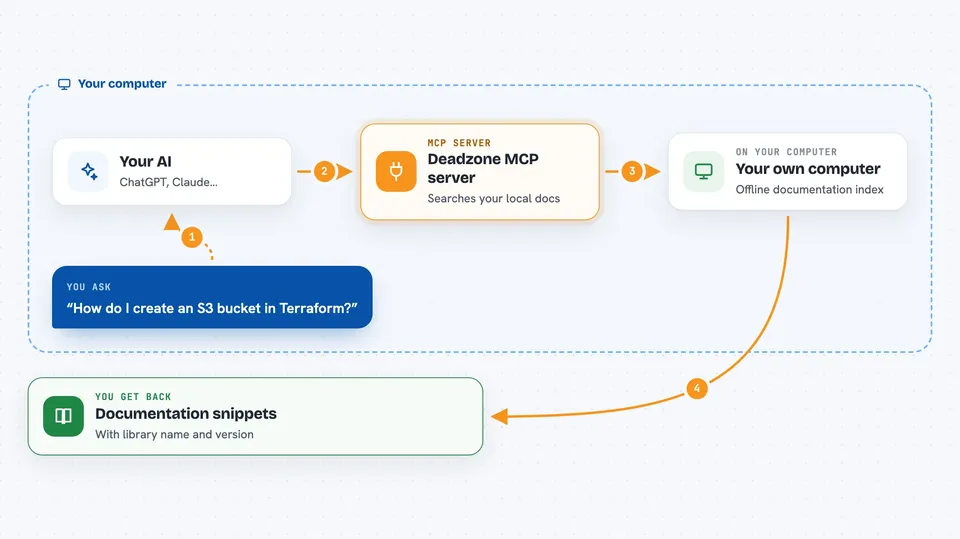
You ask your AI something like how to create an S3 bucket in Terraform. The AI sends your question to Deadzone, which is running quietly in the background. Deadzone turns your words into numbers and compares them against its local index of documentation. It picks the closest matching snippets and sends them back. Your AI then shows you those snippets in the chat, often with the library name and version.
 Click to zoom
What you can do with it
- Search across many library docs at once
- Find the right library by name or topic
- Get documentation snippets for a specific library and version
- Limit how much text comes back so answers stay short
- Work fully offline after the first launch
- Keep your searches private on your own computer
Try asking your AI
- “How do I register a tool in the Go SDK?”
- “Show me how to create an S3 bucket in Terraform”
- “Find docs about authentication in this library”
- “What does the quick start guide say for this project?”
What it gives back to you
You get short documentation snippets in the chat, chosen to match your question. Each snippet usually comes with the library name and version it belongs to. You can also ask for a list of matching libraries first, then narrow down. The answers are plain text, not links or files.
Before you start
What you need
- A Mac or Linux computer (Windows needs WSL)
- The Deadzone program installed (one command or one download)
- An MCP client like Claude Desktop or another tool that supports MCP servers
Good to know
The first launch needs an internet connection to download the index and model; after that it stays offline. It only reads documentation, so it cannot change anything on your computer.
Install it with your AI
Add Deadzone MCP server to your AI, no technical skills needed
You don't install anything by hand. You copy one prompt, paste it into an AI that can work on your computer, and it checks, installs and connects the server for you, asking you when it needs something.
Sign in to get the install prompt
Members get a ready-made prompt that lets the Claude desktop app check Deadzone MCP server, install it and connect it for them, step by step. You don't need any technical skills: you copy, paste and answer a few questions. Your connected AI can also find and install any of the 4,361 MCP servers here for you.
Who it's for
Developers, technical writers, and anyone who looks up software library documentation often and wants fast, private answers.