MCP server · Developer tools
cc-sensei MCP server
Lets your AI look up how Claude Code is built and read its source code, so it can help you design your own agent.
cc-sensei is a small helper that gives your AI a map of how Claude Code works inside. It comes with written notes about 32 parts of Claude Code, plus the actual source code, all stored on your own computer. It is handy if you are building your own AI agent and want to see how a real one was put together.
What is an MCP server? The 30-second version
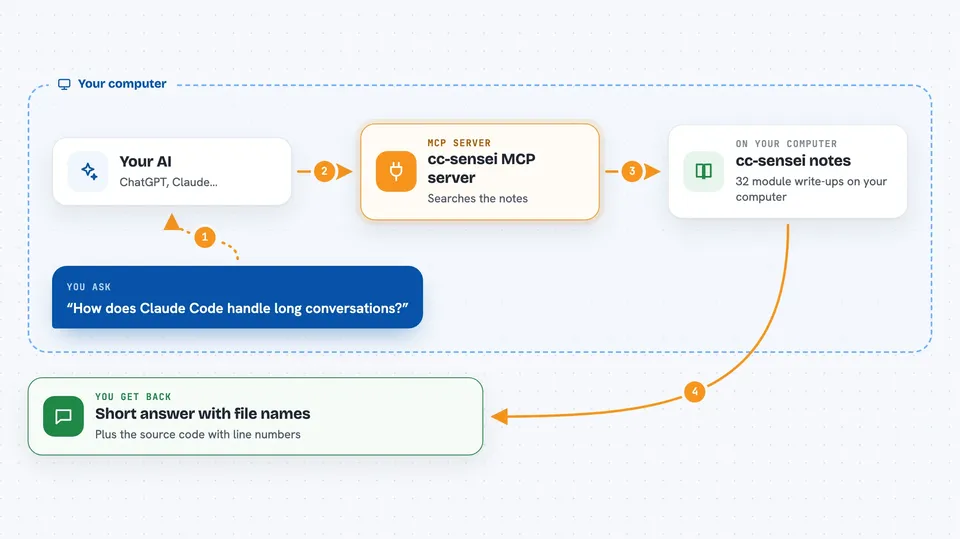
On its own, your AI can only chat with you. An MCP server is a small helper program that gives your AI a new skill or a connection to something. This one connects your AI to a local collection of notes and source code about Claude Code. Once it is connected, your AI can search those notes and read those files for you when you ask.
What this MCP server does
You ask your AI a question in plain words, like how Claude Code handles long conversations. Your AI passes the question to cc-sensei. cc-sensei looks through its 32 module write-ups and finds the matching ones. It sends back a short explanation, the design choices behind it, and the file names where the code lives. If you want, it can also open the actual source file and show you the lines.
 Click to zoom
What you can do with it
- List all 32 modules that make up Claude Code
- Search the notes in plain words and get a brief, standard, or deep answer
- Drill into one module to see its responsibilities, decisions, and principles
- Trace one topic, like prompt cache, across all modules
- Pull out reusable design patterns you can copy
- Read the actual Claude Code source files with line numbers
Try asking your AI
- “Use cc-sensei to tell me how Claude Code compacts long conversations.”
- “Which modules in Claude Code deal with prompt cache?”
- “Show me the design principles behind the context engineering module.”
- “Open the file services/compact/microCompact.ts and show me the first 100 lines.”
What it gives back to you
You get answers in your chat window: short explanations, lists of modules, comparison tables, and design principles with the file names where each idea lives. When you ask for source code, it shows the file with line numbers so you can read it yourself. Everything comes back as text, and it stays short on purpose so your chat does not get flooded.
Before you start
What you need
- Node.js 18 or newer on your computer
- A copy of the cc-sensei project (either cloned from GitHub or run with npx)
- An MCP client like Claude Desktop, Cursor, or Qoder to connect it to
Good to know
It only reads files from the folder you point it at, so keep that folder to the Claude Code source and notes you want it to see.
Install it with your AI
Add cc-sensei MCP server to your AI, no technical skills needed
You don't install anything by hand. You copy one prompt, paste it into an AI that can work on your computer, and it checks, installs and connects the server for you, asking you when it needs something.
Sign in to get the install prompt
Members get a ready-made prompt that lets the Claude desktop app check cc-sensei MCP server, install it and connect it for them, step by step. You don't need any technical skills: you copy, paste and answer a few questions. Your connected AI can also find and install any of the 4,361 MCP servers here for you.
Who it's for
People building their own AI agents who want to learn from how Claude Code was designed, without reading hundreds of thousands of lines of source themselves.