
MCP server · Notes
cachly AI Brain MCP server
by cachly-dev
Give your AI a shared, lasting memory of your codebase so it stops forgetting what your team already learned.
cachly is a memory helper for your AI coding assistant. It remembers the bugs your team fixed, the decisions you made, and the lessons learned, so your AI starts each session already briefed. It is handy for developers and teams who are tired of re-explaining the same things every morning.
What is an MCP server? The 30-second version
On its own, your AI can only chat with what you paste into it. An MCP server is a small helper program that gives your AI a new skill or a connection to a service. This one connects your AI to cachly, a shared memory for your codebase. Once connected, your AI can look up past lessons, ask who knows what, and save new lessons as you work.
What this MCP server does
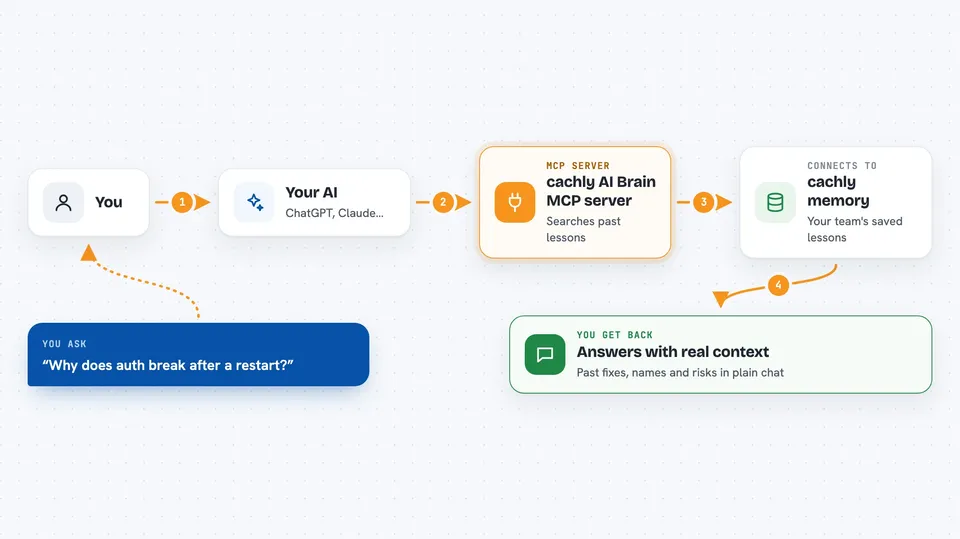
You ask your AI a question about your project, like why a deploy keeps failing. The AI talks to the cachly helper, which searches your team's stored lessons and git history. cachly finds the relevant past fixes, decisions, and people, then hands them back to your AI. Your AI uses that to answer you with real context from your own work. After you fix something, cachly can save that lesson so it is there next time.
 Click to zoom
What you can do with it
- Recall past bug fixes and the exact commands that worked
- Find out who on your team knows about a topic
- See which lessons and people are tied to a file before you edit it
- Get a health score for your team's knowledge and a list of gaps
- Predict likely failure risks before a deploy based on past incidents
- Trace a problem back to its root cause through past lessons
- Export all your lessons to a file you can read or reuse
Try asking your AI
- “Why does auth break after a restart? Check our past lessons.”
- “Who on my team knows about Kubernetes deploys?”
- “What should I know before touching the billing service file?”
- “We just fixed the Stripe retry bug. Save that as a lesson.”
What it gives back to you
You get answers in plain chat: lists of past lessons with dates and commands, names of teammates ranked by expertise, or a short summary of risks. It can also show a knowledge health score and a list of blind spots. When it saves a lesson, it confirms what was stored. Everything comes back as text you can read right in the conversation.
Before you start
What you need
- Node.js installed on your computer (the setup command uses npx)
- A free cachly account (the setup signs you in through your browser, no credit card)
- An AI editor that supports MCP, like Claude Code, Cursor, VS Code, or JetBrains
Good to know
It reads your git history and can store code excerpts if you run index_project, so check what your team is comfortable sharing before you turn it on.
Install it with your AI
Add cachly AI Brain MCP server to your AI, no technical skills needed
You don't install anything by hand. You copy one prompt, paste it into an AI that can work on your computer, and it checks, installs and connects the server for you, asking you when it needs something.
Sign in to get the install prompt
Members get a ready-made prompt that lets the Claude desktop app check cachly AI Brain MCP server, install it and connect it for them, step by step. You don't need any technical skills: you copy, paste and answer a few questions. Your connected AI can also find and install any of the 4,361 MCP servers here for you.
Who it's for
Developers and engineering teams who use AI coding assistants and want their shared knowledge to stick around.



