
MCP server · Notes
Claude Engram memory server
by 20alexl
Gives your AI a long-term memory of your project's past work, mistakes and decisions.
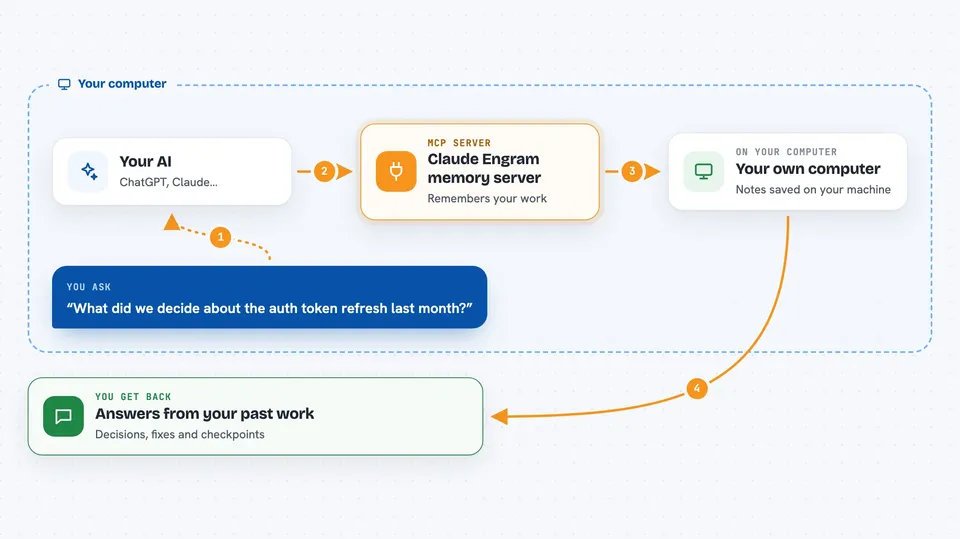
Claude Engram is a memory helper for Claude Code. It quietly watches what happens in your coding sessions and remembers the important parts, so your AI can bring them back later when they matter. It is handy if you work on the same project over many days and keep forgetting what you already tried.
What is an MCP server? The 30-second version
On its own, your AI can only chat about what is in front of it right now. An MCP server is a small helper program that gives your AI a new skill or a connection to something else. This one connects your AI to a memory store that lives on your own computer, tied to your project. When you ask a question, the AI can look things up in that store instead of guessing.
What this MCP server does
You keep working in Claude Code like you normally do. In the background, Engram notices your edits, your test runs, your mistakes and the decisions you type, and it writes short notes about them. Before your AI edits a file, Engram quietly slips in the most relevant old notes, like a past bug tied to that file or a rule you set. When you ask about something from weeks ago, your AI can search all your past sessions and bring the answer back. You do not have to call anything for most of this; it just happens.
 Click to zoom
What you can do with it
- Remember a discovery or a rule so your AI never forgets it
- Search everything you ever discussed across past sessions
- Warn you before an edit that repeats a past mistake
- Save a checkpoint of what you are doing so you can resume cleanly
- List the mistakes your AI has made and mark them as learned
- Check whether a claim of 'done' is backed by real evidence
- Run a long task unattended with a safety bracket around it
Try asking your AI
- “What did we decide about the auth token refresh last month?”
- “Have I hit this TypeError before, and how did we fix it?”
- “Save a checkpoint: I am halfway through the export feature, the parser is done, the writer is left.”
- “Mine my past sessions for anything I said I would come back to.”
What it gives back to you
You get short answers in the chat, not files. Sometimes it is a list of past mistakes with their fixes, sometimes a summary of a decision you made weeks ago, sometimes a checkpoint you can restore. When it warns you before an edit, you see a small note in the conversation explaining what it remembered and why. Everything stays readable and plain.
Before you start
What you need
- Claude Code installed on your computer
- Python 3 (the README uses a virtual environment)
- The Engram repo cloned and its install script run once
- A per-project setup step for each project you want it to remember
Good to know
It reads your past Claude Code sessions and your project files to build its memory, so treat that store as private and review what it saves before sharing your machine or repo.
Install it with your AI
Add Claude Engram memory server to your AI, no technical skills needed
You don't install anything by hand. You copy one prompt, paste it into an AI that can work on your computer, and it checks, installs and connects the server for you, asking you when it needs something.
Sign in to get the install prompt
Members get a ready-made prompt that lets the Claude desktop app check Claude Engram memory server, install it and connect it for them, step by step. You don't need any technical skills: you copy, paste and answer a few questions. Your connected AI can also find and install any of the 4,609 MCP servers here for you.
Who it's for
Developers and anyone who uses Claude Code on the same project for many days and wants their AI to stop forgetting past work.



