MCP server · Security
Auth Box MCP server
by MARUCIE
Let your AI look up and use your saved passwords and API keys, only for the things you allow.
Auth Box is a password manager built around a 24 word recovery phrase instead of an email account. It also comes with an MCP gateway, which is the part that lets an AI assistant reach your saved logins and API keys in a controlled way. It is handy if you already use Auth Box and want your AI to help with accounts, keys, or passwords without you copying them around by hand.
What is an MCP server? The 30-second version
On its own, your AI can only chat with you. It cannot open your password manager or read your saved logins. An MCP server is a small helper program that gives your AI one new skill, and here that skill is talking to your Auth Box vault. Once it is connected, you can ask your AI to fetch a password or check an API key, and the helper passes the request to Auth Box for you.
What this MCP server does
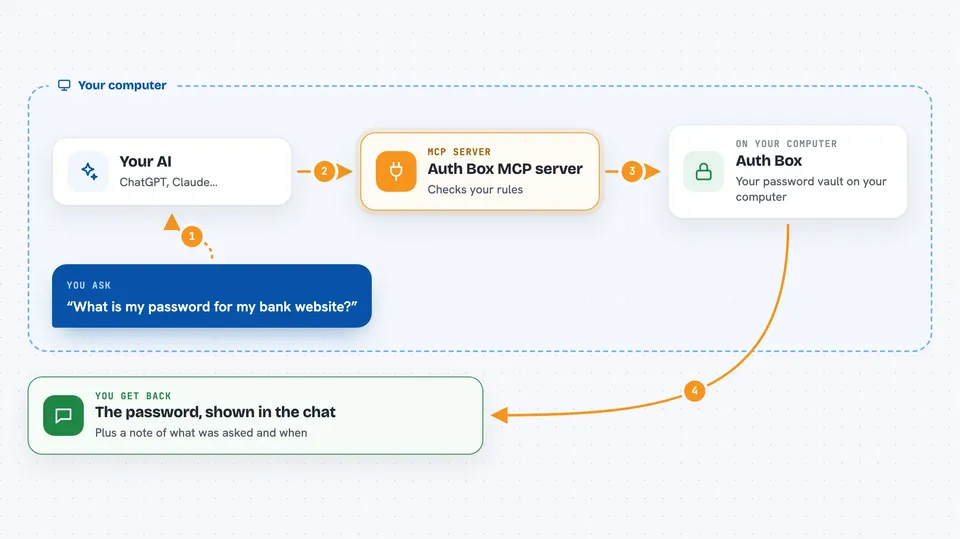
You ask your AI something like which password you use for a site, or whether a certain API key still works. The AI sends that request through this MCP gateway instead of guessing. The gateway checks the rules you set up in Auth Box, called policies, to see if this kind of request is allowed. If it is, Auth Box answers, and the AI shows you the result in the chat. Every request like this gets written into an audit trail, so you can look back later and see what was asked and when.
 Click to zoom
What you can do with it
- Look up a saved password for a site you name
- Check whether a stored API key is still valid
- List the credentials you have saved in your vault
- Fetch an API key for a service so you can paste it somewhere
- See which requests your AI made, through the audit trail
- Follow the access rules you set for each agent
Try asking your AI
- “What is my password for my bank website?”
- “Is my OpenAI API key still working?”
- “List the logins I have saved for work accounts”
- “Show me what my AI asked Auth Box for today”
What it gives back to you
You get answers in the chat, like a password shown as text, a yes or no on whether a key is valid, or a short list of saved items. If you ask about the audit trail, you get a list of past requests with times. Nothing is changed in your vault unless you ask for a change, and even then the rules you set decide what is allowed.
Before you start
What you need
- An Auth Box vault, which you create with a 24 word seed phrase and a master password
- The Auth Box app or extension set up on your computer
- Your AI assistant connected to the Auth Box MCP gateway
Good to know
This gateway can hand your AI real passwords and API keys, so set your access policies carefully and treat anything the AI shows in chat as sensitive.
Install it with your AI
Add Auth Box MCP server to your AI, no technical skills needed
You don't install anything by hand. You copy one prompt, paste it into an AI that can work on your computer, and it checks, installs and connects the server for you, asking you when it needs something.
Sign in to get the install prompt
Members get a ready-made prompt that lets the Claude desktop app check Auth Box MCP server, install it and connect it for them, step by step. You don't need any technical skills: you copy, paste and answer a few questions. Your connected AI can also find and install any of the 4,361 MCP servers here for you.
Who it's for
People who already use Auth Box and want their AI assistant to help with passwords and API keys without copying them back and forth.