MCP server · Security
Fida MCP server
by ajipurn
Keeps passwords and API keys out of your AI coding agent by hiding them before the AI sees them.
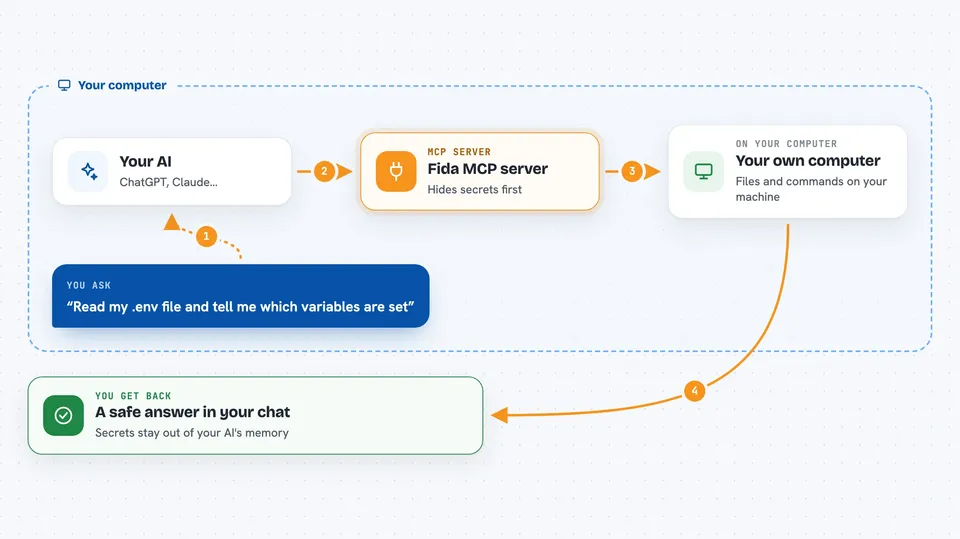
Fida is a small helper that sits between your AI coding agent and your files. When the agent reads a file or runs a command, Fida spots things that look like passwords or API keys and replaces them with [REDACTED] before the AI ever sees them. It is handy if you use AI coding tools on real projects that contain secret keys.
What is an MCP server? The 30-second version
On its own, your AI can only chat with you. An MCP server is a small helper program that gives your AI a new skill or a connection to something else. Fida is that helper, and its skill is protecting secrets: it gives your AI redacted views of files and command output instead of the real values. So when your AI needs to look at a .env file, it sees API_KEY=[REDACTED] rather than the actual key.
What this MCP server does
You ask your AI to look at a file or run a command. The AI uses Fida instead of reading the file directly. Fida scans the content, finds anything that looks like a credential, and swaps it for [REDACTED]. The AI gets the safe version and can still do its work, because the real command still runs with the real value behind the scenes. You get a clean answer without your secret ever landing in the AI's memory.
 Click to zoom
What you can do with it
- Read sensitive files like .env without exposing the real values to your AI
- Run shell commands and get back output with secrets hidden
- Check which of your AI coding agents are protected and which are not
- Scan a project to see where secret risk exists, without printing any secret
- Turn protection on or off for one agent or all detected agents
- Block a native file read when Fida spots a secret it cannot redact
- Keep file reads limited to your project folder by default
Try asking your AI
- “Read my .env file and tell me which variables are set”
- “Run the deploy script and show me the output”
- “Scan this project and tell me if any secrets could leak to my AI agent”
- “Check the status of my Fida protection”
What it gives back to you
You get back normal-looking answers, file contents, or command output, but with secret values replaced by [REDACTED]. Fida also gives you a status view showing which agents are protected and how many secrets it has shielded. A scan tells you where risk exists without ever printing the secret itself. Everything appears right in your chat, just like a normal reply.
Before you start
What you need
- A Mac, Linux, or similar computer where you can run terminal commands
- One of the supported AI coding agents installed (like Claude Code, Codex, Cursor, or Copilot)
- A terminal where you can paste the install command
Good to know
Fida only catches secret formats it recognizes, so an unusual key format can still slip through, and it is best-effort protection rather than a guarantee.
Install it with your AI
Add Fida MCP server to your AI, no technical skills needed
You don't install anything by hand. You copy one prompt, paste it into an AI that can work on your computer, and it checks, installs and connects the server for you, asking you when it needs something.
Sign in to get the install prompt
Members get a ready-made prompt that lets the Claude desktop app check Fida MCP server, install it and connect it for them, step by step. You don't need any technical skills: you copy, paste and answer a few questions. Your connected AI can also find and install any of the 4,361 MCP servers here for you.
Who it's for
Developers and anyone who uses AI coding agents on projects that contain real passwords, API keys, or other secrets.