MCP server · Security
AgentDevX MCP server
Give your AI a safe identity, a locked vault for passwords, and a memory that lasts between chats.
AgentDevX is a helper service that gives your AI assistant a proper identity and a safe place to keep passwords for other apps. It is made for people who want their AI to remember things and use other services without pasting secret keys into every chat. You do not need to be a programmer to try it, but it does ask for a bit of setup.
What is an MCP server? The 30-second version
On its own, your AI can only chat with you. An MCP server is a small helper program that gives your AI a new skill or a connection to an app or service. This one connects your AI to AgentDevX, a gateway that hands out an identity for your AI and keeps its passwords locked up. Once connected, your AI can look things up, remember things, and call other tools for you when you ask.
What this MCP server does
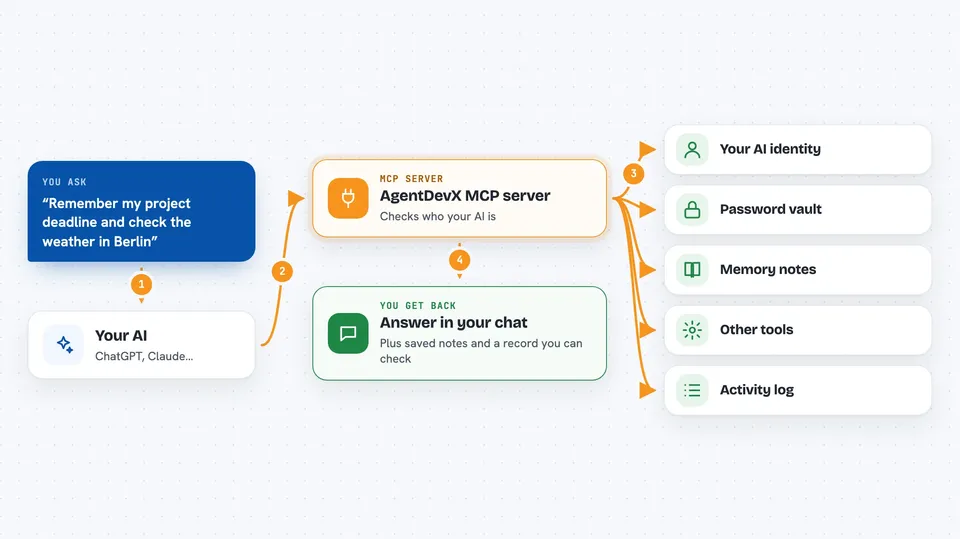
You ask your AI to do something, like remember a note or call another service. Your AI sends that request through this helper to the AgentDevX gateway. The gateway checks who your AI is, unlocks the right password from its vault, and passes the request on to the tool you wanted. It records what happened in a log, saves any memory your AI wanted to keep, and sends the answer back to your chat.
 Click to zoom
What you can do with it
- Give your AI a stable identity it can use across tools
- Store API keys in an encrypted vault instead of pasting them
- Save notes and facts your AI can recall in later chats
- Call other registered tools through one gateway
- Keep a record of every tool call for review
- Apply simple access rules so your AI only does what you allow
Try asking your AI
- “Remember that my project deadline is the 14th of next month”
- “What did I ask you to remember about the Johnson account?”
- “Store this API key in the vault so you can use it later”
- “Call the weather tool for Berlin and tell me if I need an umbrella”
What it gives back to you
You get answers in plain chat, like a short summary, a list of saved notes, or the result of a tool call. When your AI saves something to memory, it tells you it saved it. When it calls another tool, you see the result the tool sent back. Everything is also written into an audit log you can check later.
Before you start
What you need
- An email address to create your agent
- The Claude desktop app or another app that supports MCP
- Node.js installed if you want to run the installer command
- A free AgentDevX account (the free tier gives 100 calls a day and 75,000 credits)
Good to know
This service can store passwords and call other tools on your behalf, so only connect it to accounts you are comfortable letting your AI use, and check the audit log now and then.
Install it with your AI
Add AgentDevX MCP server to your AI, no technical skills needed
You don't install anything by hand. You copy one prompt, paste it into an AI that can work on your computer, and it checks, installs and connects the server for you, asking you when it needs something.
Sign in to get the install prompt
Members get a ready-made prompt that lets the Claude desktop app check AgentDevX MCP server, install it and connect it for them, step by step. You don't need any technical skills: you copy, paste and answer a few questions. Your connected AI can also find and install any of the 4,361 MCP servers here for you.
Who it's for
People who want their AI to remember things and use other apps safely, like freelancers, small teams, and anyone tired of pasting secret keys into chats.