MCP server · Developer tools
CLI MCP server
by MladenSU
Lets your AI run safe, approved command-line tasks on your own computer and show you the results.

This is a small helper that lets your AI run simple commands on your computer, but only the ones you allow. It is handy if you want your AI to look at files or folders for you without giving it free rein over everything. You stay in control of what it is allowed to touch.
What is an MCP server? The 30-second version
On its own, your AI can only chat. An MCP server is a small helper program that gives your AI a new skill or a connection to something. This one connects your AI to the command line on your own computer, so it can run approved commands like listing files or reading a text file when you ask. You decide in advance which commands and which folders are allowed.
What this MCP server does
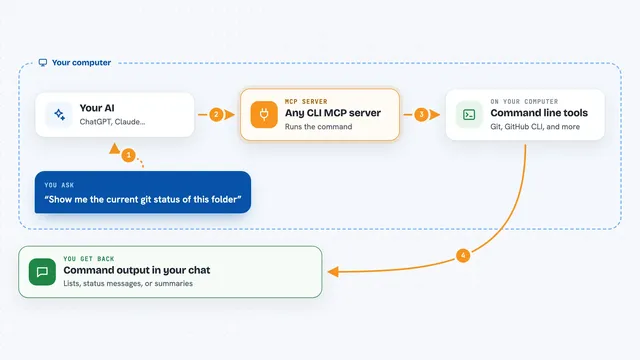
You ask your AI something, like what files are in a folder. The AI passes a single command to this helper. The helper checks that the command and the folder are on your approved list, then runs it on your computer. It sends the result back, and your AI shows it to you in the chat. If the command is not allowed, it refuses and tells you why.
 Click to zoom
What you can do with it
- List the files in a folder you have approved
- Read the contents of a text file
- Show the current working directory
- Echo back a piece of text
- Check which commands and folders are currently allowed
- Run short commands with a time limit so nothing hangs
Try asking your AI
- “List the files in my approved folder”
- “Show me what is inside notes.txt”
- “What commands am I allowed to run?”
- “Print the current folder path”
What it gives back to you
You get the output of the command as text in the chat, like a list of file names or the contents of a file. If something is blocked, you get a short explanation of why. If a command takes too long, it stops and tells you it timed out.
Before you start
What you need
- Python 3.10 or newer installed on your computer
- The uv tool installed (a small program that runs Python helpers)
- The Claude desktop app if you want to add it there
- A folder you are happy for the AI to work inside
Good to know
This lets your AI run real commands on your computer, so keep the allowed list short and only point it at a folder you are comfortable sharing.
Install it with your AI
Add CLI MCP server to your AI, no technical skills needed
You don't install anything by hand. You copy one prompt, paste it into an AI that can work on your computer, and it checks, installs and connects the server for you, asking you when it needs something.
Sign in to get the install prompt
Members get a ready-made prompt that lets the Claude desktop app check CLI MCP server, install it and connect it for them, step by step. You don't need any technical skills: you copy, paste and answer a few questions. Your connected AI can also find and install any of the 4,361 MCP servers here for you.
Who it's for
People who want their AI to peek at files or folders on their own computer, but only in a safe, limited way.