MCP server · Chat
OpenAI MCP server
by mzxrai
Ask Claude to send a question to OpenAI models like gpt-4o or o1 and bring the answer back.
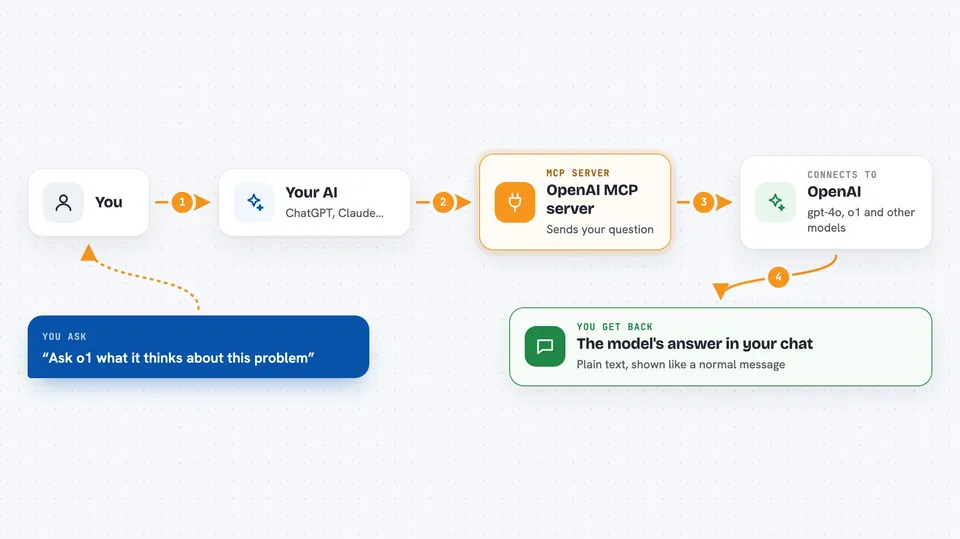
This is a small helper that connects Claude to OpenAI's chat models. Once it is set up, you can ask Claude to pass a question along to gpt-4o or o1 and show you what they say. It is handy if you already use Claude but sometimes want a second opinion from a different model.
What is an MCP server? The 30-second version
On its own, your AI can only chat with you. An MCP server is a small helper program that gives your AI one extra skill or connection. This one connects Claude to OpenAI's models, so Claude can send a message over to them and read the reply. You stay in the same Claude chat the whole time; the helper just runs in the background.
What this MCP server does
You type a request in Claude, like asking what another model thinks about something. Claude notices it needs OpenAI for this and calls this helper. The helper sends your message to OpenAI's chat service using your API key. OpenAI replies, and the helper hands that reply back to Claude. Claude then shows you the answer right in the chat.
 Click to zoom
What you can do with it
- Ask gpt-4o a question and read its answer inside Claude
- Ask o1-preview or o1-mini to think through a tricky problem
- Get a second opinion from a different model on something you wrote
- Compare how two models respond to the same prompt
- Use the smaller gpt-4o-mini when you want a quicker, cheaper reply
Try asking your AI
- “Can you ask o1 what it thinks about this problem?”
- “What does gpt-4o think about this paragraph?”
- “Send this question to gpt-4o-mini and show me the answer.”
- “Ask o1-mini to review my plan and point out anything I missed.”
What it gives back to you
You get the model's reply as text in your Claude chat, just like a normal message. If you asked several models, you get each answer one after another. There are no files or downloads, just the written answer.
Before you start
What you need
- The Claude Desktop app
- Node.js 18 or newer (this includes npx, which runs the helper)
- An OpenAI API key from platform.openai.com (a kind of password for apps; the site gives you one for free, but OpenAI charges for usage)
Good to know
Using OpenAI models costs money on your OpenAI account, so keep an eye on your usage, and remember this is alpha software that may have bugs.
Install it with your AI
Add OpenAI MCP server to your AI, no technical skills needed
You don't install anything by hand. You copy one prompt, paste it into an AI that can work on your computer, and it checks, installs and connects the server for you, asking you when it needs something.
Sign in to get the install prompt
Members get a ready-made prompt that lets the Claude desktop app check OpenAI MCP server, install it and connect it for them, step by step. You don't need any technical skills: you copy, paste and answer a few questions. Your connected AI can also find and install any of the 4,609 MCP servers here for you.
Who it's for
People who already chat with Claude and want to quickly check what an OpenAI model says, without leaving the Claude window.