MCP server · Research
Shopify Storefront MCP server
by QuentinCody
Lets your AI look up products, collections and stock in a Shopify store, and build shopping carts for you.
This is a small helper that connects your AI assistant to a Shopify store's public shop data. It is handy if you run a Shopify store, help manage one, or just want your AI to check products and prices without you clicking around the admin. It is an unofficial tool, not made by Shopify.
What is an MCP server? The 30-second version
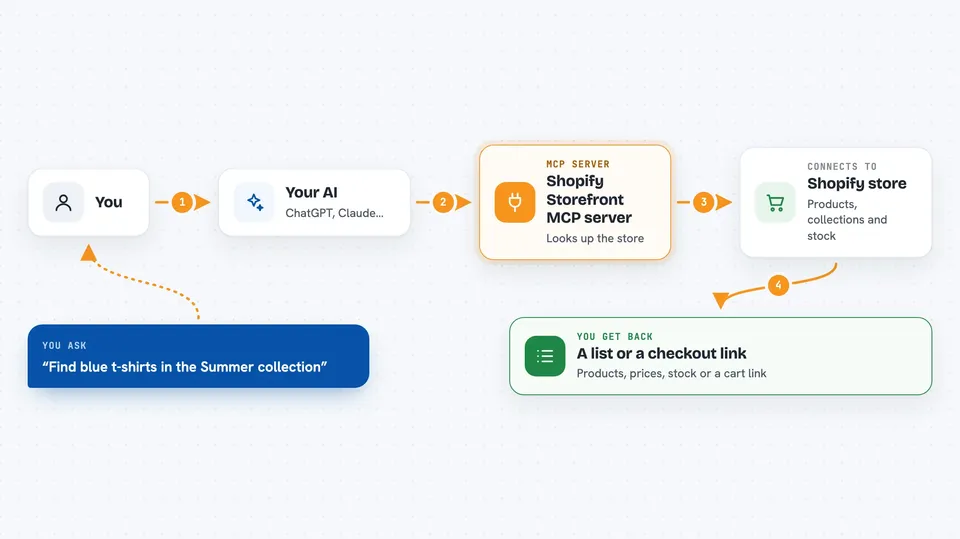
On its own, your AI can only chat with you. An MCP server is a small helper program that gives your AI a new skill or a connection to an app, and here that connection is to a Shopify storefront. Once it is set up, your AI can ask this helper to look up products, collections and stock, or to build a cart, and then tell you the answer in the chat. You still talk to your AI the normal way; the helper does the behind-the-scenes work.
What this MCP server does
You ask your AI something about a Shopify store, like what products exist or what a collection contains. Your AI passes that request to this helper. The helper talks to the Shopify Storefront API, which is Shopify's public doorway for reading shop data and creating carts. Shopify sends the answer back, and your AI turns it into a plain reply for you. It can also keep a small profile of customer details on your own computer and use those details when building a checkout.
 Click to zoom
What you can do with it
- Look up products, prices and stock in a Shopify store
- List collections and see what is inside them
- Check whether a web address belongs to a Shopify store
- Create a shopping cart and get a checkout link
- Save and update a customer profile (name, email, addresses)
- Add custom notes to a customer profile, like a loyalty tier
- Combine saved customer details with a new cart
Try asking your AI
- “Find all products in the Summer collection on my-store.myshopify.com and show me their prices”
- “Is this shop a Shopify store? https://example.com”
- “Create a cart with one of the blue t-shirts and give me the checkout link”
- “Update my saved customer profile with the email jane@example.com”
What it gives back to you
You get answers in the chat: lists of products with names and prices, collection contents, stock numbers, or a checkout link for a cart it built. It can also show or update the saved customer profile, and confirm what changed. Everything comes back as normal text you can read, not as code you have to run.
Before you start
What you need
- A Shopify store and access to its admin
- A Storefront API access token from your Shopify admin (a kind of password the admin gives you for free)
- Python installed on the computer that runs the server
- An MCP-compatible AI assistant, like the Claude desktop app
Good to know
It can create carts and change the saved customer profile on your computer, so check what your AI is about to do before you say yes, and never share your Storefront token or the customer file with anyone.
Install it with your AI
Add Shopify Storefront MCP server to your AI, no technical skills needed
You don't install anything by hand. You copy one prompt, paste it into an AI that can work on your computer, and it checks, installs and connects the server for you, asking you when it needs something.
Sign in to get the install prompt
Members get a ready-made prompt that lets the Claude desktop app check Shopify Storefront MCP server, install it and connect it for them, step by step. You don't need any technical skills: you copy, paste and answer a few questions. Your connected AI can also find and install any of the 4,609 MCP servers here for you.
Who it's for
Shopify store owners, shop managers and anyone who helps run an online store and wants their AI to check products and build carts for them.