MCP server · Security
mcp-doctor
by realwigu
Check your AI helper programs: are they running, are they safe, and how fast are they?
mcp-doctor is a small tool that checks the helper programs your AI uses. It finds them on your computer, tests whether they still work, looks for leaked passwords, and times how fast they respond. It is handy if you have added a few AI helpers and things have started to feel slow or broken.
What is an MCP server? The 30-second version
On its own, your AI can only chat. An MCP server is a small helper program that gives your AI a new skill, like reading files or talking to another app. mcp-doctor is itself one of those helpers, but its skill is checking the other helpers. So you can ask your AI to run a checkup, and it will look at every helper you have set up and tell you what it finds.
What this MCP server does
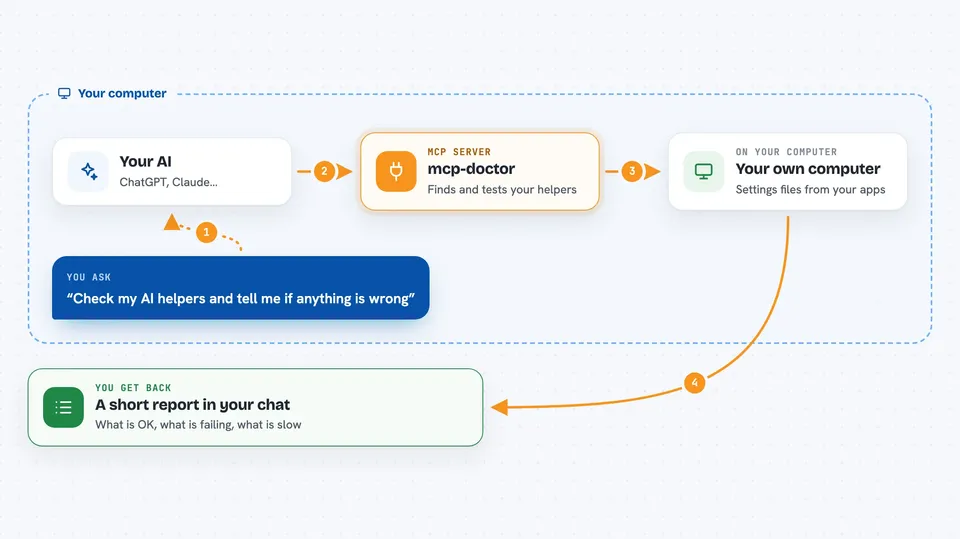
You ask your AI to check your helpers. The AI passes that request to mcp-doctor. mcp-doctor then looks in the usual places where tools like Claude Desktop, Cursor, and VS Code keep their helper settings, and it collects the list. It tries to talk to each helper, looks for passwords sitting in plain text, and times how long each one takes to reply. Then it hands the results back to your AI, which shows them to you in the chat.
 Click to zoom
What you can do with it
- Find every AI helper set up on your computer, across different apps
- Test whether each helper still responds
- Spot passwords or keys stored in plain text in settings files
- Time how fast each helper replies
- Run all three checks at once with one command
- Get the results as plain text or as a structured file for scripts
Try asking your AI
- “Run a full checkup on my MCP servers and tell me what is wrong”
- “Which of my MCP servers are failing right now?”
- “Are there any leaked passwords in my MCP config files?”
- “Which MCP server is the slowest?”
What it gives back to you
You get a short report in the chat. It lists each helper by name, where it was found, and whether it is OK or failing. If there are security problems, you see them with a severity label like HIGH or MEDIUM. For speed, you get a number in milliseconds and a simple rating like fast, ok, or slow.
Before you start
What you need
- Node.js 18 or newer installed on your computer
- At least one AI tool with MCP helpers set up, like Claude Desktop or Cursor
Good to know
The security check reads your settings files, which may contain passwords or keys, so the results could show sensitive text in your chat.
Install it with your AI
Add mcp-doctor to your AI, no technical skills needed
You don't install anything by hand. You copy one prompt, paste it into an AI that can work on your computer, and it checks, installs and connects the server for you, asking you when it needs something.
Sign in to get the install prompt
Members get a ready-made prompt that lets the Claude desktop app check mcp-doctor, install it and connect it for them, step by step. You don't need any technical skills: you copy, paste and answer a few questions. Your connected AI can also find and install any of the 4,609 MCP servers here for you.
Who it's for
People who have set up a few AI helper programs and want a quick way to check they are healthy, safe, and not slowing things down.