MCP server · Research
SommelierX wine pairing MCP server
Ask your AI for wine pairings by ingredient, dish, or recipe and get scored suggestions back.
This is a small helper that lets your AI assistant answer wine pairing questions. You ask something like what wine goes with grilled salmon, and the AI looks it up through a real pairing service instead of guessing. It is handy if you cook, host dinners, or just want a decent bottle suggestion without reading a whole book about wine.
What is an MCP server? The 30-second version
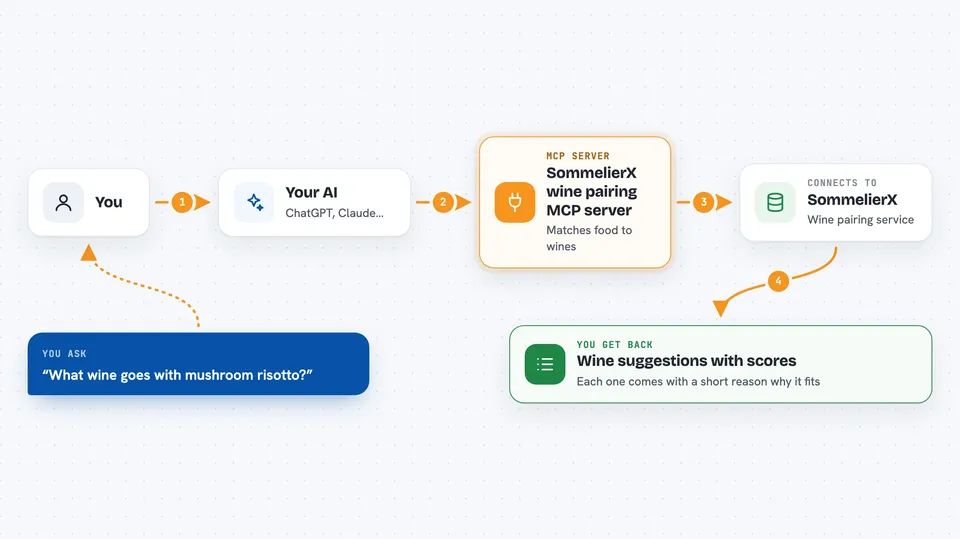
On its own, your AI can only chat with you using what it already knows. An MCP server is a small helper program that gives your AI one new skill or a connection to an outside service. This one connects your AI to SommelierX, a wine pairing service. So when you ask a wine question, your AI can actually look up an answer from that service and bring it back to you.
What this MCP server does
You ask your AI a wine question in normal words, like what to drink with a mushroom risotto. Your AI passes that to this helper, which sends it to the SommelierX pairing service. The service matches your food against its wine data and works out which wines fit best. Your AI then shows you the suggestions in the chat, usually with scores so you can see which ones matched strongest.
 Click to zoom
What you can do with it
- Find wines for a list of ingredients you have at home
- Find wines for a named dish like risotto ai funghi
- Find dishes to cook for a bottle you already own
- Search the ingredient and meal databases
- Pair wines for a recipe from a web link (paid tier)
- Find one wine that works across several courses (paid tier)
Try asking your AI
- “What wine goes with salmon, asparagus, and hollandaise sauce?”
- “I have a bottle of Barolo. What should I cook with it?”
- “What wine goes with this recipe? https://www.allrecipes.com/recipe/...”
- “I'm planning a 3-course dinner: Caesar salad, rack of lamb, and chocolate mousse. What single wine works for all courses?”
What it gives back to you
You get a list of wine suggestions in the chat, usually with a match score and a short reason why each one fits. For reverse questions, you get meal ideas instead. On the paid tier you can also get a breakdown of the score and a single wine picked for a whole menu.
Before you start
What you need
- The Claude desktop app, Cursor, Windsurf, or another app that supports MCP servers
- Node.js 18 or newer installed on your computer
- Optional: a SommelierX API key from api.sommelierx.com for the paid features (a kind of password for apps; the site gives you one when you sign up)
Good to know
The paid tools can cost money per call, either from your monthly allowance or as a small USDC payment on the Base network, so keep an eye on how often your AI uses them.
Install it with your AI
Add SommelierX wine pairing MCP server to your AI, no technical skills needed
You don't install anything by hand. You copy one prompt, paste it into an AI that can work on your computer, and it checks, installs and connects the server for you, asking you when it needs something.
Sign in to get the install prompt
Members get a ready-made prompt that lets the Claude desktop app check SommelierX wine pairing MCP server, install it and connect it for them, step by step. You don't need any technical skills: you copy, paste and answer a few questions. Your connected AI can also find and install any of the 4,609 MCP servers here for you.
Who it's for
Home cooks, dinner hosts, and anyone who wants a quick wine suggestion without being a wine expert.