
MCP server · Research
TripGo MCP server
by skedgo
Let your AI plan trips, find stops and check live public transport departures.
TripGo MCP server is a small helper that connects your AI assistant to the TripGo travel service. Once it is connected, you can ask your AI to plan a journey, find a nearby train or bus stop, or check when the next train leaves. It is handy for anyone who travels around a city and wants quick answers without opening several apps.
What is an MCP server? The 30-second version
On its own, your AI can only chat with you. An MCP server is a small helper program that gives your AI a new skill or a connection to an outside service. This one connects your AI to TripGo, a travel planning service. So when you ask about a trip or a departure, your AI can actually look it up there and answer with real information.
What this MCP server does
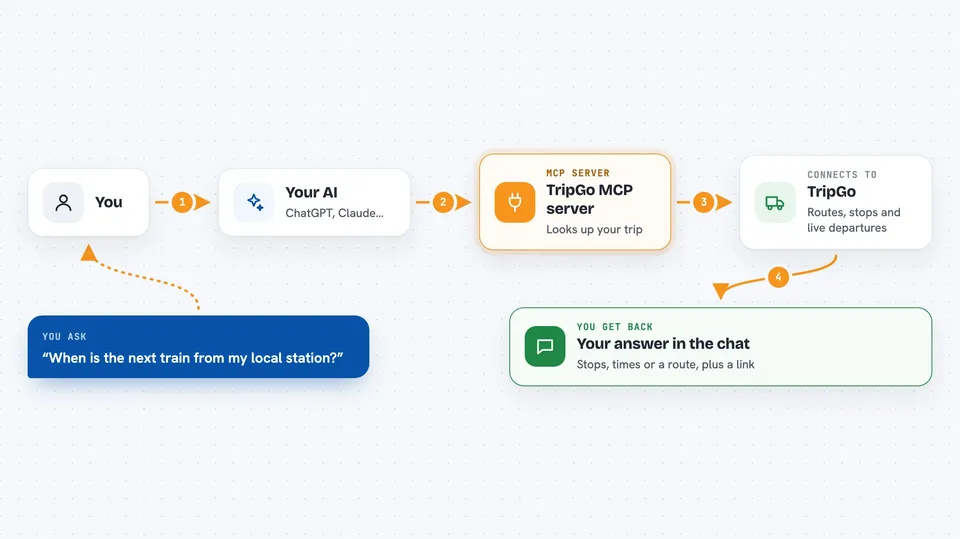
You ask your AI something like how to get from A to B, or when the next bus leaves from a stop. Your AI passes that question to this helper, which talks to the TripGo service. TripGo looks up routes, stops and live departure times and sends the results back. Your AI then turns that into a normal answer in your chat, and can even give you a link to the trip it found.
 Click to zoom
What you can do with it
- Plan a trip from one place to another using different types of transport
- Find train, bus, tram or ferry stops near an address
- Check live departure times from a specific stop
- Compare mixed routes, like walking plus train plus bus
- Get a shareable link to a trip your AI just planned
Try asking your AI
- “How do I get from Central Station to the airport tomorrow morning?”
- “What bus stops are near 10 Downing Street?”
- “When is the next train leaving from my local station?”
- “Plan a trip that mixes walking, a bus and a train, and give me the link”
What it gives back to you
You get normal chat answers: a list of stops, a set of departure times, or a step by step route with the transport types and times. For planned trips, it can also give you a web link you can open or share. Everything shows up as text in the conversation, so you can ask follow up questions right away.
Before you start
What you need
- An AI assistant that can use MCP servers, like the Claude desktop app
- Node.js installed if you connect through the mcp-remote helper (the README shows the exact setup)
Good to know
Trip planning and departure times come from an outside service, so always double check times before you rely on them for an important journey.
Install it with your AI
Add TripGo MCP server to your AI, no technical skills needed
You don't install anything by hand. You copy one prompt, paste it into an AI that can work on your computer, and it checks, installs and connects the server for you, asking you when it needs something.
Sign in to get the install prompt
Members get a ready-made prompt that lets the Claude desktop app check TripGo MCP server, install it and connect it for them, step by step. You don't need any technical skills: you copy, paste and answer a few questions. Your connected AI can also find and install any of the 4,609 MCP servers here for you.
Who it's for
Anyone who commutes or travels in a city and wants fast trip and departure answers from their AI assistant.




