MCP server · Chat
Planning Copilot MCP server
by SPL-BGU
Lets your AI run planning tools that solve, check, and simulate step-by-step plans for you.
Planning Copilot is a small chat program that connects your AI to a set of planning tools. You describe a planning problem in plain words, and the AI picks the right tool, runs it, and reports back. It is handy for people who work with planning problems but do not want to memorize command line tools.
What is an MCP server? The 30-second version
On its own, your AI can only chat. An MCP server is a small helper program that gives your AI a new skill or a connection to another tool. This one connects your AI to a planning pipeline, so it can solve planning problems, check the resulting plans, and simulate running them. You just ask in normal language, and the helper does the tool work behind the scenes.
What this MCP server does
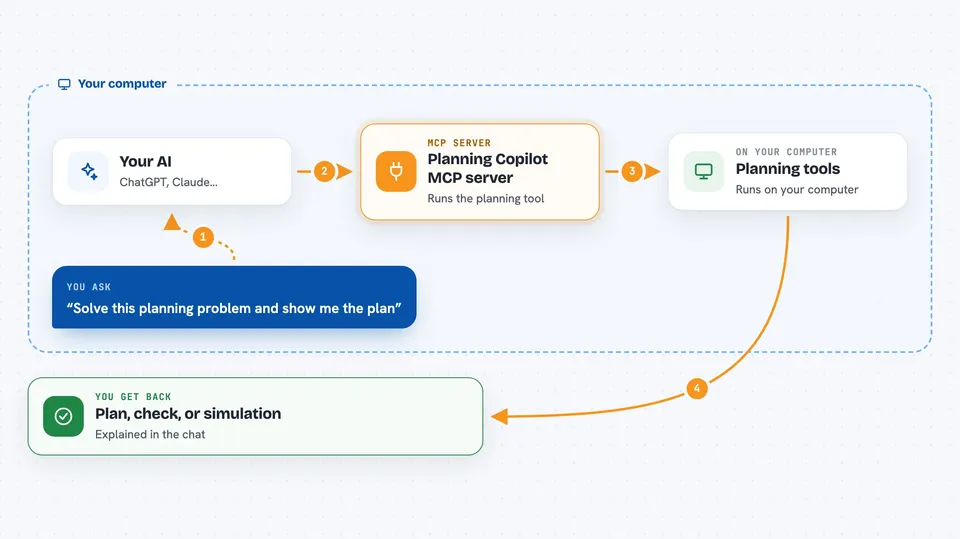
You type a request about a planning problem, like asking it to solve a problem or check a plan. Your AI reads your request and decides which planning tool to use. The helper then runs that tool, for example a solver that finds a plan, a checker that verifies a plan, or a simulator that steps through a plan. The result comes back to your AI, which explains it to you in the chat. Everything runs on your own computer.
 Click to zoom
What you can do with it
- Solve a planning problem and get a plan back
- Check whether a plan is valid
- Simulate a plan step by step
- Run different planning tools from one chat
- Describe a planning task in plain language instead of commands
Try asking your AI
- “Solve this planning problem and show me the plan”
- “Check if this plan is valid for my problem”
- “Simulate running this plan and tell me what happens at each step”
- “Use the numeric planner on this problem and explain the result”
What it gives back to you
You get answers in the chat, like a plan as a list of steps, a yes or no on whether a plan is valid, or a step-by-step trace of a simulated run. Sometimes it returns short explanations of what the tools found. The exact format depends on the tool that ran.
Before you start
What you need
- Python 3.10 installed and active
- Ollama installed to run the language model locally
- The project requirements installed with pip
- A config.py file with your paths and settings filled in
Good to know
It runs planning tools on your computer and reads the files and settings you point it to, so check your config.py paths before you start.
Install it with your AI
Add Planning Copilot MCP server to your AI, no technical skills needed
You don't install anything by hand. You copy one prompt, paste it into an AI that can work on your computer, and it checks, installs and connects the server for you, asking you when it needs something.
Sign in to get the install prompt
Members get a ready-made prompt that lets the Claude desktop app check Planning Copilot MCP server, install it and connect it for them, step by step. You don't need any technical skills: you copy, paste and answer a few questions. Your connected AI can also find and install any of the 4,609 MCP servers here for you.
Who it's for
People who work with planning problems, such as researchers, students, and engineers, and who want to run planning tools through a chat instead of the command line.