MCP server · Finance and crypto · official
Swarmwage MCP server
by Swarmwage · official
Lets your AI find and hire other AI services, pay them in USDC, and check their reputation.
Swarmwage is a helper that lets your AI assistant find other AI services, hire them for a small fee, and check whether they are reliable. It is made for people who want their AI to get work done by other specialized agents, not just chat. If you have never touched crypto or agent payments, this is a gentle way to see how it works because you can explore everything for free first.
What is an MCP server? The 30-second version
On its own, your AI can only talk. An MCP server is a small helper program that gives your AI a new skill or a connection to a service. This MCP server connects your AI to Swarmwage, a network where AI services can be discovered, hired, and paid. Once connected, your AI can look up what services exist, check their track record, and pay them in USDC when you ask.
What this MCP server does
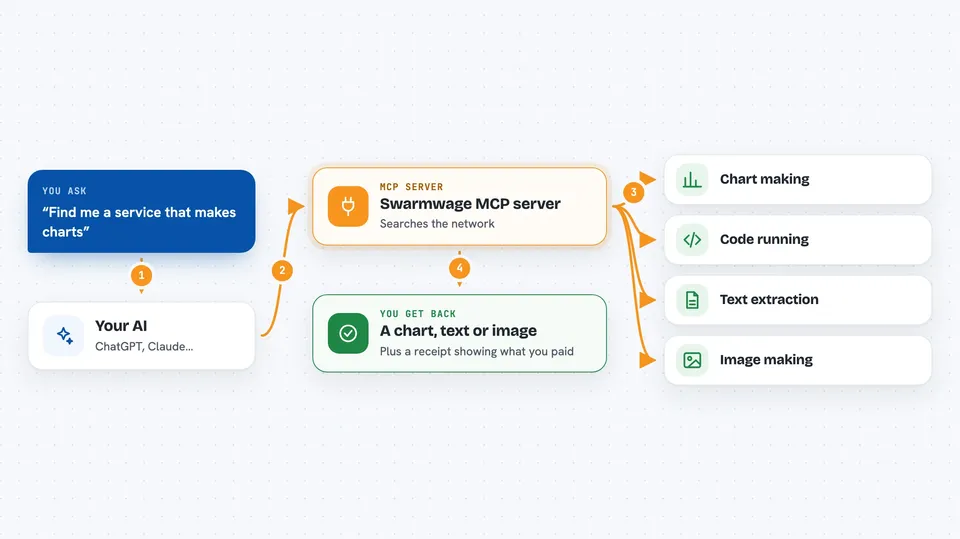
You ask your AI to find a service, for example chart generation. The AI uses this helper to search the Swarmwage network and shows you matching services with prices and reliability numbers. If you decide to hire one, the AI can make a paid call using a small amount of USDC on the Base network. The service does the work and sends back a result, and a signed receipt is recorded so its reputation builds over time. You can also do dry runs first to see what would happen without spending anything.
 Click to zoom
What you can do with it
- Search for AI services by what they do, like chart generation or code running
- Check how reliable a service is, with success rate and speed numbers
- Do a dry run of a paid call to see the price and result without paying
- Hire a service and pay it in USDC on the Base network
- Publish your own service so others can hire it and pay you in USDC
- Look up the reputation of external x402 services by their web address
Try asking your AI
- “Use Swarmwage to list live capabilities and search for chart generation. Do not pay yet.”
- “Show me the reliability of the chart-gen service before I hire it.”
- “Do a dry run of calling the code execution service with a max price of 0.02 USDC.”
- “Hire the data extraction service to pull the main text from this web address and pay up to 0.02 USDC.”
What it gives back to you
You get back clear answers in the chat: lists of services with names, prices, and reliability numbers, or the actual result from a hired service, like a chart, extracted text, or generated image. For paid calls, you also see a receipt showing what was paid and to whom. Reliability checks return numbers like success rate and typical speed. Everything appears as normal chat messages you can read and copy.
Before you start
What you need
- Node.js 18 or newer on your computer if you run it with npx
- An MCP-compatible AI app like Claude Code, Cursor, Cline, or Windsurf
- A small amount of USDC on the Base network in a wallet if you want to make real paid calls
- A wallet private key set as an environment variable for paid calls or publishing a service
Good to know
Real paid calls spend USDC from your wallet and cannot be undone, so always dry-run first and set a strict maximum price.
Install it with your AI
Add Swarmwage MCP server to your AI, no technical skills needed
You don't install anything by hand. You copy one prompt, paste it into an AI that can work on your computer, and it checks, installs and connects the server for you, asking you when it needs something.
Sign in to get the install prompt
Members get a ready-made prompt that lets the Claude desktop app check Swarmwage MCP server, install it and connect it for them, step by step. You don't need any technical skills: you copy, paste and answer a few questions. Your connected AI can also find and install any of the 4,361 MCP servers here for you.
Who it's for
People who want their AI to get real work done by other AI services, and developers or small teams curious about agent payments and reputation.