MCP server · Finance and crypto
Anomaly Tracker MCP server
Lets your AI spot unusual patterns in crypto markets, airspace, and GitHub repos and explain them in plain words.
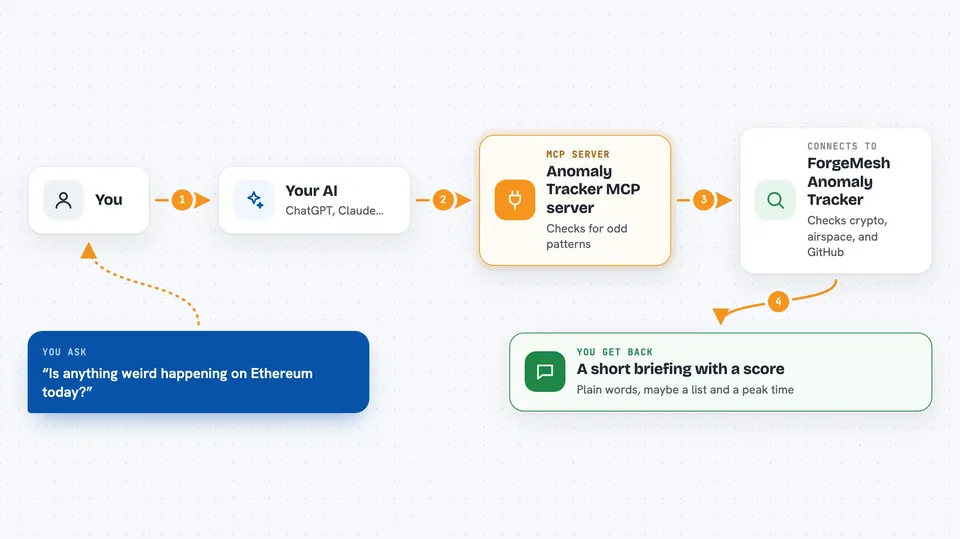
This is a helper that connects your AI to a service called ForgeMesh Anomaly Tracker. That service watches for unusual patterns in things like crypto wallets, stablecoin prices, planes in the sky, and busy GitHub projects. It is handy if you follow crypto or tech news and want your AI to notice weird activity before you do.
What is an MCP server? The 30-second version
On its own, your AI can only chat with you using what it already learned. An MCP server is a small helper program that gives your AI a new skill or a connection to an outside service. This one connects your AI to the ForgeMesh Anomaly Tracker, which watches live data across crypto, aviation, and GitHub. Once it is set up, you can just ask your AI a question and it will go check that service for you.
What this MCP server does
You ask your AI something like whether a token is acting strange or which repos are suddenly getting popular. Your AI sends that request to this helper, and the helper passes it to the ForgeMesh Anomaly Tracker service. The service looks at recent activity, compares it to normal patterns, and comes back with a score and a short story label. Your AI then explains the result to you in the chat, in everyday words.
 Click to zoom
What you can do with it
- Scan a blockchain for unusual activity across many wallets
- Check whether a single token is behaving oddly
- See recent whale moves and exchange flows
- Look at a specific wallet for strange transaction patterns
- Watch for stablecoin price wobbles
- Find GitHub repos with sudden spikes in stars or forks
- Check live airspace for emergency squawk codes
Try asking your AI
- “Is anything weird happening on the Ethereum chain in the last 24 hours?”
- “Check USDT transfers on Base for anything unusual today”
- “Which GitHub repos have been blowing up in stars this week?”
- “Are there any planes squawking emergency codes right now?”
What it gives back to you
You get back a short answer in the chat, usually with a score from 0 to 100 and a plain label like a story name. Some tools also give you a list, such as recent whale moves or repos with fast-growing stars. The AI may mention a peak window (when the odd activity happened) and possible reasons. It reads like a short briefing, not a wall of numbers.
Before you start
What you need
- Node.js installed on your computer (the free software that runs the helper)
- An MCP client like the Claude desktop app
- A crypto wallet with a small amount of USDC on Base if you want the paid tools to actually run (the free health check does not need this)
Good to know
Most of the useful tools cost a small amount of USDC per call, so if you set up a wallet, real money can be spent each time you ask.
Install it with your AI
Add Anomaly Tracker MCP server to your AI, no technical skills needed
You don't install anything by hand. You copy one prompt, paste it into an AI that can work on your computer, and it checks, installs and connects the server for you, asking you when it needs something.
Sign in to get the install prompt
Members get a ready-made prompt that lets the Claude desktop app check Anomaly Tracker MCP server, install it and connect it for them, step by step. You don't need any technical skills: you copy, paste and answer a few questions. Your connected AI can also find and install any of the 4,361 MCP servers here for you.
Who it's for
People who follow crypto, stablecoins, or tech trends and want their AI to flag unusual activity for them without digging through dashboards.