MCP server · Security
AgentScore MCP server
Ask your AI whether an MCP package is safe to install, and let it set up automatic safety checks in your project.
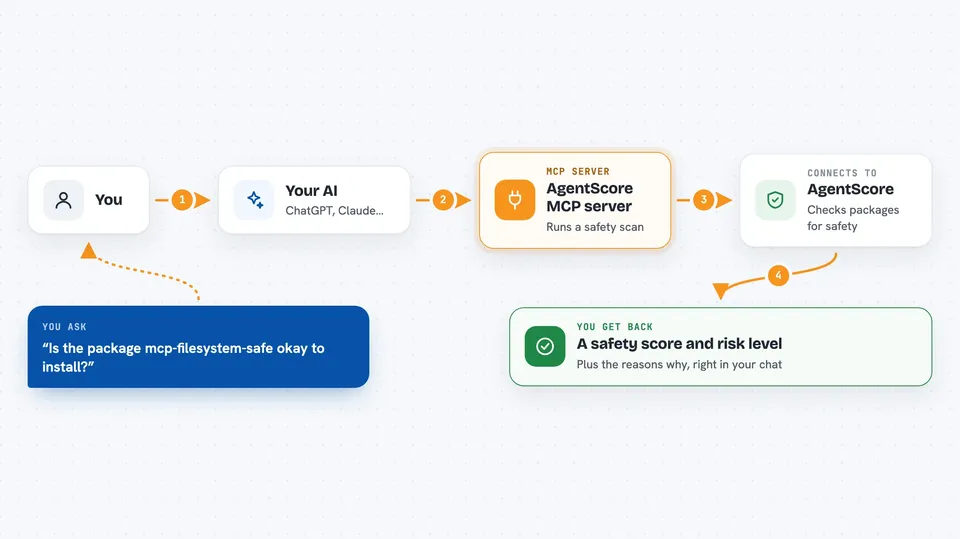
This is a small helper that lets your AI answer questions about the safety of software packages, especially ones built for AI assistants themselves. It scans those packages for risky behaviour and tells you how much to trust them. If you ever wonder "should I really install this thing someone mentioned online", this is for you.
What is an MCP server? The 30-second version
On its own, your AI can only talk. An MCP server is a little extra program you connect to it that teaches it a new trick. Here, connecting this server means your AI gains access to AgentScore's scanning service. So instead of guessing, your assistant can actually look at a package and tell you whether it seems trustworthy.
What this MCP server does
Once connected, you just ask your AI something normal like whether some package is safe. Your AI sends that question to this helper behind the scenes. The helper then runs a real security scan on the package, checking things like hidden install steps, suspicious links, leaked passwords inside the code, and who published it. A moment later your AI replies with a clear score, a simple risk level, and the reasons why. You never leave the chat window.
 Click to zoom
What you can do with it
- Get a yes-or-no style trust verdict on almost any AI-related package
- See a numbered safety score plus a low-to-critical risk label
- Find out what warning signs were spotted during a scan
- Discover which popular packages have recently been hacked or flagged
- Look across all the AI helpers already listed in your own project folder
- Generate and drop in an automated checker that reviews each update request
Try asking your AI
- “Is this package called mcp-filesystem-safe okay to install? What did the scanner flag on my last installed plugin? Which well-known AI plugins rely on the library everyone says got hacked today? Please put the automatic safety-checking job into our team repository.”
What it gives back to you
Mostly short readable answers right in the conversation. For a single package you typically get a number out of 100, a word such as moderate or high, and a couple of lines naming whatever looked off. Asking about many items returns a compact summary listing each one next to its result. Setting up automation writes a configuration file straight into your working directory rather than printing long output.
Before you start
Good to know
Treat results as advice rather than guarantees because scanners cannot catch absolutely every problem lurking beneath unfamiliar releases.
Install it with your AI
Add AgentScore MCP server to your AI, no technical skills needed
You don't install anything by hand. You copy one prompt, paste it into an AI that can work on your computer, and it checks, installs and connects the server for you, asking you when it needs something.
Sign in to get the install prompt
Members get a ready-made prompt that lets the Claude desktop app check AgentScore MCP server, install it and connect it for them, step by step. You don't need any technical skills: you copy, paste and answer a few questions. Your connected AI can also find and install any of the 4,609 MCP servers here for you.
Who it's for
Anyone adding third-party extensions to their AI toolkit, particularly developers and IT staff responsible for keeping company projects clean and secure.