MCP server · Security · official
Shieldly MCP server
by shieldly-io · official
Lets your AI check AWS IAM policies and CloudFormation templates for risky permissions.
Shieldly is an official helper that lets your AI assistant look over your AWS permissions and tell you what looks risky. It checks IAM policies and CloudFormation templates for things like wildcards and paths that could let someone give themselves more access. It is handy if you work with AWS and want a second pair of eyes without learning a security tool.
What is an MCP server? The 30-second version
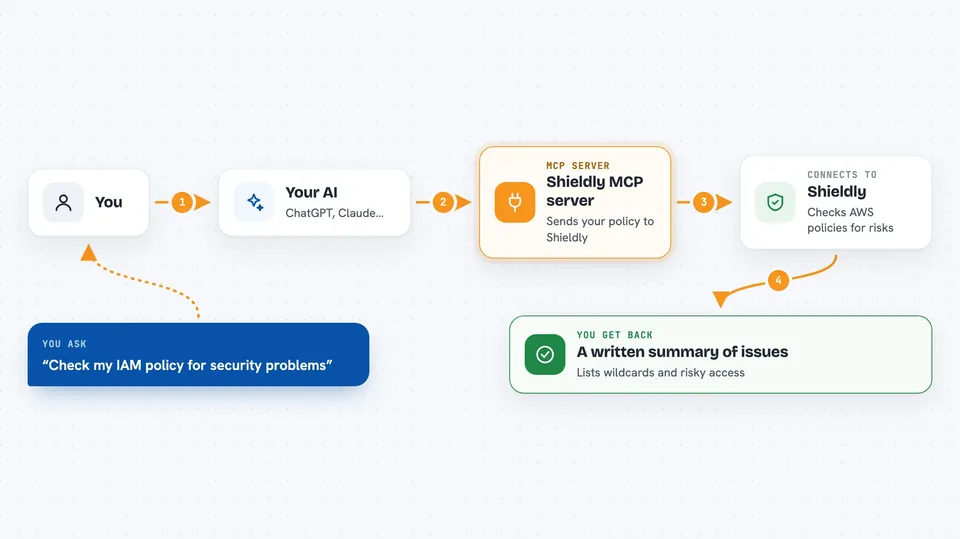
On its own, your AI can only chat. An MCP server is a small helper program that gives your AI a new skill or a connection to a service. This one connects your AI to Shieldly, a security analysis service for AWS. Once it is set up, you can paste in a policy or template and ask your AI to check it, and the AI passes it to Shieldly and brings the answer back to you.
What this MCP server does
You paste an AWS IAM policy or a CloudFormation template into your chat and ask your AI to review it. Your AI sends the text to this helper, which forwards it to Shieldly for analysis. Shieldly looks for privilege escalation paths, wildcards, and other signs of over-permissive access. The result comes back into your chat as a written summary of the findings. You can then ask follow-up questions or fix the policy and check it again.
 Click to zoom
What you can do with it
- Check an IAM policy for wildcards and over-permissive access
- Spot privilege escalation paths in a policy
- Review a cross-account trust and identity policy pair
- Scan a CloudFormation template for risky IAM roles and policies
- Get a plain-language summary of what looks wrong
- Re-check a policy after you edit it
Try asking your AI
- “Here is my IAM policy, can you check it for security problems?”
- “Does this policy allow anyone to escalate their privileges?”
- “Review this CloudFormation template and flag any over-permissive IAM roles.”
- “Check this cross-account trust policy and tell me what looks risky.”
What it gives back to you
You get back a written summary in the chat. It lists the issues Shieldly found, such as wildcards or escalation paths, and explains what each one means. If nothing looks wrong, it tells you that too. You can ask your AI to explain any finding in more detail.
Before you start
What you need
- An MCP-compatible AI assistant, such as Claude Desktop, Claude Code, or Cursor
- Node.js installed on your computer so the npx command can run
- Optional: a Shieldly API key for higher limits (the free demo mode works without one)
Good to know
The free demo mode is rate-limited, so you may hit a cap if you check many policies in a row.
Install it with your AI
Add Shieldly MCP server to your AI, no technical skills needed
You don't install anything by hand. You copy one prompt, paste it into an AI that can work on your computer, and it checks, installs and connects the server for you, asking you when it needs something.
Sign in to get the install prompt
Members get a ready-made prompt that lets the Claude desktop app check Shieldly MCP server, install it and connect it for them, step by step. You don't need any technical skills: you copy, paste and answer a few questions. Your connected AI can also find and install any of the 4,361 MCP servers here for you.
Who it's for
Developers, cloud engineers, and anyone who writes or reviews AWS IAM policies and CloudFormation templates.