
MCP server · Developer tools
Citio Slack AI teammate
by lawrencehui
Mention a Slack bot and your AI investigates bugs, reads logs, and opens pull requests for you.
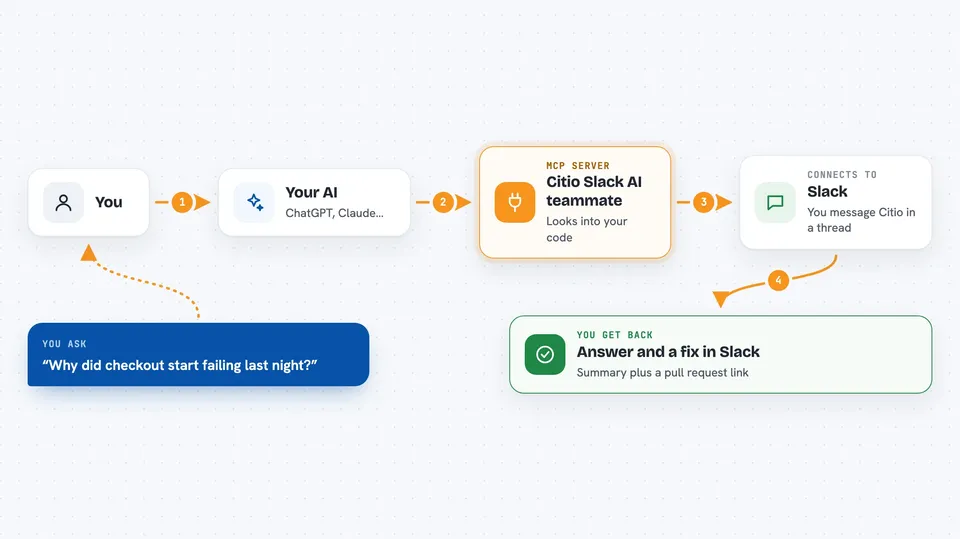
Citio is a Slack bot that you run yourself. You mention it in a channel or send it a direct message, ask for real engineering work, and it uses your own Claude or ChatGPT subscription to do the job. It is handy for solo developers and small teams who want an AI teammate in Slack without buying an enterprise plan.
What is an MCP server? The 30-second version
On its own, your AI can only chat with you. An MCP server is a small helper program that gives your AI a new skill or a connection to another app or service. Citio runs its own MCP server that connects your AI to your code, your logs, and your GitHub account, so the AI can look things up and make changes for you when you ask. The important part is that your passwords and keys stay with Citio, not with the AI model.
What this MCP server does
You send Citio a message in Slack, like asking it to look into a bug. Citio passes that request to Claude Code or OpenAI Codex, which is the AI that does the thinking. The AI then uses Citio's MCP tools to read files, search your code, check CloudWatch logs, or run allowed commands. When it has an answer or a fix, it can create a branch and open a pull request on GitHub. You watch the progress right in the Slack thread and get the result there.
 Click to zoom
What you can do with it
- Investigate a bug and explain what is going wrong
- Search through CloudWatch logs for errors
- Read and edit files in your connected repositories
- Create a branch and open a pull request with a fix
- Run allowlisted commands like tests
- Check the status of your CI pipeline
- Remember context from earlier conversations
Try asking your AI
- “Citio, why did the checkout service start failing last night? Check the logs.”
- “Look at the payment repo and fix the bug where refunds double-count.”
- “Run the test suite on the api repo and tell me what failed.”
- “Open a pull request that adds a null check to the user profile handler.”
What it gives back to you
You get answers and updates right in the Slack thread. Citio streams its progress as it works, so you can see what it is doing. When it is done, you get a summary of what it found or changed, plus links to any pull request it opened. Log output and secrets are redacted before they appear.
Before you start
What you need
- A Claude Max/Pro subscription or a ChatGPT Go/Plus/Pro subscription (an API key also works)
- A Slack app and the channel ID where you want the bot to live
- A GitHub fine-grained token with write access to the repos you want worked on
- An AWS account with the AWS CLI set up, since Citio runs in your own cloud
Good to know
Citio can edit your code and open pull requests, and it runs inside your own AWS account, so review what it does before merging and keep an eye on your AWS costs.
Install it with your AI
Add Citio Slack AI teammate to your AI, no technical skills needed
You don't install anything by hand. You copy one prompt, paste it into an AI that can work on your computer, and it checks, installs and connects the server for you, asking you when it needs something.
Sign in to get the install prompt
Members get a ready-made prompt that lets the Claude desktop app check Citio Slack AI teammate, install it and connect it for them, step by step. You don't need any technical skills: you copy, paste and answer a few questions. Your connected AI can also find and install any of the 4,361 MCP servers here for you.
Who it's for
Solo developers and small engineering teams who already pay for Claude or ChatGPT and want an AI teammate inside Slack without an enterprise plan.



