MCP server · Coding
GNU Radio MCP server (Marconi)
by yoelbassin
Ask your AI to build and run radio signal flowcharts and simulations, and keep the files it makes.
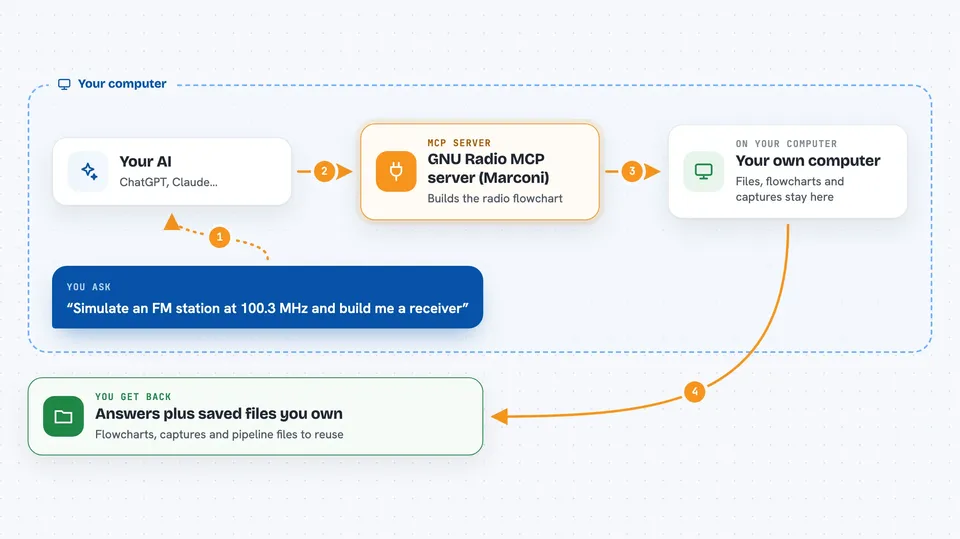
This is a helper that lets your AI work with GNU Radio, a free tool used to build radio signal processing setups. You describe what you want on the air in plain words, and the AI puts together the flowchart files, runs them, and shows you what came out. It is handy for radio hobbyists, students, and engineers who work with signals but would rather describe the job than click through menus.
What is an MCP server? The 30-second version
On its own, your AI can only chat. An MCP server is a small helper program that gives your AI a new skill or a connection to another tool. This one connects your AI to GNU Radio, so it can build and run radio flowcharts for you. When you ask for something like an FM receiver, the AI uses this helper to do the actual work instead of just talking about it.
What this MCP server does
You ask your AI in plain language for something radio related, like simulating a station or decoding a recording. The AI picks the right skill and uses this helper to build the GNU Radio flowchart or pipeline. The helper runs the setup, looks at the signal, and checks whether it worked. You get the results in the chat plus saved files you can keep and reuse. Everything happens on your own computer, and for now it is simulation only, with no real radio hardware.
 Click to zoom
What you can do with it
- Survey a recording or simulated spectrum and see what signals are present
- Build a receiver that tunes to a channel and demodulates it
- Simulate a radio scene, like an FM station at a chosen frequency
- Debug a receiver that outputs nothing and find where it went wrong
- Run a transmit-then-receive experiment entirely in simulation
- Save your work as flowcharts, captures, and pipeline files you own
Try asking your AI
- “Simulate an FM station at 100.3 MHz and build me a receiver.”
- “Here is a capture called mystery.wav. Survey what is on the air, then decode the strongest carrier.”
- “My receiver outputs nothing. Help me figure out why.”
- “Set up a transmit and receive loop in simulation and show me the result.”
What it gives back to you
You get answers and summaries in the chat, like what signals were found or whether the receiver worked. It also saves files for you: GNU Radio flowcharts, signal captures, and pipeline files, usually in an artifacts folder. Those files are yours to open, edit, and run again later.
Before you start
What you need
- The uv tool and Python 3.13 or newer
- GNU Radio 3.10 or newer installed on your computer (not needed just to analyze existing recordings)
- Claude Code, where you add this as a plugin
Good to know
It is early development and simulation only for now, so it will not touch real radio hardware, and it saves files to your computer, so keep an eye on where those land.
Install it with your AI
Add GNU Radio MCP server (Marconi) to your AI, no technical skills needed
You don't install anything by hand. You copy one prompt, paste it into an AI that can work on your computer, and it checks, installs and connects the server for you, asking you when it needs something.
Sign in to get the install prompt
Members get a ready-made prompt that lets the Claude desktop app check GNU Radio MCP server (Marconi), install it and connect it for them, step by step. You don't need any technical skills: you copy, paste and answer a few questions. Your connected AI can also find and install any of the 4,361 MCP servers here for you.
Who it's for
Radio hobbyists, students, and signal processing engineers who want to describe a job in words instead of building flowcharts by hand.