MCP server · Coding
UGS CNC MCP server
by zackpeters93
Lets your AI talk to a CNC machine through Universal GCode Sender so you can jog, home, run files, and check G-code.
This is a helper that connects your AI assistant to a CNC machine through Universal GCode Sender (UGS). It lets you ask your AI to check the machine, move an axis, or look at a G-code file in plain English. It is handy if you run a small CNC router or mill and want a safer, chattier way to work with it.
What is an MCP server? The 30-second version
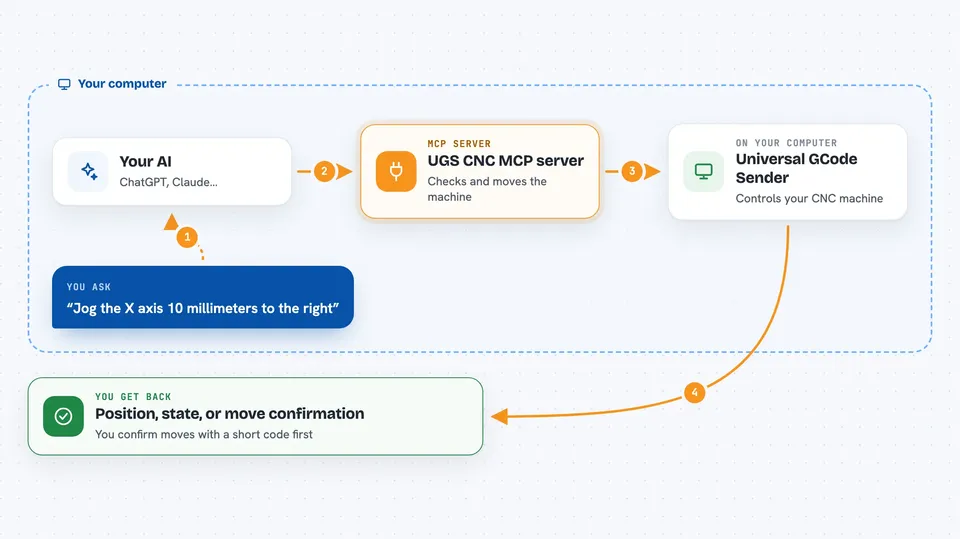
On its own, your AI can only chat. An MCP server is a small helper program that gives your AI a new skill or a connection to an app or service. This one connects your AI to Universal GCode Sender, which talks to your CNC machine, so the AI can look up the machine status or send motion commands when you ask. It runs on your own computer, right next to UGS.
What this MCP server does
You ask your AI something like "what is the machine doing right now" or "jog the X axis 10 mm". The AI uses this helper, which talks to Universal GCode Sender over its Pendant web interface. UGS then passes the request to your CNC. For anything that moves the machine, the helper first shows you a preview and a short code, and it only moves after you read that code back. You get answers, positions, warnings, or the result of the move right in the chat.
 Click to zoom
What you can do with it
- Check whether UGS is connected and what the machine is doing
- Read the current position, feed rate, and spindle speed
- Jog an axis a small distance after you confirm a code
- Home the machine or return to work zero
- Run a G-code file or a saved macro
- Pause or cancel a running job
- Translate a G-code file into plain English and estimate how long it will take
Try asking your AI
- “Is the CNC connected and where is it right now?”
- “Jog the X axis 10 millimeters to the right”
- “Home the machine, please”
- “Look at this G-code file and tell me what it does and how long it will take”
What it gives back to you
You get short answers in the chat: the machine state, positions, feed rate, spindle speed, or a plain-English summary of a G-code file. For motion, you first get a preview of what will happen plus a short code, and after you read the code back you get a confirmation that the move was sent. For files, you can get a safety check, a tool list, and a rough cycle time.
Before you start
What you need
- Universal GCode Sender 2.x installed on the same computer
- The UGS Pendant plugin installed and turned on inside UGS
- Python 3.11 or newer
- UGS Pendant running at http://localhost:8080 (the default)
Good to know
This controls a real machine that can damage parts or hurt people, so always know where your emergency stop is and never read a motion code back unless you are sure the move is safe.
Install it with your AI
Add UGS CNC MCP server to your AI, no technical skills needed
You don't install anything by hand. You copy one prompt, paste it into an AI that can work on your computer, and it checks, installs and connects the server for you, asking you when it needs something.
Sign in to get the install prompt
Members get a ready-made prompt that lets the Claude desktop app check UGS CNC MCP server, install it and connect it for them, step by step. You don't need any technical skills: you copy, paste and answer a few questions. Your connected AI can also find and install any of the 4,361 MCP servers here for you.
Who it's for
People who run a small CNC machine at home or in a workshop and want to check or move it by chatting with their AI.