MCP server · Coding
YADE MCP server
by yusong652
Lets your AI look up YADE docs, run simulation code, and keep an eye on long runs for you.
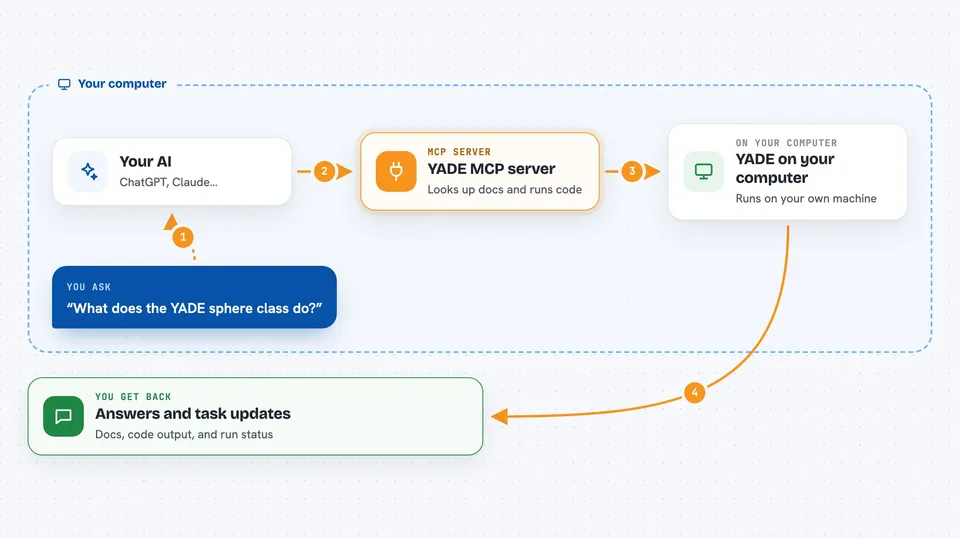
This is a helper that connects your AI assistant to YADE, the free open-source engine for simulating how grains, rocks, and powders move and bump into each other. It is handy if you already use YADE and want your AI to look things up, run code, and watch long simulations instead of you sitting at the console the whole time. You do not need to be a programmer to follow along, though you will need YADE installed on your computer.
What is an MCP server? The 30-second version
On its own, your AI can only chat. An MCP server is a small helper program that gives your AI a new skill or a connection to another piece of software. This one connects your AI to YADE on your machine, so when you ask a question about YADE or want a simulation run, the AI can actually look things up and do things there for you. Think of it as giving your assistant a seat at your YADE console.
What this MCP server does
You ask your AI something in plain words, like what a YADE class does or to run a script. The AI uses this helper to search the YADE documentation or to send Python code into the running YADE program. For short bits of code, the answer comes back right away in the chat. For long simulations, the helper starts them in the background, keeps an eye on the output, and can stop them if something looks wrong. You get back the results, the status, and a record of what has been run.
 Click to zoom
What you can do with it
- Search the YADE documentation for a class or function by keyword
- Browse the YADE Python class tree to find what you need
- Run short Python snippets inside your live YADE session
- Submit a full YADE script as a background task
- Check the status and live output of a running task
- Stop a running task gracefully if something looks off
- List all the tasks you have submitted so far
What it gives back to you
You get answers in the chat: short explanations from the docs, the output of code you ran, and status updates on background tasks. For long runs, you can ask for the live output or a summary of how far it has gotten. You can also ask for a list of everything you have submitted, with the script and final state for each one.
Before you start
What you need
- YADE installed on your computer
- uv installed (the tool that runs the helper)
- The yade-mcp-bridge package installed inside YADE's own Python
- An AI app that supports MCP, like Claude Code or Codex CLI
Good to know
It runs real code inside your YADE program, so anything the code does to your simulation or files happens for real, and long background jobs can use a lot of your computer's resources.
Install it with your AI
Add YADE MCP server to your AI, no technical skills needed
You don't install anything by hand. You copy one prompt, paste it into an AI that can work on your computer, and it checks, installs and connects the server for you, asking you when it needs something.
Sign in to get the install prompt
Members get a ready-made prompt that lets the Claude desktop app check YADE MCP server, install it and connect it for them, step by step. You don't need any technical skills: you copy, paste and answer a few questions. Your connected AI can also find and install any of the 4,361 MCP servers here for you.
Who it's for
Researchers, students, and engineers who already use YADE for granular or powder simulations and want their AI to help run and monitor them.